
Key Takeaways
-
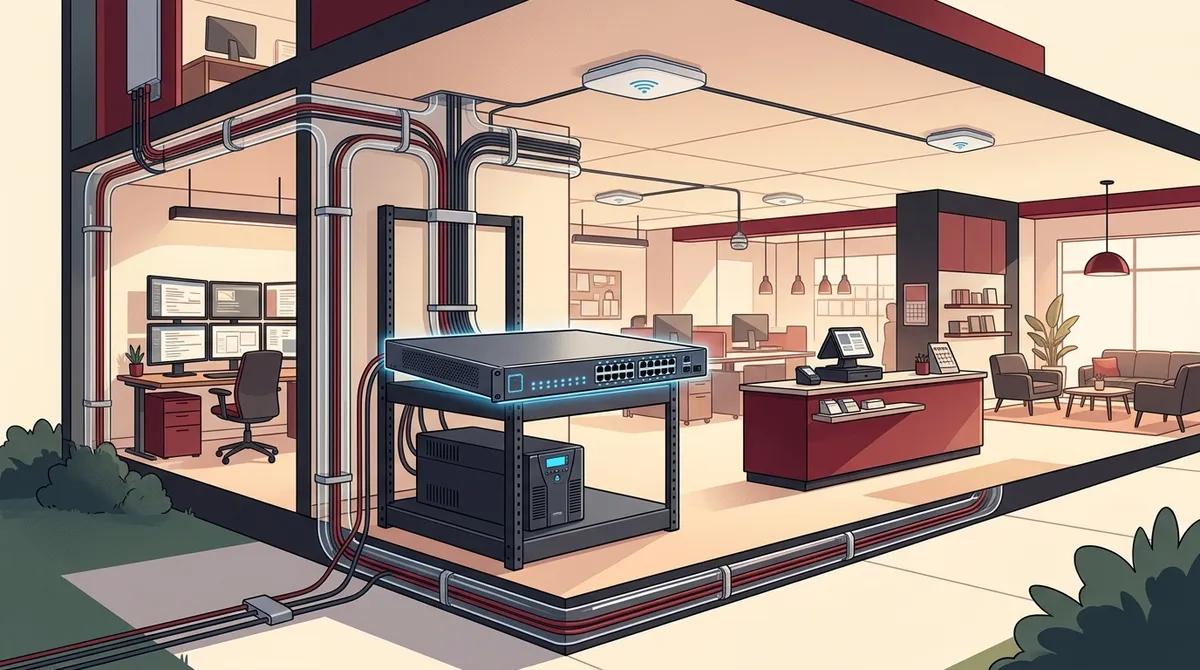
A hybrid wired-and-wireless network combining CAT6 Ethernet for phones, computers, and cameras with commercial Wi-Fi access points is the optimal setup for growing Tampa businesses seeking stability and scalability.
-
Budget $1,500–$3,500 for a complete network setup covering 2,000–4,000 square feet, including managed PoE switch, commercial access points, structured cabling, and network segmentation for employee, guest, and POS traffic.
-
Match internet speed to team size: 110 Mbps for up to 10 users, 250 Mbps for 10–25 users, 500 Mbps for 25–50 users, and 1 Gbps for 50–100 users; fiber offers symmetrical speeds critical for VoIP and cloud apps.
-
Implement network segmentation using VLANs to create separate zones for employees, guests, POS/payment systems, and IoT devices, limiting breach damage and meeting compliance standards for payment processing.
-
Deploy cellular failover backup ($200 hardware, $50–$100/month service) and UPS battery backup on core equipment to ensure business continuity during internet outages and power interruptions.
-
Establish redundancy through dual ISP connections or SD-WAN technology to intelligently route traffic across multiple internet providers, protecting growing businesses from revenue loss and customer dissatisfaction during downtime.
Your business is growing. New team members are joining. More devices are connecting every week. And suddenly, your old router just can’t keep up. Sound familiar? If you’re running a growing business in Tampa, Florida, figuring out the best network setup for a growing business in Tampa Florida is one of the smartest investments you can make right now.
A solid business network does more than move data. It keeps your VoIP phones clear, your cloud apps fast, your security cameras recording, and your team productive. Get it wrong and you’re looking at dropped calls, slow internet, and unhappy customers. Get it right and everything just works — smoothly and reliably.
In this guide, we’ll walk you through exactly what a great business network setup looks like in 2026, how much it costs, and how to build one that grows with you. Let’s dig in!

Why Your Network Setup Matters More Than Ever
Tampa’s business scene is booming. The city’s business-friendly environment — including no Florida state personal income tax — makes it a magnet for entrepreneurs and growing companies alike. More businesses mean more competition, and a slow or unreliable network can quietly cost you clients and employees.
Think about what runs over your network today. Cloud-based phone systems, video conferencing, point-of-sale systems, cloud security cameras, and dozens of employee devices all compete for bandwidth. A network designed for five people will struggle badly when you scale to twenty.
Planning your network infrastructure early — and correctly — saves you time, money, and major headaches down the road. It’s truly one of those things where doing it right the first time pays off for years.

Wired, Wireless, or Hybrid: What Works Best?
This is one of the most common questions Tampa business owners ask. The honest answer? A hybrid network is the best choice for most growing businesses. It combines the rock-solid reliability of wired Ethernet with the convenience of Wi-Fi.
Wired Connections
Wired connections use Ethernet cables — typically CAT6 cabling — to link devices directly to your network. They are faster, more stable, and more secure than wireless. Desktop computers, VoIP phones, printers, and security cameras all benefit from a dedicated wired connection.
Wireless Connections
Wi-Fi is essential for laptops, mobile devices, and guests. Modern commercial-grade access points can handle dozens of devices simultaneously without slowing down. You’ll want at least two to three access points for a typical office space between 2,000 and 4,000 square feet.
Why Hybrid Wins
- Stable wired connections for phones, computers, and cameras
- Flexible Wi-Fi for mobile workers and visitors
- Better overall network performance and reliability
- Easier to secure and segment different types of traffic
- Scales naturally as your team and devices grow
For more on how professional cabling supports your entire network — including VoIP phones and security cameras — check out this helpful guide: 13 Ways Structured Cabling Supports VoIP & Cameras.
Core Components of a Great Business Network
Building the best network setup for a growing business in Tampa Florida means having the right hardware in place from day one. Here’s what every solid business network needs:
| Component | Purpose | Why It Matters |
|---|---|---|
| Business Router | Connects your network to the internet | Handles traffic routing and basic security |
| Managed PoE Switch | Connects wired devices and powers IP phones/cameras | Gives you control over network traffic (VLANs) |
| Commercial Access Points | Provides Wi-Fi coverage throughout your space | Handles many devices without slowdowns |
| Firewall | Blocks unauthorized access and threats | Keeps your data and systems secure |
| Structured Cabling (CAT6) | Physical wired backbone of your network | Fast, reliable connections for all wired devices |
| UPS (Battery Backup) | Keeps network gear running during power blips | Prevents dropped calls and lost data |
| Cellular Backup | Secondary internet if your main line goes down | Keeps business running during outages |
Learn more about getting your structured cabling services done right from the start. Professional installation means fewer problems later and a cleaner, more organized setup overall.
How Much Internet Speed Does Your Business Need?
Choosing the right business high-speed internet service is critical. Too little speed and your team slows down. Too much and you’re overpaying every month. Here’s a simple guide based on your team size:
| Number of Users/Devices | Recommended Internet Speed |
|---|---|
| Up to 10 | 110 Mbps |
| 10 to 25 | 250 Mbps |
| 25 to 50 | 500 Mbps |
| 50 to 100 | 1 Gbps (1 Gig) |
Keep in mind that these numbers assume typical business use — cloud apps, video calls, email, and VoIP. If you run data-heavy operations like video editing or large file transfers, size up. For tips on how to choose the right internet speed for your Tampa business, it’s worth doing a quick audit of your current usage before you sign any contracts.
Also, always check whether Internet Service Providers in your specific Tampa location offer fiber or dedicated circuits — these give you symmetrical upload and download speeds, which matters a lot for VoIP and cloud applications.
Network Security: Keeping Your Business Safe
A growing business is a target for cyber threats. Network security isn’t optional — it’s essential. The good news is that setting up a secure network doesn’t have to be complicated.
Network Segmentation Is a Must
One of the smartest things you can do is separate your network into distinct zones using VLANs or separate SSIDs. This limits the damage if one device or user gets compromised.
- Employee network — for staff computers, phones, and work devices
- Guest Wi-Fi — for visitors and customers, completely isolated from your business data
- POS/Payment network — for cash registers and payment terminals (required by most compliance standards)
- IoT/Security camera network — for smart devices and surveillance systems
Separating these networks means a guest on your Wi-Fi can never accidentally (or intentionally) access your internal systems. It’s a simple step that makes a huge difference in protecting your business.
Firewall and Access Control
A business-grade firewall monitors all traffic entering and leaving your network. Pair this with cloud-based access control for your physical building, and you’ve got a strong security posture both digitally and physically.
How to Build Redundancy Into Your Network
What happens when your internet goes down? For a growing business, downtime means lost revenue, missed calls, and frustrated customers. Building redundancy into your network protects you from that pain.
The most practical option is cellular backup. A cellular failover device automatically switches your network to a 4G or 5G cellular connection the moment your primary internet fails. You may not even notice the switch happened. Hardware for cellular backup runs around $200, with monthly service costs between $50 and $100 — a small price for business continuity.
Here are the top redundancy strategies for Tampa businesses:
- Dual ISP connections — use two different internet providers so if one fails, the other keeps you online
- Cellular failover — automatic 4G/5G backup that kicks in within seconds of a primary outage
- UPS battery backups — keep your router, switch, and access points running through short power interruptions
- SD-WAN technology — intelligently routes traffic across multiple connections for optimal performance
For businesses managing multiple Tampa locations, SD-WAN solutions are an especially powerful option worth exploring.
How Much Does a Business Network Setup Cost in Tampa?
Let’s talk numbers. For a typical small office or retail space in the Tampa Bay area — roughly 2,000 to 4,000 square feet — a complete business network setup generally runs between $1,500 and $3,500.
That range typically covers a demarc extension, patch panel, managed PoE switch, two to three commercial access points, cabling to each access point, guest Wi-Fi configuration, and POS network separation. It’s a comprehensive setup that handles real business workloads.
| Network Component | Estimated Cost Range |
|---|---|
| Full network setup (2,000–4,000 sq. ft.) | $1,500 – $3,500 |
| Cellular backup hardware | ~$200 one-time |
| Cellular backup monthly service | $50 – $100/month |
| Business internet (fiber/broadband) | Varies by speed and provider |
For more detail on managing internet costs wisely, check out this guide: 12 Business Internet Cost Mistakes Tampa Owners Make in 2026. A little research upfront can save you a lot of money over a multi-year contract.
Step-by-Step: Setting Up Your Business Network
Ready to get started? Here’s a simple process to follow when building or upgrading your business network in Tampa:
- Audit your current setup — identify what’s working, what’s failing, and what devices need connectivity
- Choose the right internet plan — match speed to your current and near-future team size
- Plan your cabling infrastructure — run CAT6 to each workstation, access point, phone, and camera location
- Install a managed switch and router — set up VLANs to segment employee, guest, and IoT traffic
- Deploy commercial access points — position for full Wi-Fi coverage with minimal dead spots
- Configure security and firewall rules — restrict access between network segments and block threats
- Add cellular or secondary internet backup — protect against outages with automatic failover
- Test everything thoroughly — verify speeds, call quality, camera feeds, and failover behavior
This process works best when handled by a professional team that understands both the physical cabling and the software-side configuration. Professional structured cabling services for Tampa businesses ensure the physical layer is done right, which makes everything above it work better.
You can also learn more about how structured cabling works and why it’s the foundation of any reliable business network.
Choosing a Trusted Network Partner in Tampa
Building and maintaining a great business network is much easier when you have a knowledgeable partner by your side. That’s exactly what Ideal Solutions Provider offers Tampa businesses. With over 24 years of experience and relationships with 35+ vetted suppliers, they serve as your single point of contact for internet, cabling, networking, VoIP, security cameras, and access control.
Instead of juggling multiple vendors, you work with one trusted team who knows your setup inside and out. They audit your existing infrastructure, compare options across dozens of providers, and recommend solutions that actually fit your needs and budget — not just whatever earns the biggest commission.
Explore their full range of business network solutions to see how they can help your Tampa business scale with confidence. You can also follow along with tips and updates on their Facebook page, watch real-world solution demos on their YouTube channel, and get quick updates on Instagram.
Quick Checklist: Is Your Network Ready to Scale?
Use this checklist to see where your current network stands:
- ✅ Business-grade internet with enough speed for your team size
- ✅ Managed switch with VLAN support for network segmentation
- ✅ Commercial access points — not a consumer home router
- ✅ CAT6 structured cabling to all workstations, phones, and cameras
- ✅ Separate employee, guest, and IoT/POS networks
- ✅ Business-grade firewall with active monitoring
- ✅ Cellular or secondary internet backup for failover
- ✅ UPS battery backup on all core network equipment
- ✅ A trusted local partner who can support and scale your setup
If you checked off most of these, you’re in great shape. If several are missing, those are your priorities.
Conclusion: Build Your Network Right From the Start
The best network setup for a growing business in Tampa Florida is one that’s built for today’s needs and tomorrow’s growth. A hybrid wired-and-wireless network, properly segmented, backed up, and secured, gives your team the reliable connectivity they need to do their best work every single day.
Don’t wait for slowdowns and outages to force your hand. A proactive investment in your network infrastructure pays dividends in productivity, security, and peace of mind for years to come. Whether you’re starting from scratch or upgrading an existing setup, the right plan makes all the difference.
Ready to build a network that actually grows with your business? Get in touch with the Ideal Solutions Provider team for a free consultation, or simply give us a call at 813-388-4935 and let’s talk about what your growing Tampa business really needs.
FAQs
Q: What is the best network topology for a small business in Tampa?
A: A hybrid wired-and-wireless network is the best choice for most small Tampa businesses! It gives you the speed and stability of Ethernet for computers and phones, plus the flexibility of Wi-Fi for mobile devices — all managed through a central switch and router.
Q: How much does a business network setup cost in Tampa Bay?
A: For a typical small office or shop between 2,000 and 4,000 square feet in Tampa Bay, expect to invest around $1,500 to $3,500 for a complete setup. That usually covers cabling, a managed switch, commercial access points, guest Wi-Fi, and network segmentation — great value for a reliable foundation!
Q: What internet speed does a growing Tampa business need?
A: It depends on your team size! A good rule of thumb is 110 Mbps for up to 10 users, 250 Mbps for 10 to 25 users, 500 Mbps for 25 to 50 users, and 1 Gbps for 50 to 100 users. Always size up a bit to leave room for growth — you’ll thank yourself later.
Q: Should a growing business use fiber, cable, or wireless internet in Tampa?
A: Fiber internet is generally the top choice for growing Tampa businesses because it offers symmetrical upload and download speeds — which matters a lot for VoIP calls and cloud applications. Cable broadband is a solid backup option, and wireless (cellular) internet works great as a failover backup when your primary line goes down.
Q: How do I secure my business network and separate guest Wi-Fi?
A: The easiest way is to use VLANs or separate Wi-Fi networks — one for employees, one for guests, and one for things like POS systems or security cameras. This keeps sensitive business data completely separate from visitor traffic, which is both a security best practice and often a compliance requirement for payment processing!





