

Key Takeaways
-
Cloud-based surveillance enables real-time remote access from any device, allowing you to monitor your business live from anywhere instead of waiting until Monday to review grainy DVR footage.
-
Cloud systems eliminate expensive on-site server hardware, reduce upfront costs, and shift maintenance responsibility to your provider who handles automatic software updates and security patches.
-
Cloud surveillance spending is projected to reach $7.80 billion by 2026, with platforms like OpenEye managing over one million connected devices, proving widespread adoption across all business sizes.
-
Hybrid cloud systems record locally while syncing copies to the cloud, ensuring footage is protected even during internet outages and providing superior resilience compared to traditional DVR/NVR systems.
-
Cloud platforms with AI analytics provide smart motion detection and pattern recognition alerts, offering capabilities that rarely exist in traditional systems without expensive hardware upgrades.
-
Before switching to cloud surveillance, audit your internet bandwidth and network infrastructure, as reliable connectivity is critical for preventing dropped footage, delayed alerts, and performance issues.
Picture this: you’re at home on a Saturday, and your phone buzzes with an alert. Someone just walked into your Tampa office after hours. With old-school DVR systems, you’d have to wait until Monday to dig through grainy footage stored on a box in a back closet. With business video surveillance cloud based systems, you just pull up your app and watch it happen live. That’s the kind of peace of mind we’re talking about today, friends.
Whether you run a single storefront or manage locations across the country, choosing the right video security setup matters more than ever. This guide compares cloud-based video surveillance against traditional on-site recording, so you can make a smart, confident decision for your business. We’ll keep things simple, friendly, and packed with the facts you actually need.

What Is Business Video Surveillance Cloud Based, Really?
Cloud-based video surveillance means your camera footage gets stored on remote servers instead of a local DVR, NVR, or NAS box sitting in your building. Think of it like the difference between saving photos on your phone versus backing them up automatically to the cloud. If your phone breaks, your memories are safe somewhere else too.
Many vendors now describe cloud VMS (video management systems) or VSaaS (video surveillance as a service) as easier to set up, manage, and grow compared to traditional systems. You don’t need a technician on-site every time you want to add a camera or check a new location. This matters a lot for multi-location businesses juggling several sites at once.
How It Actually Works Behind the Scenes
Your cameras connect to the internet through your business network. Footage streams up to secure cloud servers, where it’s encrypted and stored safely off-site. Many systems also use a hybrid approach, recording locally on the camera or an edge device while sending copies and alerts to the cloud for backup and smart features.
This hybrid setup gives you the best of both worlds. If your internet goes down for a moment, your camera keeps recording locally. Once the connection returns, everything syncs back up to the cloud automatically.
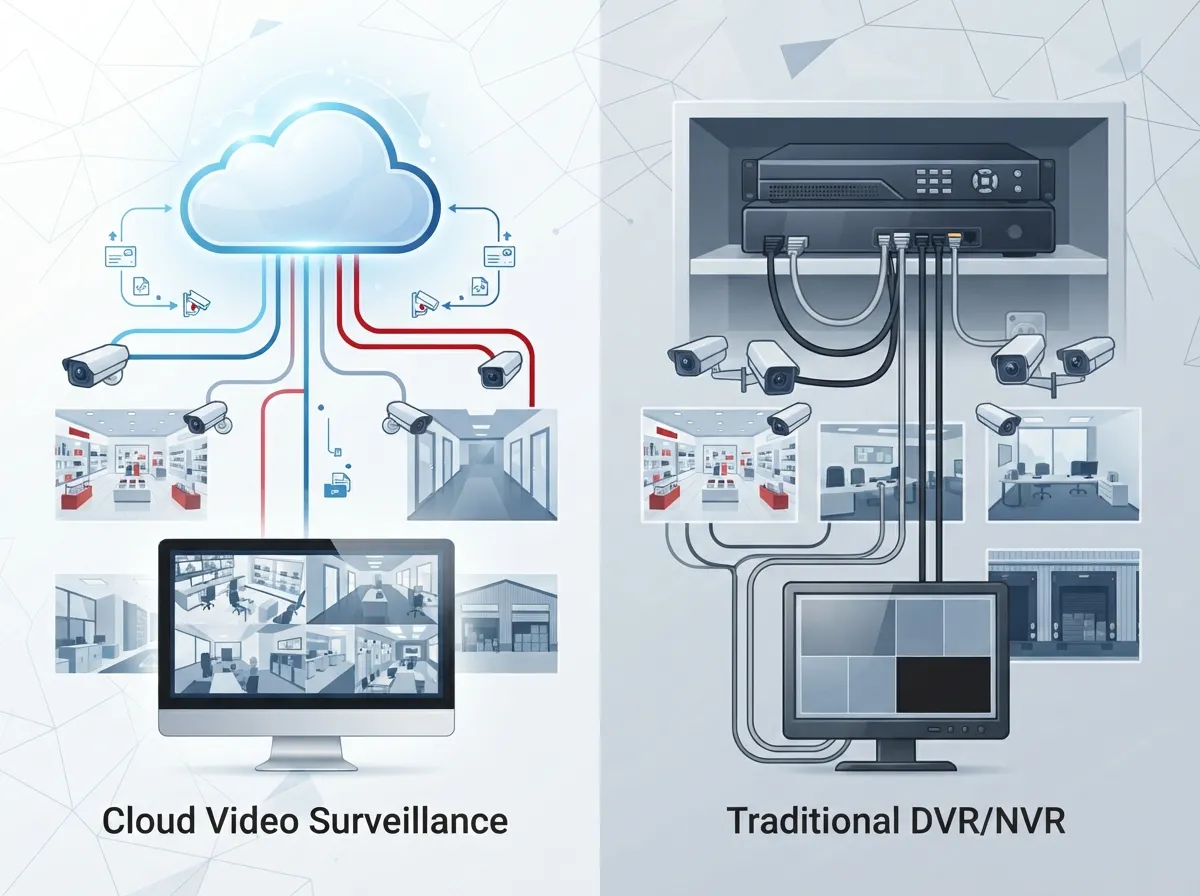
Cloud vs. Traditional DVR/NVR: A Side-by-Side Look
Let’s break this down so you can see exactly how these two options stack up. We think you’ll notice a clear pattern pretty quickly.
| Feature | Cloud-Based Surveillance | Traditional DVR/NVR |
|---|---|---|
| Storage Location | Off-site, encrypted cloud servers | On-site hardware box |
| Remote Access | Yes, from any device, anywhere | Limited, often requires VPN setup |
| Scalability | Easy to add cameras or locations | Often requires new hardware |
| Risk of Tampering | Low, footage is off-site | Higher, box can be stolen or damaged |
| AI & Analytics | Common, smart search and alerts | Rare or requires upgrades |
| Maintenance | Managed by provider | Falls on your IT team |
See what we mean? Cloud systems just make life easier for busy business owners and IT managers who already have enough on their plates. If you want to dig deeper into how these two approaches compare, this breakdown of key differences between cloud video security and DVR systems is worth a read.
Why More Businesses Are Making the Switch
The numbers tell a pretty convincing story. Cloud-based surveillance spending is projected to hit $7.80 billion in 2026, according to data cited by Coram.ai and attributed to Fortune Business Insights. That’s not a small trend, that’s a full-on shift in how businesses protect their people and property.
OpenEye, one of the bigger names in cloud-managed video, reports its platform connects over one million devices. That scale tells us businesses of every size, from small retail shops to giant logistics operations, trust the cloud with their security.
Top Benefits Business Owners Care About
- Remote access from anywhere. Check on your business from your phone, tablet, or laptop, whether you’re on vacation or in a meeting across town.
- Lower upfront hardware costs. No expensive on-site servers to buy, maintain, or eventually replace.
- Automatic software updates. Your provider handles the technical upkeep, so you’re always running the latest features.
- Better resilience. Off-site storage means a broken camera or stolen DVR box doesn’t wipe out your footage.
- Smart alerts and AI features. Get notified about motion, specific events, or even unusual activity patterns.
- Easy multi-site management. View all your locations from one single dashboard, perfect for franchise operators.
Who Benefits Most From Cloud Video Surveillance?
Cloud video surveillance isn’t just for big corporations anymore. It’s become a practical, affordable tool for all kinds of businesses. Here’s a quick rundown of who’s using it and why.
- Retail stores: Watch for theft, monitor customer flow, and even gather insights on busy hours.
- Logistics and warehouses: Keep an eye on loading docks, inventory areas, and employee safety.
- Healthcare offices: Protect patient areas, entry points, and sensitive storage rooms.
- Franchise operations: Manage security across dozens of locations from one simple app.
- Professional offices: Monitor entrances, parking lots, and after-hours activity.
- Manufacturing facilities: Watch production floors and secure equipment storage areas.
If any of these sound like your business, you’re definitely in good company. Vendor materials increasingly target these exact use cases because the demand keeps growing across industries.
Understanding VSaaS, Cloud VMS, and Hybrid Systems
These terms get thrown around a lot, and honestly, it can feel like alphabet soup. Let’s clear things up so you sound like a pro at your next team meeting.
VSaaS (Video Surveillance as a Service)
This is a fully managed, subscription-based model. Your provider handles storage, software, updates, and often the cameras themselves. You just pay a monthly fee and enjoy the peace of mind.
Cloud VMS (Video Management System)
This gives you more control over your setup while still storing footage in the cloud. It’s a popular choice for businesses that want flexibility without managing physical servers.
Hybrid Video Surveillance
This combines local recording with cloud backup. Cameras or edge devices record footage on-site, then sync copies, metadata, and alerts to the cloud. Many enterprise deployments favor this approach because it adds an extra layer of resilience.
Is Cloud Video Surveillance Secure Enough for Business Use?
This is probably the question we hear most often, and it makes total sense. You’re trusting someone else with footage of your building, your employees, and sometimes sensitive areas.
The good news? Cloud storage is typically encrypted both in transit and at rest. That means your footage is scrambled into unreadable code unless someone has the proper access credentials. It’s also stored off-site, which makes it far less vulnerable to local tampering, theft, or hardware failure than a DVR box sitting in your closet.
Security and resilience have become major selling points for cloud vendors, and for good reason. When your footage lives in a professionally managed data center instead of a dusty server room, you’re getting a level of protection most small businesses simply can’t match on their own.
What Features Should You Look For?
Not all cloud surveillance platforms are created equal. Here’s a simple checklist to guide your search.
- Encrypted cloud storage with off-site backup
- Mobile app access for live and recorded video
- AI-powered smart search and motion detection
- Multi-site dashboard for managing several locations
- Flexible storage plans that scale with your needs
- Integration with access control and alarm systems
- Reliable customer support and installation help
If you’re not sure where to start, it helps to work with a partner who already knows the landscape. Our team at Ideal Solutions Provider has spent over 24 years helping Tampa businesses and companies nationwide find the right fit, comparing options across 35 vetted suppliers so you don’t have to do the legwork alone.
How Much Does Cloud Video Surveillance Cost?
Costs vary based on the number of cameras, storage length, and features like AI analytics. Most providers use a subscription model, similar to how you might pay monthly for internet or phone service.
| Business Size | Typical Camera Count | Estimated Monthly Range |
|---|---|---|
| Small business (1 location) | 2-8 cameras | $50 – $200 |
| Mid-sized business | 8-20 cameras | $200 – $600 |
| Multi-location enterprise | 20+ cameras across sites | $600+ |
These numbers are rough estimates and depend heavily on your specific setup. For a more accurate picture, check out this guide on budgeting for commercial video surveillance in Tampa FL, which breaks down real cost factors in detail.
Steps to Move From On-Prem to Cloud Surveillance
Switching systems might sound like a headache, but it doesn’t have to be. Here’s how a smooth transition typically works.
- Audit your current setup. Figure out what’s working and what’s not with your existing cameras and network.
- Check your internet bandwidth. Cloud cameras need reliable connectivity, so this step matters a lot.
- Choose your camera hardware. Some cloud platforms work with specific camera brands, so pick wisely.
- Plan your cabling needs. Solid structured cabling keeps your cameras connected and performing well.
- Schedule professional installation. A trained technician ensures cameras are placed for maximum coverage.
- Set up remote access permissions. Decide who on your team gets to view live and recorded footage.
- Test alerts and analytics. Make sure your smart features are actually catching what matters.
Following these steps in order helps avoid the common headaches that come with rushed installations. If you’d rather have someone else manage the details, our team can walk you through the entire process from start to finish.
Cloud Surveillance and Your Broader Telecom Setup
Here’s something a lot of business owners don’t realize at first: your video surveillance system relies heavily on your internet connection and network infrastructure. A slow or unstable connection can lead to dropped footage, delayed alerts, and frustrated employees.
That’s why smart businesses pair their surveillance upgrades with a broader look at their high-speed internet setup and network reliability. It’s also worth reviewing your structured cabling services to make sure your cameras have a strong, dependable connection.
Many businesses also choose to bundle their video security with cloud-based access control systems. Combining these two tools gives you a complete picture of who’s coming and going, plus what’s happening on camera at every entry point.
Common Mistakes to Avoid
We’ve seen a few patterns pop up again and again when businesses rush into a surveillance upgrade. Here’s what to watch out for.
- Choosing cameras without checking bandwidth requirements first
- Skipping professional installation to save a little money upfront
- Forgetting to plan for long-term storage costs
- Not testing remote access before going live
- Overlooking integration with existing security tools
- Ignoring warranty and support terms from the provider
Avoiding these missteps saves you time, money, and a whole lot of frustration down the road. For more detail on this, take a look at this list of cloud video security mistakes to avoid in 2026.
Why Work With a Telecom Partner Instead of Going It Alone?
Setting up cloud video surveillance touches your internet, your network, your cabling, and sometimes your phone system too. Trying to coordinate all of that with separate vendors can turn into a full-time job you never signed up for.
That’s where having one trusted partner makes a real difference. Ideal Solutions Provider has spent over 24 years helping businesses across Tampa and nationwide simplify exactly this kind of project. We work with 35+ vetted suppliers, which means we can compare your options honestly instead of pushing one brand because it’s the only one we sell.
We’ve found that 9 out of 10 companies we audit are overpaying, underperforming, or both when it comes to their telecom and security setups. That’s a lot of wasted money sitting on the table. You can follow our updates and behind-the-scenes look at projects on Facebook, Instagram, and YouTube to see real examples of how this works in practice.
Final Thoughts: Making the Right Choice for Your Business
Choosing between cloud-based and traditional surveillance isn’t just about cameras. It’s about protecting your people, your property, and your peace of mind. Cloud video surveillance gives you the flexibility, security, and scalability that today’s businesses truly need, whether you’re running one office or fifty.
We know navigating telecom and security decisions can feel overwhelming, especially when you’re already juggling a dozen other responsibilities. That’s exactly why we’re here. Our friendly team genuinely enjoys helping business owners, office managers, and IT professionals find setups that actually fit their needs, not someone else’s sales quota.
Ready to see how cloud video surveillance could work for your business? Get in touch with our team for a free consultation, or give us a call today. We’d love to help you find a solution that keeps your business safe, connected, and running smoothly for years to come.
FAQs
Q: What is cloud-based video surveillance for businesses?
A: It’s a security setup where your camera footage gets stored on remote servers instead of a local box on-site. This means you can access live and recorded video from anywhere, and your footage stays safe even if something happens to your on-site equipment.
Q: How does cloud video surveillance compare to DVR or NVR systems?
A: Cloud systems store footage off-site and offer remote access from any device, while DVR and NVR systems keep everything on a local box that’s harder to access remotely. Cloud setups also tend to scale more easily and include smart features like AI alerts, which is a nice bonus.
Q: Is cloud video surveillance secure for commercial use?
A: Absolutely, most cloud platforms encrypt your footage both in transit and while it’s stored. This actually makes it safer than many traditional setups, since there’s no physical box for someone to steal or tamper with on-site.
Q: How much does cloud-based video surveillance cost for a business?
A: Costs vary based on camera count and features, but small businesses often pay between $50 and $200 monthly, while larger multi-location setups can run $600 or more. It really depends on your specific needs, so getting a personalized quote helps a lot.
Q: What is the difference between VSaaS, cloud VMS, and hybrid systems?
A: VSaaS is a fully managed subscription service where the provider handles everything, while cloud VMS gives you more control with cloud storage. Hybrid systems combine local recording with cloud backup, giving you extra reliability if your internet ever goes down.





