
Key Takeaways
-
Network management services are provider-delivered operations that go beyond monitoring, covering fixes, configuration changes, upgrades, and lifecycle support for LAN, WAN, and security.
-
Choose a service model based on your team: fully managed suits teams with no in-house IT, co-managed shares control with your IT staff, and monitoring-only costs less but leaves fixes to you.
-
Compare SLAs closely by checking incident severity definitions, response and restoration targets, maintenance windows, reporting frequency, and who approves configuration changes.
-
Confirm who is responsible for firewalls and security decisions, since some providers bundle security with connectivity while others sell it separately.
-
Request a line-by-line proposal that separates circuits, installation, equipment, and out-of-scope work, because costs vary widely by locations, network size, and contract terms.
-
For multi-location businesses, managed SD-WAN lets one provider oversee edge devices, circuits, traffic rules, and performance under a single SLA instead of juggling several carriers.
If your office Wi-Fi drops during a big client call, or a branch location suddenly goes offline, you already know how fast a network problem turns into a business problem. The tricky part? Most small and mid-sized teams don’t have a full-time network pro on staff. That’s where network management services come in.
In plain terms, these services put a skilled partner in charge of watching, fixing, and improving the systems that keep your people connected. Think of it like having a pit crew for your office network. You focus on the race. They keep the engine running.
In this guide, we’ll walk through what network management services are, what they usually include, how the different service models work, and how to pick the right provider. Whether you run one office in Tampa or a handful of franchise locations across the country, you’ll find simple, practical advice here.

What Are Network Management Services?
In the business telecom world, network management services are provider-delivered operations and lifecycle support for your company’s network. They are often called managed network services, or MNS. They are not just internet access, and they are not just a monitoring tool that sends you alerts.
Industry analysts describe the market as remote management of enterprise network and security operations. According to Gartner’s 2025 description, the three core areas are managed LAN, managed WAN, and managed security.
That might sound technical, so here is the simple version. Your provider helps run the cables, switches, routers, Wi-Fi, firewalls, and connections that make your business tick. They watch for trouble, fix issues, and help you plan for what comes next.
The exact scope depends on your contract. Some providers handle everything. Others handle only part of the job. That is why understanding the details really matters.
What Is Included in Managed Network Services?
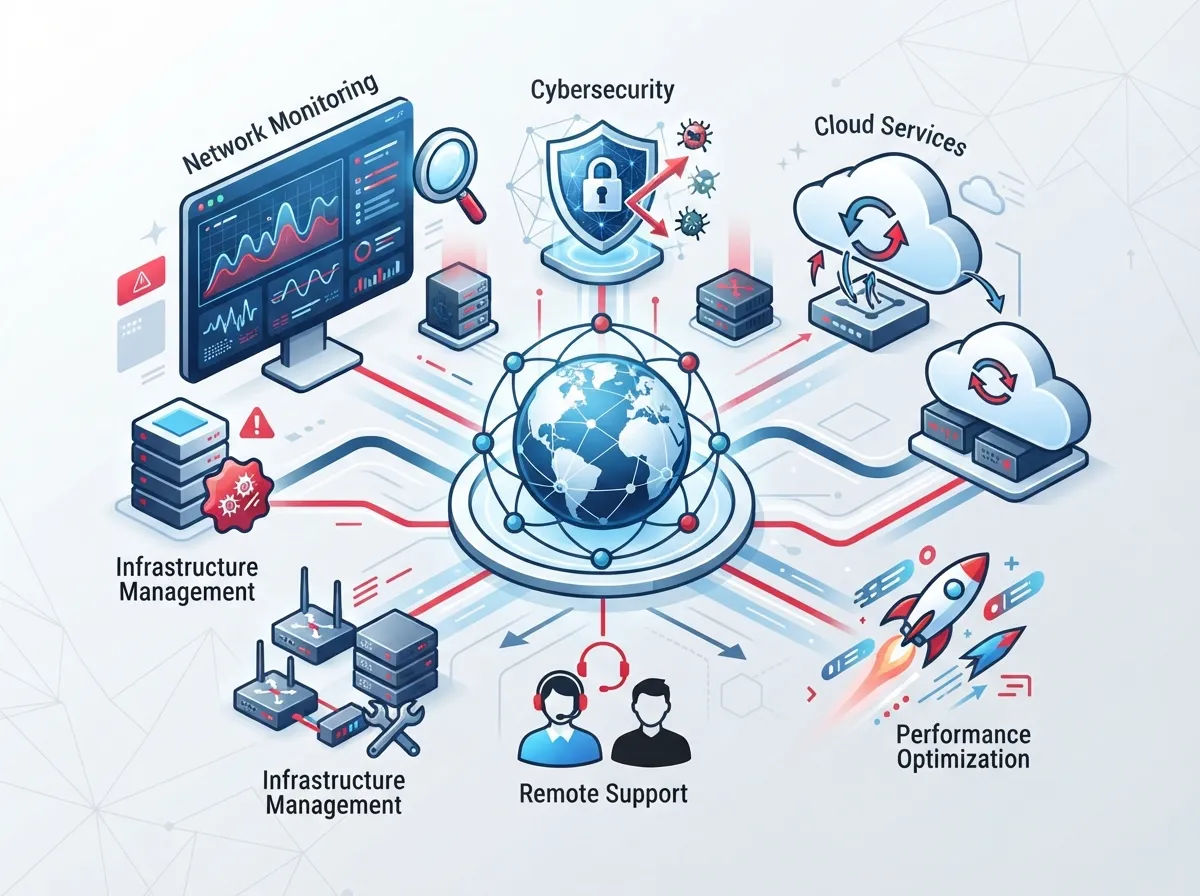
Every provider packages things a little differently. Still, most network management services share a common set of building blocks. Here are the pieces you will see most often:
- Network design and assessment: A review of what you have today and a plan for what you need.
- Equipment and circuit provisioning: Getting the right gear and connections in place.
- Configuration and change management: Making updates in a controlled, documented way.
- 24/7 monitoring: Round-the-clock watching for outages and slowdowns.
- Fault detection and troubleshooting: Finding the root cause when something goes wrong.
- Performance reporting: Clear updates on how your network is doing.
- Maintenance and restoration: Keeping gear healthy and getting you back online fast.
These services can cover wired and wireless LAN, Wi-Fi, routers, switches, WAN links, SD-WAN, firewalls, and connections to cloud applications. Some providers also bundle internet, voice, security, or unified communications. Always ask what is included and what costs extra.
Monitoring vs. Management: What’s the Difference?
This is one of the most common questions we hear, and it is a great one. Monitoring means watching your network and alerting someone when something looks off. Management goes further. It includes fixing problems, making changes, planning upgrades, and keeping everything running smoothly.
Cisco explains that network management involves a broader set of activities than watching alone. Monitoring is one important part of that bigger picture.
| Feature | Monitoring Only | Full Network Management |
|---|---|---|
| Watches for outages | Yes | Yes |
| Sends alerts | Yes | Yes |
| Troubleshoots and fixes issues | Usually not | Yes |
| Handles configuration changes | Usually not | Yes |
| Plans upgrades and lifecycle support | No | Often included |
| Coordinates with circuit carriers | No | Often included |
If your team is small and already stretched thin, an alert-only service may leave you holding the bag when something breaks at 2 a.m.
Three Common Service Models
Network management services usually come in three flavors. Knowing the difference helps you pick one that fits your team.
Fully Managed
The provider handles most routine operations and fixes. This is a great fit for small businesses, office managers, and franchise operators who do not have an in-house IT team. You get peace of mind without hiring extra staff.
Co-Managed
You and the provider share the work. Your IT team might handle day-to-day tasks while the provider covers monitoring, after-hours support, or specialty projects. IT managers often love this option because it adds backup without taking away control.
Monitoring-Only
The provider watches your network and alerts you to issues. You or your team take it from there. It costs less, but it also puts more responsibility on you.
No matter which model you choose, put the details in writing. Your contract should spell out who approves configuration changes, who handles security decisions, and how issues get escalated.
How Managed Networks Support SD-WAN and Multiple Locations
Running more than one location? Then you know how tough it can be to keep every site connected, secure, and consistent. Managed SD-WAN is a popular telecom offering built for exactly this challenge.
With managed SD-WAN, a provider may manage the edge devices and software, coordinate the underlying broadband or Ethernet circuits, apply traffic rules, monitor performance, and support you under a service level agreement. That means one team looks after the whole picture instead of you juggling several carriers.
The market is active here. A 2025 ISG Provider Lens U.S. report evaluated 40 providers across four software-defined networking categories, including Managed SD-WAN and SASE. That shows how many options are out there, and why a neutral guide can help.
If you want to dig deeper, check out 6 SD-WAN Benefits Every Business Owner Should Know or compare options in SD-WAN vs. MPLS: What Tampa Businesses Need to Know. Franchise owners may also like 11 Reliable Network Solutions for Multi-Location Tampa Businesses.
Why Businesses Choose Network Management Services
Let’s talk about the good stuff. When the service is a fit, businesses often see benefits like these:
- Less routine work for internal IT: Your people can focus on projects that move the business forward.
- Access to specialist skills: You tap into experts without hiring a full team.
- Better visibility across locations: You can see how every site is performing.
- More consistent changes: Updates follow a standard process instead of ad-hoc fixes.
- Faster response when things break: Defined support steps help cut downtime.
A quick, honest note: the word “managed” does not guarantee great results. Outcomes depend on your network design, the provider’s skill, the service scope, and the quality of your SLA. A solid foundation, such as proper structured cabling services, makes any managed service work better.
How to Evaluate a Network Management Provider
Choosing a provider is a big decision, so let’s make it simple. Here is a step-by-step checklist you can use:
- List what you have today. Count your locations, devices, circuits, and phone and security systems.
- Define what you want handled. Decide if you need fully managed, co-managed, or monitoring-only support.
- Check supported technologies and locations. Make sure the provider covers your sites and your gear.
- Review monitoring and response coverage. Ask about hours, severity levels, and response and restoration targets.
- Ask about security responsibilities. Know who manages firewalls and who approves security changes.
- Read the fine print on equipment and terms. Look at contract length, equipment ownership, and charges for out-of-scope work.
- Confirm reporting and escalation. You should know who to call and how problems move up the chain.
For a deeper look, see How to Choose a Managed Service Provider for Your Business Telecom.
Key SLA Items to Compare
| SLA Item | What to Ask |
|---|---|
| Incident severity definitions | How does the provider define a minor issue versus a critical outage? |
| Response targets | How fast will someone start working on the problem? |
| Restoration targets | How quickly is service expected to be restored? |
| Maintenance windows | When will planned work happen, and how much notice do you get? |
| Reporting | What reports do you receive, and how often? |
| Change controls | Who approves configuration changes? |
What Do Network Management Services Cost?
This is the question everyone asks, and we want to be upfront with you. There is no single price that fits every business. Costs vary based on the number of locations, the size of your network, the services included, and the contract terms.
Many quotes also separate out items like circuits, installation, equipment, and work outside the agreed scope. That is why asking for a clear, line-by-line proposal is so important. You can learn more in How to Budget for Managed Network Services in Tampa.
Who Benefits Most?
Network management services can help many types of organizations. Here is how it often plays out:
- Small business owners: You get expert help without adding payroll, plus fewer vendors to manage.
- Mid-sized companies: You gain steady support as your network grows more complex.
- IT managers: A co-managed setup adds coverage and a single point of contact.
- Office managers: You get a reliable team to call when something goes wrong.
- Franchise operators: You get consistent, scalable connectivity across many sites.
Want to weigh your options? In-House IT vs. Network Solutions Provider: Which Wins? is a helpful read.
Can One Provider Handle Connectivity and Security?
Often, yes. Many providers can manage both your connections and your network security, but the details vary by contract. Some include firewalls and secure access. Others treat security as a separate service.
This is where having one trusted partner can really simplify life. Ideal Solutions Provider, a Tampa-based telecom and IT partner with over 24 years of experience, works with 35+ vetted suppliers. That means they can compare options across carriers and act as your single point of contact for internet, networking, phones, cabling, cloud security cameras, and access control. If you are curious, take a look at their business network solutions or read 8 Managed Network Services Every Business Should Know.
You can also see how a local expert approaches these projects in 5 Managed Network Services Tampa FL Businesses Need Now. If you want a broader picture of how connectivity fits in, the basics of an Internet Service Provider are a helpful starting point.
Simple Ways to Get Ready Before You Call a Provider
A little prep goes a long way. Before you request quotes, try these quick steps:
- Write down the pain points you are seeing, like dropped calls, slow Wi-Fi, or repeated outages.
- Gather your current bills for internet, phones, and any network support.
- Map out your locations and how many people work at each.
- Decide what you would like to keep in-house and what you would like to hand off.
This makes your first conversation faster and your quotes easier to compare. If your network feels shaky, 7 Signs Your Tampa Business Network Needs an Upgrade can help you spot the warning signs.
Wrapping Up: Make Your Network the Easy Part
Network management services are all about taking the stress out of keeping your business connected. The right partner watches your network, fixes problems, and helps you plan ahead, so you can focus on customers and growth. Just remember to check the scope, the service model, and the SLA before you sign anything.
You do not have to figure it out alone. If you would like a friendly, no-pressure review of your current setup, contact us and the Ideal Solutions Provider team will help you compare options and find a plan that fits your business. Prefer to talk it through? Call us any time.
FAQs
Q: What are network management services for businesses?
A: They are provider-delivered services that help you run, monitor, fix, and improve your business network. That can include LAN, Wi-Fi, WAN, SD-WAN, and related security. The exact scope depends on your contract, so it’s smart to ask for the details in writing.
Q: What is the difference between fully managed and co-managed network services?
A: With fully managed service, the provider handles most routine operations and fixes for you. With co-managed service, you share the work with the provider, and your IT team keeps some control. Either way, your contract should spell out who approves changes and how issues get escalated.
Q: How much do business network management services cost?
A: There’s no one-size-fits-all price, since cost depends on your number of locations, network size, service scope, and contract terms. Circuits, installation, and out-of-scope work are often priced separately. Ask for a line-by-line proposal so you can compare quotes with confidence.
Q: What should a business look for in a network management SLA?
A: Look for clear incident severity definitions, response and restoration targets, maintenance windows, and regular reporting. You’ll also want to see change controls and escalation steps spelled out. These details tell you what kind of support you’ll really get when something goes wrong.
Q: Can a managed network provider manage both connectivity and network security?
A: Often they can, though it varies by provider and contract. Some bundle firewalls and secure access, while others offer security as a separate service. Be sure to confirm who is responsible for what before you sign.





