
Key Takeaways
-
Cloud video security systems enable remote access to live and recorded footage from anywhere via smartphone or laptop, making them ideal for multi-location Tampa businesses and remote teams.
-
AI-powered smart alerts and motion detection eliminate the need to monitor feeds constantly by notifying you instantly of unusual activity, saving time and money for Tampa businesses.
-
Professional installation and system design are critical—a properly placed camera system typically costs $2,500-$15,000 and pays for itself through reduced theft, liability protection, and operational insights.
-
Integration with access control systems creates unified security by syncing door access events with camera recordings and enabling remote lockdown of entry points from a single dashboard.
-
Cloud storage is scalable and flexible—businesses can choose 7-90 day retention plans based on actual needs without purchasing new hardware, unlike traditional NVR systems.
-
Centralized management dashboards are essential for franchises and multi-location operations, allowing owners to monitor all sites from one platform while controlling user permissions by location.
Running a business in Tampa means keeping an eye on a lot of moving parts. Whether you manage a retail shop on Bayshore Boulevard, a warehouse in Ybor City, or a multi-location franchise across the Bay area, security is always top of mind. That’s where cloud video security systems for businesses in Tampa FL come in — and they’re changing the game in a big way.
Gone are the days of grainy footage stored on a dusty DVR in a back office. Today’s cloud-based camera systems let you watch live video, review past footage, and get smart alerts — all from your phone or laptop, anywhere in the world. The best part? These systems work hand-in-hand with your existing business telecom infrastructure, making them a natural fit for companies already thinking about VoIP phones, high-speed internet, and access control.
In this guide, we’ll walk you through seven must-know features of cloud video security systems, what to look for when choosing one, and how Tampa businesses just like yours are putting them to work every day.
What Makes Cloud Video Security Different for Tampa Businesses
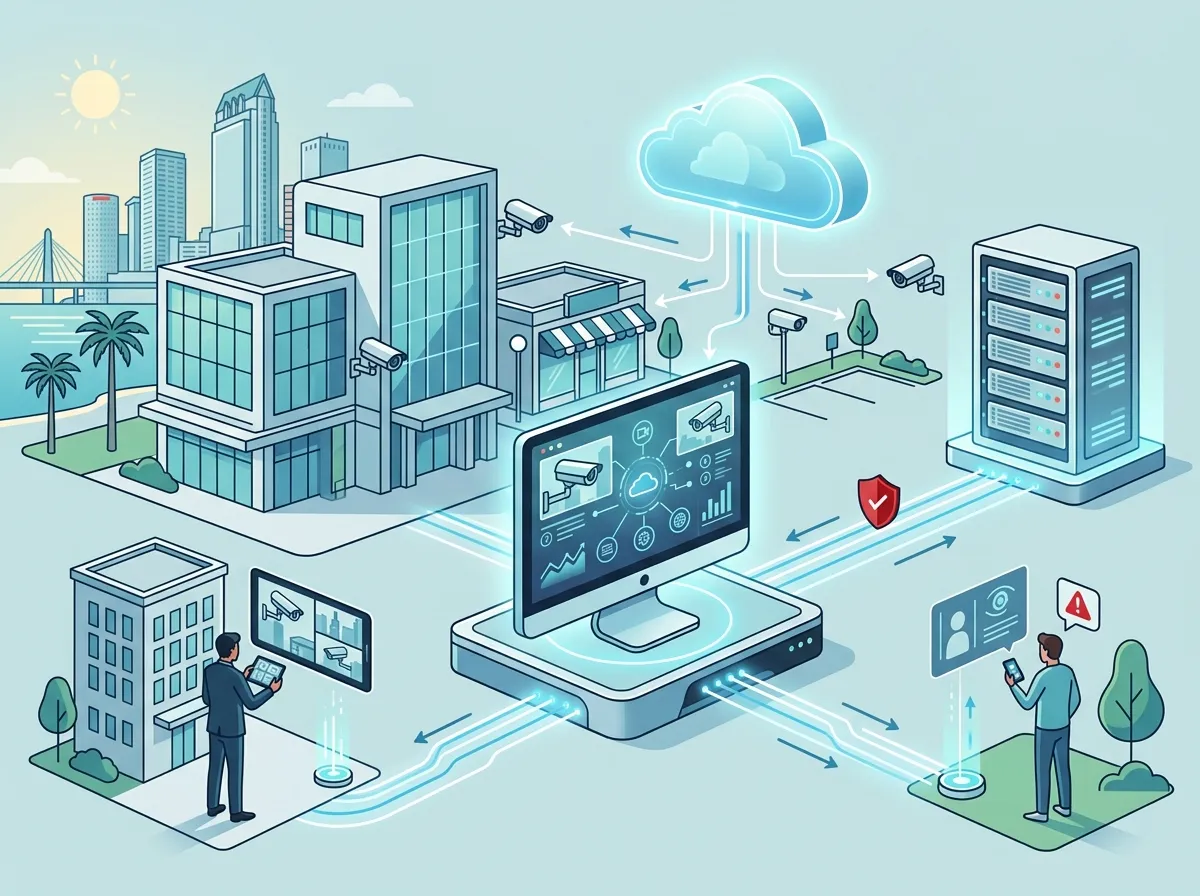
Traditional security cameras record footage to a local hard drive or NVR (network video recorder). Cloud systems do something smarter — they send footage directly to secure cloud servers, where you can access it anytime. This matters a lot for Tampa business owners who can’t always be on-site.
Here’s a quick comparison of the two approaches:
| Feature | Traditional NVR System | Cloud Video Security System |
|---|---|---|
| Remote Access | Limited or complex setup | Easy, app-based from anywhere |
| Storage | On-site hard drive (can be stolen or damaged) | Secure offsite cloud servers |
| Scalability | Requires hardware upgrades | Add cameras easily without major hardware changes |
| Maintenance | Manual updates, on-site visits | Automatic software updates |
| Integration | Limited with other systems | Connects with access control, alerts, and more |
| Cost Model | Higher upfront, lower monthly | Lower upfront, predictable monthly subscription |
For businesses with multiple Tampa locations or a hybrid remote team, cloud systems are almost always the smarter choice. They also pair beautifully with business high-speed internet services — which makes sense, since reliable bandwidth is the backbone of any cloud solution.
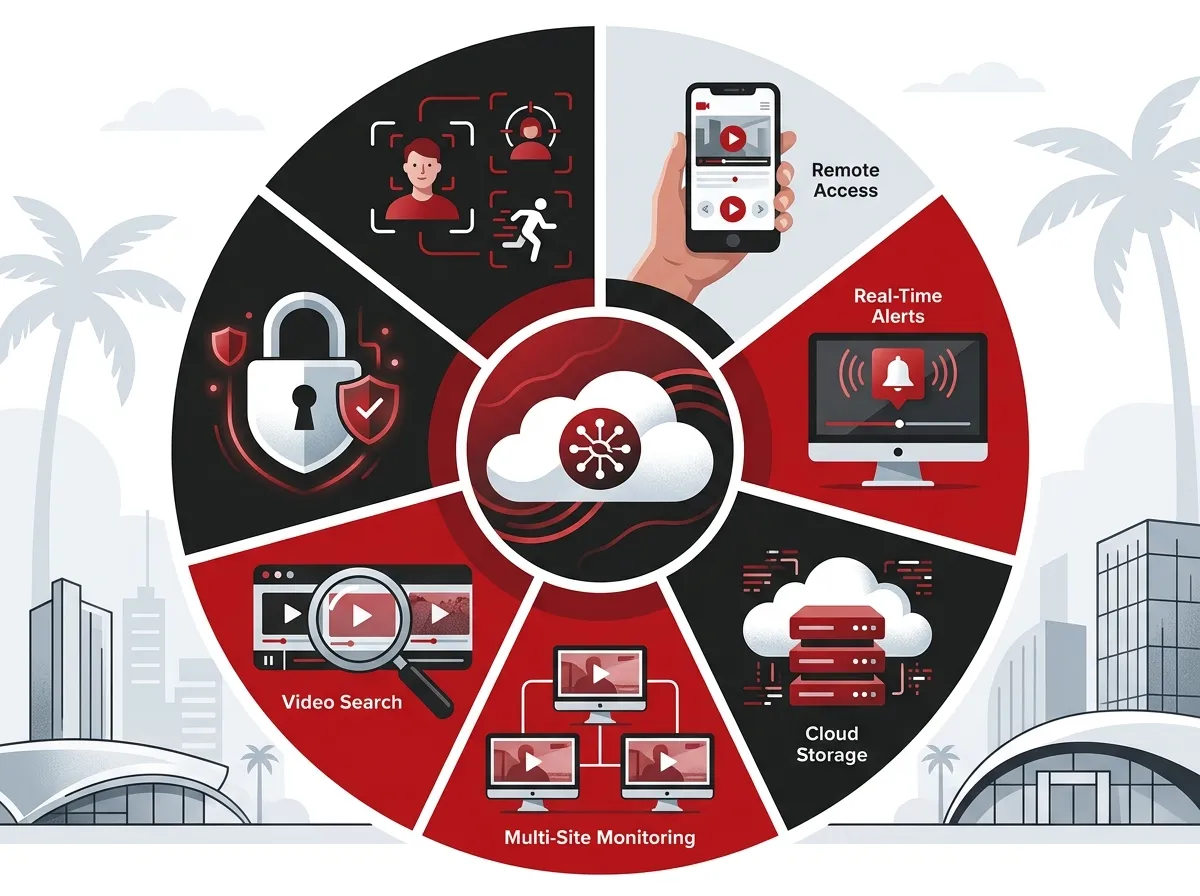
7 Must-Have Features of Cloud Video Security Systems for Tampa Businesses
1. Remote Access and Mobile Viewing
The single biggest advantage of cloud video security is being able to check your cameras from anywhere. Whether you’re at a client meeting across town or on vacation in the Keys, you can pull up live feeds or recorded footage on your smartphone in seconds. For franchise operators managing multiple sites across Tampa Bay, this is an absolute game-changer.
Look for systems with intuitive mobile apps that support both iOS and Android. The best platforms let you view multiple camera feeds simultaneously so you can monitor your whole facility at once.
2. Smart Alerts and Motion Detection
You don’t want to stare at camera feeds all day — and you don’t have to. Modern cloud security systems use AI-powered motion detection to send you instant alerts when something unusual happens. Think of it as having a virtual security guard who never blinks.
- Get notified when someone enters a restricted area
- Receive alerts for after-hours activity
- Filter out false alarms from passing cars or animals
- Review flagged events without scrubbing through hours of footage
This kind of smart monitoring saves Tampa businesses both time and money, especially when paired with cloud-based access control that can lock or unlock doors automatically based on detected events.
3. High-Definition Image Quality with Night Vision
Crystal-clear footage is non-negotiable, especially if you ever need to use video evidence for an insurance claim or police report. Today’s commercial PoE IP cameras deliver sharp HD and even 4K resolution, plus infrared night vision for round-the-clock coverage.
Here’s what to look for in camera specs for Tampa commercial properties:
| Camera Feature | Why It Matters for Tampa Businesses |
|---|---|
| 1080p or 4K resolution | Clear identification of faces and license plates |
| Wide-angle lens (90°–180°) | Covers more area with fewer cameras |
| Infrared night vision | Essential for parking lots and after-hours monitoring |
| Weather resistance (IP67 rating) | Holds up in Tampa’s humid, rainy climate |
| PoE (Power over Ethernet) | Simplifies installation, uses existing cabling infrastructure |
Speaking of PoE cameras — they run over your network cabling, which means your structured cabling infrastructure plays a big role in how well your cameras perform. Don’t overlook this connection when planning a new system.
4. Scalable Cloud Storage Options
Every Tampa business has different storage needs. A small retail boutique might only need 30 days of footage retention, while a large logistics company might require 90 days or more for compliance purposes. Cloud storage lets you scale up or down without buying new hardware.
Common cloud storage tiers for business surveillance include:
- Short-term retention (7–14 days): Good for small offices or low-risk environments
- Standard retention (30 days): Ideal for most retail, healthcare, or service-based businesses
- Extended retention (60–90 days): Required for regulated industries or high-security facilities
The right provider will help you match storage plans to your actual needs — not upsell you on space you’ll never use. You can also explore what security cameras really do for your business to better understand how footage retention plays into your overall security strategy.
5. Integration with Access Control Systems
Cloud video security becomes even more powerful when it talks to your access control system. Imagine this: an employee badging into a server room after hours automatically triggers a camera recording and sends you an alert. That kind of integration turns two separate tools into one unified security platform.
- Sync door access events with camera timestamps
- Lock down entry points remotely if suspicious activity is detected
- Track who enters and exits each area throughout the day
- Receive combined alerts from both systems in one dashboard
This integration is a top priority for IT managers and office managers who want visibility across their entire facility — not just at the front door. Learn more about how cloud-based access control can work alongside your camera system.
6. Professional Installation and System Design
Even the best cameras won’t help if they’re pointed at the wrong spots. Professional camera placement is one of the most underrated parts of a commercial security system. A trained installer will assess your facility layout, identify blind spots, and design a coverage plan that gives you full visibility.
For Tampa businesses, professional installation typically involves:
- A walkthrough of your facility to map coverage zones
- Camera placement design for entrances, exits, parking areas, and interior spaces
- Network and cabling assessment to ensure bandwidth is sufficient
- System configuration, app setup, and staff training
According to industry data, a professionally installed small-business security camera system in Tampa typically runs between $2,500 and $15,000, depending on camera count, resolution, and whether you’re using cloud or on-premise storage. A 4-camera setup sits at the lower end, while a 16-camera warehouse deployment runs higher.
That investment pays for itself quickly when you factor in reduced theft, liability protection, and operational insights. And if you want to see cloud video security solutions in action, exploring a provider’s portfolio is always a smart first step.
7. Centralized Management for Multi-Location Businesses
If you run more than one Tampa Bay location — or have sites spread across Florida and beyond — centralized video management is where cloud systems truly shine. Instead of logging into separate systems at each location, you get one unified dashboard that shows everything.
- View cameras across all locations from a single platform
- Manage user permissions so managers only see their own sites
- Pull footage from any location for incident reviews
- Scale seamlessly as you open new locations
Franchise operators in particular love this feature. It removes the complexity of managing security site-by-site and gives ownership-level visibility across the entire business. Pair this with a solid business network solution and you’ve got a genuinely enterprise-grade setup — even if you’re a mid-sized company.
Types of Tampa Businesses That Benefit Most
Cloud video security is a great fit across a wide range of industries. Here’s a look at who’s using these systems most in the Tampa market:
| Business Type | Key Use Case | Top Camera Features Needed |
|---|---|---|
| Retail Stores | Theft prevention, customer flow analysis | HD resolution, wide-angle, smart alerts |
| Offices | Entry monitoring, employee safety | Access control integration, remote access |
| Warehouses | Inventory protection, compliance documentation | Night vision, wide coverage, extended storage |
| Multi-Site Franchises | Centralized oversight across all locations | Unified dashboard, cloud management |
| Healthcare Facilities | Patient safety, HIPAA-compliant footage handling | Secure cloud storage, access logging |
| Educational Campuses | Perimeter security, incident response | Wide-area coverage, real-time alerts |
If your business type isn’t on this list, don’t worry — the flexibility of cloud video security means it adapts to almost any commercial environment. The key is working with a provider who takes time to understand your specific needs before recommending a solution.
How Ideal Solutions Provider Helps Tampa Businesses Get It Right
Ideal Solutions Provider is a Tampa-based telecom and IT partner with over 24 years of experience helping businesses just like yours. They offer professionally installed cloud video security systems alongside VoIP phone systems, structured cabling, high-speed internet, networking, and access control — all under one roof.
What sets them apart is their role as an independent advisor. They work with 35+ vetted suppliers and help you compare options side by side, so you always get the right solution for your budget and goals — not just whatever happens to be on the shelf. Their team handles everything from initial design to installation and ongoing support, so you never have to juggle multiple vendors again.
You can also follow their latest tips and project showcases on Facebook and Instagram to see how they’re helping Tampa businesses every week.
What to Look for in a Tampa Cloud Security Provider
Choosing the right company is just as important as choosing the right camera. Here’s a quick checklist to guide your search:
- Local expertise: Do they know Tampa’s business landscape and regulations?
- Professional installation: Do they design and install, or just drop ship equipment?
- Telecom integration: Can they bundle security with internet, cabling, and phones?
- Ongoing support: Is there a support team available when something goes wrong?
- Scalability: Can the system grow as your business grows?
It’s also worth checking out vendor video resources. The YouTube channel for Ideal Solutions Provider has helpful content that walks you through real-world telecom and security system setups for Tampa-area businesses.
For businesses with networking needs that go hand-in-hand with your security setup, check out this guide on reliable network solutions for multi-location Tampa businesses — it’s packed with practical advice.
Hybrid vs. Cloud vs. On-Premise: Which Is Right for You?
Not every business is ready to go fully cloud-based. Some Tampa companies prefer a hybrid approach — using cloud for remote access and management while keeping some footage stored on-site for speed and redundancy. Here’s a simple breakdown:
- Full cloud: Best for businesses that prioritize flexibility, remote access, and minimal hardware
- Hybrid: Great for businesses that want cloud benefits but also need local storage for compliance or bandwidth reasons
- On-premise: Works for businesses with very specific security requirements or limited internet connectivity
Your choice will also depend heavily on your available internet bandwidth. High-definition cameras streaming to the cloud require solid, reliable upload speeds. That’s why pairing your camera system with the right high-speed internet solution for your Tampa company is so important. Skimping on bandwidth will create choppy video and missed alerts — exactly what you don’t want from a security system.
Ready to Upgrade Your Tampa Business Security?
Cloud video security systems for businesses in Tampa FL are more accessible, more affordable, and more capable than ever in 2026. Whether you’re starting from scratch or upgrading an outdated system, the right setup will give you peace of mind, operational insights, and real protection for your people and property.
The smartest move you can make right now is talking to an expert who can walk through your specific situation and recommend the right solution. Don’t try to guess your way through camera specs and cloud storage tiers — let a pro handle it.
Ready to take the next step? Get in touch with the team at Ideal Solutions Provider for a free consultation and let them build a cloud security system that fits your Tampa business perfectly. Or if you’d rather talk it through right now, give them a call at 813-388-4935 — they’d love to hear from you.
FAQs
Q: What is a cloud video security system for a business?
A: A cloud video security system uses internet-connected cameras that send footage to secure cloud servers instead of a local hard drive. This means you can access live video and recorded footage from anywhere using a smartphone or computer — no need to be on-site!
Q: How much does a business security camera system cost in Tampa, FL?
A: A professionally installed small-business security camera system in Tampa typically runs between $2,500 and $15,000. The price depends on the number of cameras, resolution, and whether you’re using cloud or on-premise storage — a 4-camera setup sits at the lower end, while a 16-camera warehouse system runs higher.
Q: Can cloud security cameras integrate with access control systems?
A: Absolutely! One of the best things about cloud video security is how well it works with access control systems. You can sync door access events with camera recordings, receive combined alerts in one dashboard, and even lock down entry points remotely — all from the same platform.
Q: What types of businesses in Tampa use cloud surveillance systems?
A: Cloud video security is a great fit for all kinds of Tampa businesses, including retail stores, offices, warehouses, healthcare facilities, educational campuses, and multi-location franchises. If you have people, property, or inventory to protect, a cloud camera system is worth exploring!
Q: Is cloud video storage better than an NVR for business security?
A: For most Tampa businesses, cloud storage offers significant advantages over a traditional NVR, including remote access from anywhere, automatic software updates, easier scalability, and offsite protection if your equipment is stolen or damaged. A hybrid option that combines both is also available for businesses with specific storage or bandwidth needs.





