

Key Takeaways
-
Cloud storage enables team access to files from any device anywhere, and when paired with cloud-based phone systems, creates a fully mobile workspace that keeps remote teams productive without location constraints.
-
Multiple team members can collaborate on the same files simultaneously in real-time, eliminating email attachments and version confusion while supporting growing teams and multi-location businesses.
-
Cloud storage scales automatically with your business growth without requiring expensive hardware purchases or IT staff to manage servers, making it particularly valuable for fast-growing companies and franchise operations.
-
Offsite data backup and disaster recovery protection dramatically reduces costly data loss risks, allowing businesses to restore files quickly after floods, crashes, or other emergencies.
-
Cloud storage performance depends critically on network quality—fast, reliable internet connections are essential, making paired telecom infrastructure (fiber internet, VoIP systems, security tools) as important as the storage platform itself.
-
Enterprise cloud storage solutions include built-in compliance tools, encryption, access controls, and audit logs that help regulated industries (healthcare, finance, legal) meet strict data governance requirements without costly mistakes.
If you run a business, you’ve probably heard the phrase “cloud storage” tossed around a lot. But what does it actually mean for your day-to-day operations? More importantly, how does it fit into your telecom and IT setup? Great questions — and you’re in the right place to get clear, friendly answers.
Cloud storage for business means keeping your company’s files on remote servers instead of just on local hard drives or office servers. You access everything through the internet or a private network connection. Think of it like a super-secure, always-accessible digital filing cabinet that lives offsite. Pretty handy, right?
For businesses that rely on strong telecom infrastructure — like VoIP phone systems, high-speed internet, and secure networks — cloud storage isn’t just a nice-to-have. It’s a core part of how modern companies communicate, collaborate, and protect their data. Let’s walk through nine powerful benefits that make cloud storage a smart move for your business in 2026.

Why Cloud Storage Matters in a Telecom-Driven Business World
Before we dive into the list, it helps to understand the connection between cloud storage and your telecom setup. Your internet connection, network infrastructure, and phone systems all work together. When cloud storage is layered on top of a reliable network, everything runs faster and more securely. If your internet is slow or unreliable, cloud storage performance suffers — which is why pairing the right connectivity with cloud solutions is so important.
Learn more about how the right connection impacts your tools in this guide on what makes high-speed internet essential for your business.
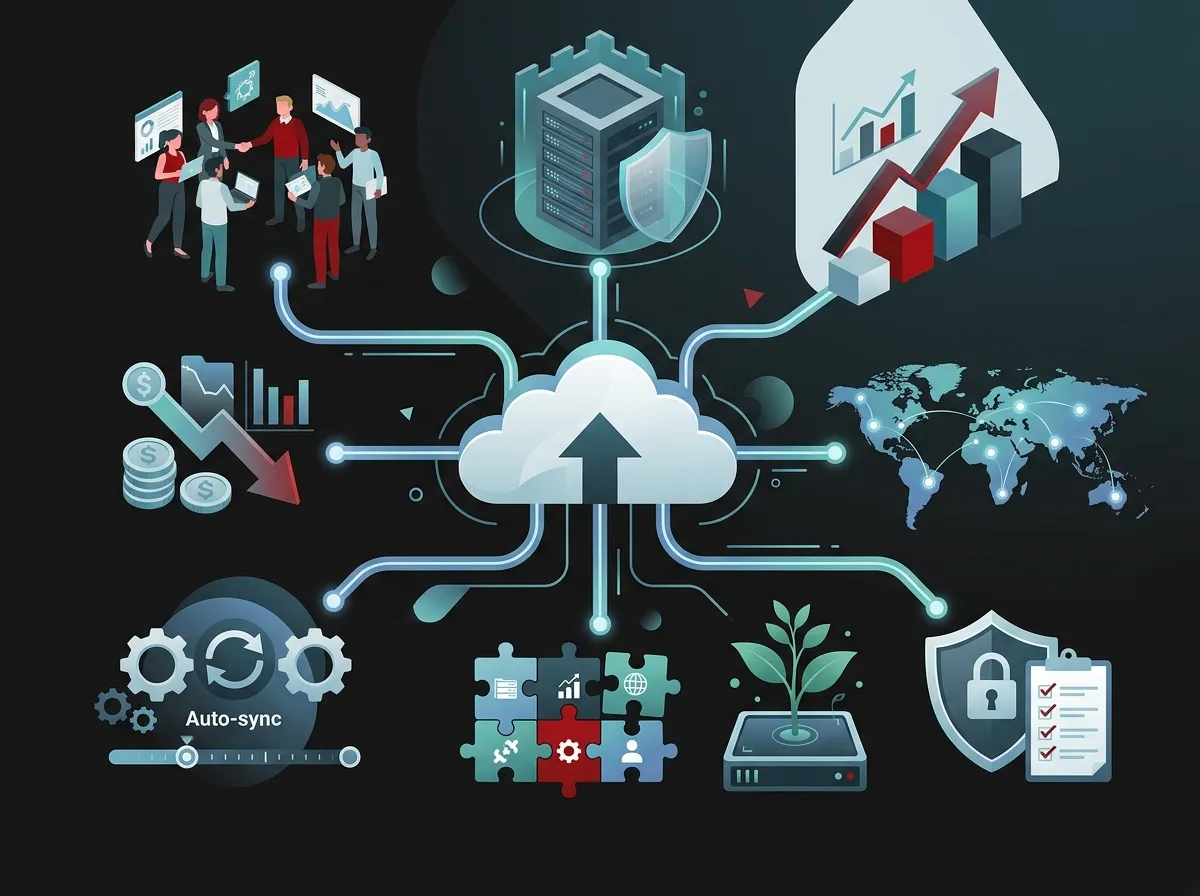
The 9 Key Cloud Storage for Business Benefits
1. Access Your Files from Anywhere
One of the biggest wins with cloud storage is simple access. Your team can pull up any file from any device — laptop, tablet, or phone — no matter where they are. Working from home? On the road? At a client site? No problem.
This is especially powerful when paired with a cloud-based phone system. Together, they create a fully mobile workspace that keeps your team productive from anywhere.
2. Easier Team Collaboration
Cloud storage lets multiple team members work on the same files at the same time. No more emailing attachments back and forth. No more version confusion. Everyone sees the latest version, always.
This kind of seamless collaboration is a game-changer for growing teams and multi-location businesses. Speaking of which, if you manage several locations, check out these reliable network solutions for multi-location businesses.
3. Scalability Without the Headache
Need more storage? Just add it. Need less? Scale it back. Cloud storage grows with your business without forcing you to buy new servers or hire IT staff to manage hardware. That flexibility is incredibly valuable for fast-growing companies.
Franchise operators, in particular, love this benefit. You can expand to new locations without overhauling your storage infrastructure each time. It’s storage that keeps up with you.
4. Built-In Backup and Disaster Recovery
What happens if your office floods or a computer crashes? With cloud storage, your data is safely backed up offsite. You can restore files quickly and get back to business without skipping a beat.
This is one of the most important reasons businesses switch to cloud-based solutions. Losing critical business data is costly — cloud backup dramatically reduces that risk. It’s peace of mind you can’t put a price on.
5. Stronger Security Controls
Good cloud storage platforms come loaded with security features. Think encryption, access controls, audit logs, and compliance support. You decide who sees what, and you get a record of every access event.
Security is a top priority for businesses handling sensitive data. Pairing cloud storage with a strong network security approach is the smart play. You can explore how cloud security compares to traditional network security to understand your options better.
6. Lower Infrastructure Costs
On-site servers are expensive. They require hardware purchases, maintenance, cooling systems, and IT oversight. Cloud storage shifts those costs to a predictable monthly subscription. You spend less upfront and reduce ongoing maintenance expenses.
For small business owners watching every dollar, this shift from capital spending to operational spending is a real budget relief. It’s also one less thing for your team to manage in-house.
7. Better Performance with the Right Network
Cloud storage only works well when your internet connection is fast and reliable. A sluggish connection means slow uploads, laggy file access, and frustrated employees. That’s why your telecom foundation matters just as much as the cloud platform itself.
If you’re experiencing slow performance, it might be time to evaluate your current internet setup. This guide on why your business internet is slow and how to fix it is a great starting point. You might also want to explore why dedicated fiber internet is a smart choice for businesses.
8. Supports Remote Work and Flexible Teams
Remote and hybrid work is the new normal in 2026. Cloud storage is a foundational tool that makes it work. Employees can stay productive whether they’re in the office, at home, or traveling.
When combined with a solid VoIP phone setup, your remote team has everything they need to communicate and collaborate effectively. Curious about VoIP options? Take a look at affordable VoIP phone services for businesses to see what’s available.
9. Compliance and Governance Support
Many industries — healthcare, finance, legal — have strict rules about how data is stored and accessed. Enterprise cloud storage solutions often come with built-in compliance tools that help you meet those requirements. That’s a big deal for businesses in regulated industries.
Having proper governance features built into your storage solution can save you from costly compliance mistakes. It’s one more reason cloud storage is a smart business decision in 2026.
Cloud Storage vs. Cloud Backup: What’s the Difference?
A lot of people use these terms interchangeably, but they’re actually different things. Here’s a quick comparison to help you understand which one you might need — or whether you need both.
| Feature | Cloud Storage | Cloud Backup |
|---|---|---|
| Primary Purpose | Store and share active files | Preserve copies of files for recovery |
| Access Style | On-demand, real-time access | Typically restored when needed |
| Collaboration | Yes — multiple users can access files | No — not designed for daily use |
| Disaster Recovery | Partial — depends on the platform | Yes — primary use case |
| Best For | Day-to-day file management | Data protection and recovery planning |
Most businesses benefit from having both. Cloud storage keeps your team productive daily, while cloud backup protects you when the unexpected happens. Think of them as partners, not substitutes.
What to Look for in a Business Cloud Storage Solution
Not all cloud storage is created equal. Here are the key features you should evaluate when choosing a solution for your business:
- Security and encryption: Look for end-to-end encryption and strong access controls
- Scalability: Can the solution grow as your business grows?
- Compliance tools: Does it support your industry’s regulatory requirements?
- Integration: Does it work with your existing phone, network, and productivity tools?
- Uptime and reliability: What is the provider’s service level agreement (SLA)?
- Support: Is help available when you need it?
Getting these features right is much easier when you have a trusted telecom partner to guide you. Reach out to our team to explore which cloud storage options work best with your existing telecom infrastructure.
How Network Quality Affects Cloud Storage Performance
Your cloud storage is only as good as the network it runs on. A fast, stable connection means smooth uploads, quick downloads, and happy employees. A weak or shared connection causes bottlenecks that slow everything down.
| Network Type | Speed Range | Best For | Cloud Storage Impact |
|---|---|---|---|
| Shared Broadband | 25–300 Mbps | Very small businesses | May slow during peak hours |
| Business Fiber | 100 Mbps–1 Gbps+ | Small to mid-sized businesses | Reliable, consistent performance |
| Dedicated Fiber | 10 Mbps–10 Gbps | Larger or high-demand businesses | Excellent — no shared bandwidth |
| SD-WAN | Varies by config | Multi-location businesses | Optimizes traffic across locations |
If you’re unsure which internet solution matches your needs, this article on how to choose the right internet speed for your business breaks it down clearly. You can also explore the difference between dedicated vs. shared fiber to find the right fit.
Cloud Storage and Your Broader Telecom Stack
Cloud storage doesn’t exist in a vacuum. It’s part of a larger connected ecosystem that includes your phone system, internet service, network infrastructure, and security tools. When these pieces work together, your business runs smoother and smarter.
Here’s how cloud storage fits into a typical business telecom stack:
- High-speed internet provides the foundation for cloud access and data transfer
- Structured cabling and networking ensure data flows efficiently across your office
- Cloud phone systems communicate in real time while sharing data via the cloud
- Cloud storage keeps all business files accessible, synced, and backed up
- Cloud security cameras store footage remotely, adding to your cloud data footprint
- Cloud access control logs entry and access events stored securely in the cloud
Notice how cloud storage touches every layer of your tech stack. That’s why choosing a single, trusted partner to manage your entire telecom ecosystem makes so much sense. Get in touch with Ideal Solutions Provider — with 24+ years of experience and 35+ vetted suppliers, they can help you build a connected, cloud-ready business from top to bottom.
You can also learn more about how a single point of contact for telecom services simplifies your operations and saves you time.
Cloud Storage for Different Business Types
Every business is different. Here’s a quick look at how cloud storage serves different types of organizations:
| Business Type | Key Cloud Storage Need | Top Benefit |
|---|---|---|
| Small Business | Affordable, easy-to-manage storage | Lower infrastructure costs |
| Mid-Sized Enterprise | Scalable storage with security controls | Supports growing teams and data needs |
| IT-Managed Organizations | Governance, audit logs, and compliance | Centralized control and visibility |
| Franchise Operations | Consistent access across all locations | Scalability without hardware overhead |
| Remote-First Teams | Reliable, device-agnostic file access | Work-from-anywhere productivity |
No matter your business size or model, there’s a cloud storage approach that fits. The key is matching the solution to your specific needs — and making sure your network infrastructure can support it.
Steps to Get Started with Business Cloud Storage
Ready to move forward? Here’s a simple roadmap to help you get started:
- Audit your current setup: Understand what data you have, where it lives, and who needs access
- Evaluate your internet speed: Make sure your connection can handle cloud data demands
- Choose a solution that fits your size and compliance needs: Look for encryption, access controls, and SLA guarantees
- Integrate with your existing tools: Ensure it works with your VoIP phone system, network, and productivity apps
- Train your team: Make sure everyone knows how to use the new system safely and efficiently
This process is much smoother with expert guidance. A telecom partner like Ideal Solutions Provider can help you evaluate options across multiple vendors to find the best fit — without the bias of selling just one solution. If you want help figuring out where to start, check out this resource on how to choose a managed service provider for your business telecom.
Common Cloud Storage Mistakes Businesses Make
Avoid these pitfalls when adopting cloud storage for your business:
- Ignoring internet quality: Cloud storage performs poorly on slow or unreliable connections
- Skipping security settings: Default settings are rarely enough — customize access controls from day one
- Choosing the wrong plan size: Underestimating storage needs leads to unexpected costs later
- Not training staff: Employees who don’t understand the system create security risks
- Treating storage and backup as the same thing: You need both — don’t confuse them
For more guidance on avoiding tech mistakes in your business, take a look at this helpful resource on cloud phone system mistakes small businesses make. Many of the same principles apply to cloud storage decisions too.
You can also follow along on Facebook and Instagram for regular tips on cloud-based business solutions and telecom best practices.
Conclusion: Cloud Storage Is a Smart Business Investment
Cloud storage for business is more than a tech trend. It’s a practical, powerful tool that helps your team collaborate, protects your data, and reduces the cost of managing on-site infrastructure. When it’s part of a well-designed telecom stack — with fast internet, solid networking, and the right cloud tools — it becomes one of the most valuable assets in your business toolkit.
Whether you’re a small business owner in Tampa, an IT manager overseeing a corporate network, or a franchise operator managing multiple locations, cloud storage delivers real, measurable value. The key is getting the right solution for your specific needs — and making sure your network infrastructure is up to the task.
Ready to build a cloud-ready business? Give our team a call at 813-388-4935 or contact Ideal Solutions Provider today for a free consultation. We’ll help you find the right cloud storage and telecom solutions to keep your business connected, protected, and growing. You can also browse more helpful content on our YouTube channel.
FAQs
Q: What is cloud storage for business?
A: Cloud storage for business means storing your company’s files on remote servers that you access through the internet or a private network — instead of keeping everything on local hard drives or office servers. It’s like having a secure, always-accessible digital filing system that your whole team can use from anywhere!
Q: How does cloud storage support remote work?
A: Cloud storage lets your team access, share, and collaborate on files from any device, no matter where they are. When paired with a cloud-based phone system and fast internet, it creates a complete remote work setup that keeps everyone productive and connected.
Q: Is cloud storage secure enough for sensitive business data?
A: Yes! Enterprise-grade cloud storage solutions come with strong security features like end-to-end encryption, access controls, audit logs, and compliance support. The key is choosing the right platform and configuring your security settings properly from the start.
Q: What is the difference between cloud storage and cloud backup?
A: Cloud storage is for actively accessing and sharing files day-to-day, while cloud backup is specifically designed to preserve copies of your data for recovery if something goes wrong. Most businesses benefit from using both — they complement each other really well!
Q: Does my internet connection affect cloud storage performance?
A: Absolutely — your internet connection is the foundation of your cloud storage experience. A fast, reliable connection (like dedicated fiber) means smooth file access and quick uploads. A slow or unstable connection will cause frustrating delays, so it’s worth making sure your network is up to the task before rolling out cloud storage.





