

Key Takeaways
-
VoIP systems cost $10-$45 per user monthly and deliver 30-70% savings compared to traditional landlines, making it accessible for businesses of all sizes.
-
Modern cloud VoIP platforms offer 99.99% uptime SLAs with redundancy built-in, but require a fast and stable internet connection to ensure call quality.
-
Essential features like auto-attendant, call recording, CRM integrations, and voicemail-to-email transcription enable better customer service and compliance without juggling multiple apps.
-
Adding new users or phone lines to VoIP requires only portal login with no technician visits or wiring work, making it ideal for scaling multi-location businesses.
-
Mobile and desktop app access allows your team to take business calls from anywhere using the same business number, supporting remote and hybrid work models.
-
Test call quality with a demo or trial before committing, audit your internet bandwidth needs, and plan for number porting to avoid common switching mistakes.
Is your office still relying on clunky landlines or outdated PBX hardware? You’re not alone — and the good news is, there’s a much better option available right now. A modern VoIP phone system transforms the way your team communicates, cutting costs while adding features that traditional phone lines simply can’t match. Whether you’re a small Tampa business owner or managing multiple office locations nationwide, switching to VoIP could be one of the smartest moves you make this year.
In this guide, we’re breaking down the 9 essential features every business VoIP phone system should have in 2026. We’ll also walk you through how VoIP works, what it costs, and how to pick the right solution for your team. Let’s dive in!

What Is a VoIP Phone System for Business?
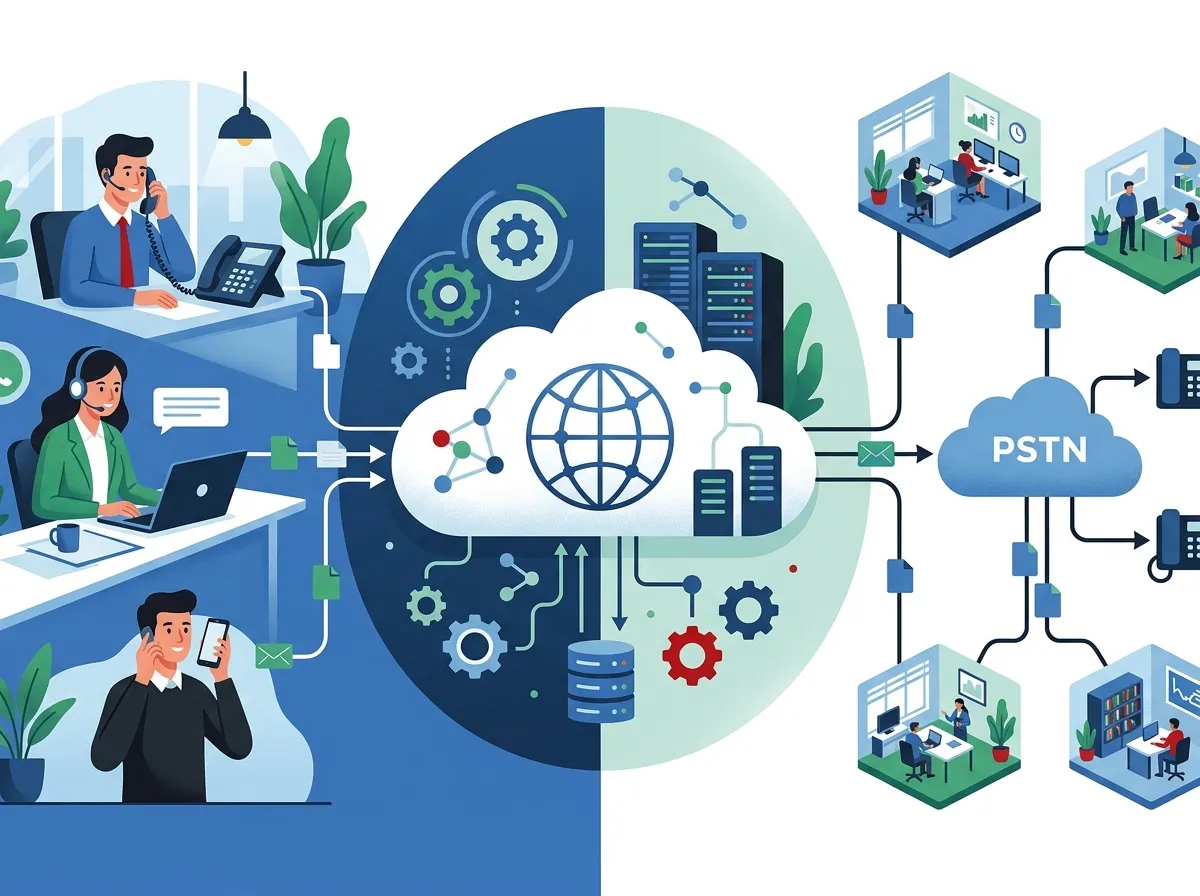
VoIP stands for Voice over Internet Protocol. Instead of sending voice calls through copper telephone wires, a VoIP phone system sends them over your internet connection. This means your team can make and receive calls from desk phones, laptops, or smartphones — all using the same business number.
Business VoIP replaces traditional landline infrastructure and physical PBX hardware. It’s faster to set up, easier to scale, and packed with features that help your team stay connected. If you want a deeper look at the core differences, check out this breakdown of 6 Key Differences Between VoIP and Traditional Phone Systems.
How Does Business VoIP Work?
When someone speaks into a VoIP-enabled device, the system converts their voice into digital data packets. Those packets travel over your internet connection to the recipient, where they’re reassembled into clear audio. The whole process happens in milliseconds.
Most businesses today choose a hosted or cloud VoIP model. This means the provider manages the servers and infrastructure off-site. Your team just logs in and starts calling. There’s no server room, no complex wiring overhaul, and no IT headaches. Want to understand your deployment options? Our guide on How to Choose Cloud Based Phone System Providers in Tampa FL walks you through every option clearly.
VoIP Deployment Models at a Glance
Choosing the right deployment model matters. Here’s a quick comparison to help you decide what fits your business best:
| Deployment Model | Who It’s Best For | Key Advantage | Main Consideration |
|---|---|---|---|
| Hosted VoIP | Small to mid-sized businesses | Low upfront cost, provider manages hardware | Requires reliable internet connection |
| Cloud VoIP / UCaaS | Remote & hybrid teams | Access from any device, anywhere | Monthly subscription model |
| On-Premises VoIP | Enterprises with compliance needs | Full control over data and hardware | Higher upfront hardware investment |
| Hybrid VoIP | Businesses mid-migration | Blends old and new infrastructure | More complex to manage |
Not sure which model is right for you? A trusted telecom partner like Ideal Solutions Provider can audit your current setup and recommend the best fit. With over 24 years of experience and 35+ vetted suppliers, they make comparing options simple and stress-free.
9 VoIP Phone System Features Every Business Needs
Not all VoIP systems are created equal. Here are the 9 features your business phone system absolutely needs to deliver real value in 2026.
1. Auto-Attendant (Virtual Receptionist)
An auto-attendant greets callers and routes them to the right department automatically. This means no missed calls and a polished, professional first impression — even for a one-person operation. It’s a must-have for any growing business.
2. Call Queues and Ring Groups
Call queues hold incoming callers in line until an agent is free. Ring groups send one call to multiple phones at once. Together, these features make sure no customer gets left on hold forever or lost in the shuffle.
3. Mobile and Desktop App Access
Your team should be able to take business calls from anywhere — a coffee shop, a job site, or their home office. A great VoIP phone system includes apps for smartphones and computers so your business number follows your staff, not their desk. This is especially valuable for remote and hybrid workers. For more reasons why Tampa businesses are making the switch, read 7 Reasons Tampa Businesses Are Switching to VoIP in 2026.
4. Voicemail-to-Email Transcription
This feature converts voicemails into text and sends them to your inbox. Your team can read messages quickly without listening to each one. It saves time and ensures nothing slips through the cracks during a busy day.
5. Call Recording
Call recording is a game-changer for quality control, training, and compliance. Managers can review calls to coach staff or resolve customer disputes. Many industries, especially healthcare and finance, require it by law.
6. Video Conferencing and Team Messaging
Modern VoIP platforms often bundle video meetings, team chat, and SMS into one app. This is what the industry calls UCaaS (Unified Communications as a Service). Instead of juggling five different apps, your team gets one hub for all communication. You can follow our Ideal Solutions Provider YouTube channel for demos and tips on getting the most from unified communications tools.
7. CRM and Software Integrations
The best VoIP phone systems connect with tools your team already uses — like CRM platforms, help desk software, and email. When a customer calls, their account details pop up automatically. This speeds up service and creates a smoother customer experience.
8. Analytics and Reporting
Call analytics let you see how many calls came in, how long they lasted, and how many went unanswered. This data helps managers make smarter staffing decisions and spot communication bottlenecks before they become real problems.
9. Easy Scalability
One of the biggest advantages of VoIP is how easy it is to grow. Adding a new user or a new phone line doesn’t require a technician or a wiring overhaul. You simply log into your admin portal and add a seat. This makes VoIP perfect for franchise operators and multi-location businesses. See how well it works at scale in our guide on 11 Reliable Network Solutions for Multi-Location Tampa Businesses.
How Much Does a Business VoIP Phone System Cost?
VoIP is significantly more affordable than traditional landline systems. Most businesses report saving between 30% and 70% after switching. Some entry-level plans start as low as $10–$15 per month per user, making it accessible even for very small offices with just 1–4 phone lines.
| Business Size | Estimated Monthly Cost | Typical Features Included |
|---|---|---|
| Solo / Very Small (1–4 lines) | $10–$25/user/month | Calling, voicemail, mobile app |
| Small Business (5–20 users) | $20–$35/user/month | Auto-attendant, call queues, SMS |
| Mid-Sized Business (21–100 users) | $25–$45/user/month | Video, CRM integrations, analytics |
| Enterprise (100+ users) | Custom pricing | Full UCaaS, compliance, dedicated support |
For a detailed cost breakdown specific to Tampa businesses, visit our article on How Much Does a VoIP Phone System Cost for a Business in Tampa?. You may also find opportunities to bundle your phone and internet for additional savings — learn more in How Do I Bundle My Business Phone and Internet Service?.
Is VoIP Reliable Enough for Business Use?
This is the question we hear most often — and the answer is yes, with the right setup. Modern cloud VoIP platforms are built with redundancy and uptime guarantees. Many providers offer 99.99% uptime SLAs, meaning downtime is extremely rare.
The key to reliability is your internet connection. A fast, stable connection is essential for crystal-clear calls. Check out these 13 High-Speed Internet for Business Tips That Save Money to make sure your bandwidth is ready for VoIP. Also, make sure your structured cabling is up to standard — learn how structured cabling supports VoIP phones and security cameras in a professional office environment.
Common VoIP Mistakes to Avoid
Switching to VoIP is straightforward — but a few missteps can cause headaches down the road. Here are the most common ones to watch out for:
- Choosing a provider without testing call quality first — always ask for a demo or trial period
- Ignoring your internet bandwidth needs — each VoIP call uses roughly 100 kbps of bandwidth
- Not planning for number porting — keeping your existing number is possible, but it takes some coordination
- Overlooking security settings — enable encryption and strong passwords from day one
- Skipping staff training — even a simple system needs a quick walkthrough so your team gets the most from it
For a complete list of pitfalls, read our guide on 8 VoIP Provider Mistakes Tampa Businesses Must Avoid. And if you’re worried about losing your current number during the switch, don’t miss How to Keep Your Phone Number When Switching to VoIP in Tampa.
VoIP vs. Traditional Phone: Quick Comparison
| Feature | VoIP Phone System | Traditional Landline |
|---|---|---|
| Monthly Cost | $10–$45/user | $50–$100+/line |
| Setup Time | Hours to days | Days to weeks |
| Scalability | Add lines instantly | Requires technician and wiring |
| Remote Access | Yes — any device | No |
| Advanced Features | Auto-attendant, recording, video, CRM | Basic calling only |
| International Calling | Often included or very affordable | Expensive per-minute rates |
The numbers speak for themselves. If you want a more in-depth look, check out VoIP vs. Traditional Phone: Which Wins for Tampa Businesses?
How to Choose the Right VoIP Provider for Your Business
Picking the right VoIP phone system comes down to a few key factors. Work through this quick checklist before you commit:
- Identify your team’s size and communication needs — do you need video, CRM integration, or international calling?
- Check your internet speed and reliability — VoIP needs solid bandwidth to perform well
- Compare pricing models — look for per-user pricing that scales with your headcount
- Ask about uptime guarantees and support — 24/7 support matters when something goes wrong
- Request a demo or free trial — always test call quality before signing a contract
- Confirm number porting is included — you shouldn’t have to give up your existing phone numbers
For expert guidance tailored to Tampa businesses, visit How to Choose a Business VoIP Solutions Provider in Tampa. You can also find a curated list of affordable options in 8 Affordable VoIP Phone Services for Tampa Businesses in 2026.
Steps to Switch Your Business to VoIP
Ready to make the move? Here’s how the process typically works:
- Audit your current phone setup — understand what you’re paying and what features you actually use
- Choose a VoIP provider and plan — match features to your business size and budget
- Confirm your internet connection can handle VoIP traffic — upgrade if needed
- Port your existing numbers — your provider handles most of this process
- Install and configure the system — set up auto-attendants, call flows, and user accounts
- Train your team — a quick walkthrough gets everyone up to speed fast
For a step-by-step walkthrough, our guide on 5 Steps to Switch Your Business Phone to the Cloud in Tampa covers everything you need. You can also stay up to date with tips and updates by following us on Instagram and Facebook.
The Bottom Line on Business VoIP in 2026
A modern VoIP phone system isn’t just a cost-saving tool — it’s the foundation of a flexible, connected, and professional business. From auto-attendants and call recording to mobile access and CRM integrations, today’s VoIP platforms give your team everything they need to communicate better and serve customers faster.
Whether you’re a solo office, a growing mid-sized company, or a franchise with locations across the country, there’s a VoIP solution built for your needs. The key is finding the right provider and getting the setup right from day one.
Ready to explore your options? Reach out to our team at Ideal Solutions Provider for a free consultation. We’ll review your current setup, identify savings, and connect you with the best VoIP solution for your business — no pressure, no guesswork.
FAQs
Q: What is a VoIP phone system for business?
A: A business VoIP phone system lets your team make and receive calls over the internet instead of traditional copper phone lines. It replaces old-school landlines and PBX hardware with a flexible, feature-rich platform that works on desk phones, computers, and smartphones — pretty cool, right?
Q: How much does a business VoIP phone system cost?
A: Most business VoIP plans range from about $10 to $45 per user per month, depending on the features and provider you choose. That’s a big win compared to traditional landlines — most businesses save between 30% and 70% after making the switch!
Q: Is a VoIP phone system reliable enough for my business?
A: Absolutely! Modern cloud VoIP platforms are built with redundancy and often come with 99.99% uptime guarantees. The main thing you need is a fast, stable internet connection — get that right, and your calls will be crystal clear every time.
Q: What is the difference between hosted VoIP and cloud VoIP?
A: Both hosted and cloud VoIP are managed off-site by a provider, so you don’t need on-site servers or complex hardware. The main difference is that cloud VoIP is often part of a broader UCaaS platform that includes video, messaging, and integrations — making it a great all-in-one solution for modern teams.
Q: Can I keep my existing business phone number when switching to VoIP?
A: Yes! Porting your current business number to a new VoIP provider is a standard part of the switching process. Your provider handles most of the heavy lifting, and the transition is usually smooth and seamless for your customers.





