
Key Takeaways
-
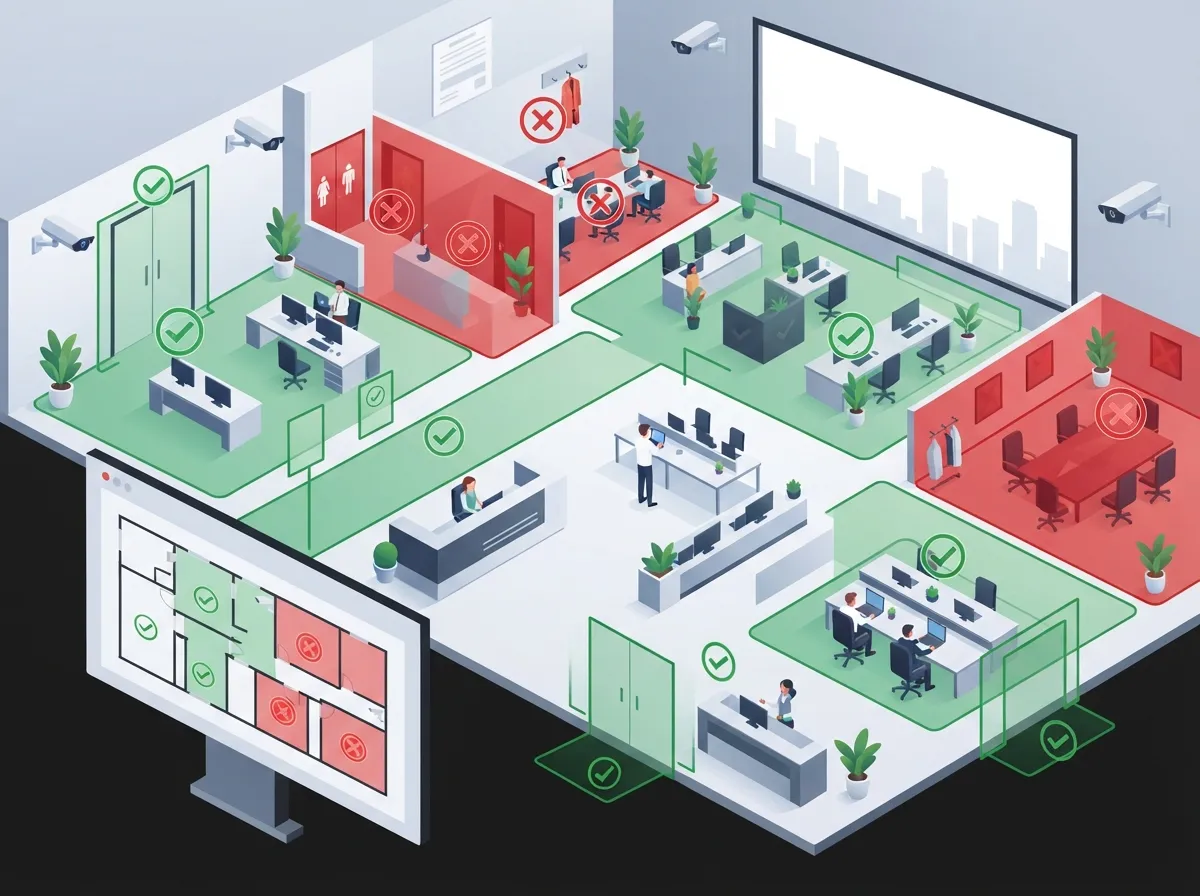
Never point cameras into private spaces like restrooms, changing rooms, or medical areas; focus instead on entrances, parking lots, and public-facing areas, and document each camera's field of view to avoid accidental privacy violations.
-
Treat camera systems as IT assets requiring robust cybersecurity: enforce unique admin credentials, multi-factor authentication, encryption, regular firmware updates, and network segmentation to prevent unauthorized access to footage.
-
Post clear, visible notices explaining that video monitoring occurs, whether audio is recorded, footage retention duration, and who has access—this builds trust and satisfies legal notification requirements.
-
Establish a written retention schedule (typically 30-90 days) based on operational and legal needs, and be aware that biometric features like facial recognition trigger stricter compliance laws in states like Illinois with potential statutory damages up to $5,000 per violation.
So you’re ready to add security cameras to your business. Great choice! But before your IT team mounts a single camera, let’s talk about something people often skip: compliance. Camera compliance sounds intimidating, but it really just means protecting your business, your employees, and your customers the right way. Think of it like buckling your seatbelt before you drive off. It’s a simple step that saves you from big headaches later.
Here at Ideal Solutions Provider, we’ve helped businesses across Tampa and nationwide set up cloud video security systems the smart way, with compliance built in from day one. Whether you’re a small business owner, an IT manager juggling vendors, or a franchise operator managing cameras at multiple sites, this guide breaks down exactly what you need to know. Let’s walk through the six biggest compliance areas you need to handle before your cameras go live.
1. Know Where Cameras Can (and Cannot) Go
The first rule of camera compliance is simple: respect private spaces. Cameras should never point into restrooms, changing rooms, showers, or private medical areas. People have a reasonable expectation of privacy in these spots, and courts take that seriously.
It’s also smart to double-check camera angles. Sometimes a camera aimed at a hallway accidentally catches a view into a break room or a neighboring office. A quick walkthrough after installation catches these issues before they become real problems.
- Keep cameras focused on entrances, parking lots, warehouses, and public-facing areas
- Avoid pointing lenses toward restrooms or locker rooms, even indirectly
- Review camera placement any time you remodel or move furniture
- Ask your installer to document each camera’s field of view
If you’re unsure where your current cameras stand, our team can walk your site and check every angle. Learn more about what security cameras really do for your business before you plan your next installation.

2. Think Twice Before You Add Audio
Here’s something a lot of business owners don’t realize: audio recording carries way more legal risk than silent video. The federal Wiretap Act generally allows recording if just one person in the conversation agrees to it. But several states require every single person to agree first.
If your business operates in more than one state, this gets tricky fast. Many companies simply turn off microphones on their cameras unless a lawyer has approved a clear, state-specific consent plan.
A Simple Rule of Thumb
When in doubt, leave audio off. Silent video footage does the job for most businesses: catching theft, monitoring entrances, and reviewing incidents. Audio adds legal complexity without adding much value in most everyday situations.
3. Post Clear Notices for Everyone to See
Nobody likes surprises, especially when it comes to being recorded. Clear, visible notice is one of the easiest compliance boxes to check, and it builds trust with your team and customers too.
Your notice should explain:
- That video monitoring is happening
- Whether audio is being recorded (if applicable)
- The general purpose of the cameras (safety, security, etc.)
- Who has access to the footage
- How long footage is kept
- Who to contact with privacy questions
A simple sign near the entrance and a line in your employee handbook usually covers this. Office managers often own this task, and it’s a quick win that protects the whole company.
4. Lock Down Your Cameras Like Any Other IT Asset
Here’s a fact that surprises a lot of people: your camera system is basically a computer network. That means it needs the same cybersecurity attention as your servers or your phones. Weak passwords and outdated firmware are open doors for hackers.
The NIST Cybersecurity Framework 2.0, published in 2024, breaks security management into six easy-to-remember categories: Govern, Identify, Protect, Detect, Respond, and Recover. These apply perfectly to camera systems too.
| Security Control | Why It Matters |
|---|---|
| Unique admin credentials | Prevents shared passwords from being an easy target |
| Multi-factor authentication | Adds a second lock on the door for remote access |
| Role-based access | Limits who can view or export footage |
| Encryption in transit and at rest | Protects footage as it moves and while it’s stored |
| Regular firmware updates | Closes known security holes quickly |
| Network segmentation | Keeps cameras isolated from sensitive business systems |
IT managers should treat camera passwords the same way they treat network passwords. Securing just the camera itself isn’t enough. Your video management software, cloud storage, and vendor remote access all need protection too. If you’re building out your network anyway, check out our guide on how structured cabling supports VoIP and cameras for a stronger foundation.
5. Set a Real Retention Schedule
How long should you keep footage? There’s no single magic number, but “forever” is never the right answer. A written retention schedule based on your operational and legal needs keeps your storage costs down and your compliance posture solid.
Here’s a simple approach to build your policy:
- Decide on a standard retention window (30, 60, or 90 days is common)
- Document the reason for that timeframe
- Build in a legal hold process for ongoing investigations or lawsuits
- Review and update the policy whenever your business changes locations or vendors
Franchise operators managing multiple sites should keep this policy consistent across every location. It makes audits and vendor contracts much easier to manage. Our article on how long footage is stored in cloud video security systems covers this in more depth.
6. Watch Out for Biometric and Sector-Specific Rules
If your cameras use facial recognition, license plate readers, or other smart analytics, you’ve entered a whole new compliance zone. States like Illinois have strict biometric privacy laws. Illinois BIPA, for example, can carry statutory damages of $1,000 per negligent violation and $5,000 per intentional violation.
Beyond biometrics, your industry might add extra layers:
- Healthcare organizations may need to consider HIPAA if cameras capture patient areas
- Retailers processing payments should think about PCI DSS scope for connected network equipment
- Schools, banks, and government contractors often have additional contractual requirements
- International operations may fall under GDPR, which can impose fines up to €20 million or 4% of global revenue
Mid-sized enterprises and franchise operators expanding into new states or countries should loop in legal counsel early. It’s much easier to build compliance in from the start than to fix it after an incident.
Building Your Camera Compliance Checklist
Feeling a little overwhelmed? Take a breath. Compliance doesn’t have to be complicated once you break it into steps. Here’s a quick inventory checklist to get you started:
- List every camera’s location and field of view
- Note whether each camera records audio
- Document any analytics features like facial recognition or license plate reading
- Record where footage is stored and for how long
- List who has access, including any outside vendors
- Review this list whenever you add cameras, change vendors, or update firmware
If you work with a telecom or managed-service partner who hosts or monitors your footage, make sure your contract spells out ownership, breach notification, data location, and support access procedures. This protects you if something goes wrong down the road.
Why a Trusted Partner Makes This Easier
You don’t have to figure all of this out alone. Ideal Solutions Provider has spent over 24 years helping businesses set up telecom and security systems the right way. With partnerships across 35+ vetted suppliers, we help you design a camera system that fits your business and keeps compliance in mind from the very first conversation.
We also handle the boring but important stuff: proper structured cabling, secure network setup, and reliable connectivity from your Internet Service Provider so your cameras run smoothly around the clock. Check out our tips on high-speed internet for business if your connection needs a boost to support your camera system.
Whether you’re a growing franchise or a single Tampa office, we act as your single point of contact. No juggling multiple vendors, no guessing which laws apply. You can also follow our latest updates and customer stories on Facebook, Instagram, and YouTube to see real examples of compliant camera setups in action.
Ready to Build a Compliant Camera System?
Camera compliance isn’t something to bolt on after installation. It’s something to design from the very beginning, right alongside your network, cabling, and internet setup. Getting it right protects your business, your team, and your customers, and it saves you from costly mistakes later.
If you’re ready to talk through your camera setup, storage needs, and compliance questions with a friendly expert, reach out to our team today or give us a call to schedule your free consultation. We’re here to make security simple, so you can get back to running your business.
FAQs
Q: Are security cameras legal in a business workplace?
A: Yes, security cameras are generally legal in workplaces, especially in common areas like entrances, hallways, and parking lots. Just make sure you avoid private spaces like restrooms and give employees clear notice that cameras are in use.
Q: Do business security cameras need audio-recording consent?
A: It depends on your state! Some states only need one person’s consent to record audio, while others require everyone in the conversation to agree. To keep things simple and safe, many businesses just turn off the microphone on their cameras.
Q: How long should a business retain security-camera footage?
A: There’s no single right answer, but most businesses keep footage for 30 to 90 days unless there’s an ongoing investigation. The key is having a written policy so everyone knows the rules, and updating it if legal needs change.
Q: Does facial recognition on a security camera trigger biometric privacy laws?
A: It can, especially in states like Illinois with strict biometric privacy laws. If your cameras use facial recognition or similar smart features, it’s worth checking your state’s rules before turning that feature on.
Q: What cybersecurity controls should be required for cloud-connected business cameras?
A: Your cameras deserve the same protection as your computers, think unique passwords, multi-factor authentication, encryption, and regular firmware updates. A trusted telecom partner can help make sure nothing gets overlooked.





