

Key Takeaways
-
Cat 6A is the practical standard for modern offices because it delivers full 10 Gb/s speeds over the entire 100-meter Ethernet limit, supporting future Wi-Fi 6/7 access points and PoE devices without rewiring.
-
Real-world cabling performance depends on the complete installed channel—cable quality, connector quality, length, and equipment—not just the speed rating printed on the cable jacket.
-
The 100-meter Ethernet distance limit is a hard rule built into Ethernet design; exceeding it requires additional network closets or switches to maintain signal quality.
-
Power over Ethernet devices generate heat in cable bundles that can cause data loss or damage over time, requiring careful planning around bundle sizes and conductor gauge, especially for camera and access control systems.
-
Professional testing and certification of installed cabling is essential and skipped too often; it verifies signal loss, crosstalk, and channel length match standards rather than assuming correctly labeled cable performs as expected.
-
Calculate bandwidth needs by inventorying all devices, checking individual speed requirements, measuring cable distances, and planning 5-10 years ahead to avoid expensive rewiring after walls are sealed.
Ever ordered internet with a shiny speed number, only to watch your VoIP calls freeze during a busy afternoon? The problem often isn’t your internet plan at all. It’s the cabling running through your walls. Cabling bandwidth requirements decide how much data your phones, cameras, and computers can actually push through your office network. Get this wrong, and even the fastest internet plan in Tampa won’t save you.
This guide breaks down cabling bandwidth in plain terms. We’ll cover what the numbers really mean, how to pick the right cable type, and how to plan for growth. Whether you run a small shop or manage IT for a growing company, you’ll walk away knowing exactly what to ask for. And if you’d rather skip the guesswork, the team at Ideal Solutions Provider is always happy to help you sort it out.

What Does Cabling Bandwidth Actually Mean?
People often mix up two different things when they talk about cabling bandwidth. One is the cable’s rated frequency, measured in MHz. The other is the actual network speed it can carry, measured in Gb/s. These numbers are related, but they are not the same thing.
A cable rated for higher MHz can generally support faster Ethernet speeds. But the real-world speed also depends on cable length, connector quality, and the installation itself. Even top-shelf cable will underperform if it’s installed poorly or run too far. That’s why the full installed channel matters more than any single number printed on a cable jacket.
Your network equipment also plays a huge role. A cable rated for 10 Gb/s won’t deliver that speed if your switch or router only supports 1 Gb/s. Think of it like a fast highway that dead-ends into a one-lane bridge. The bridge decides your actual speed, not the highway.
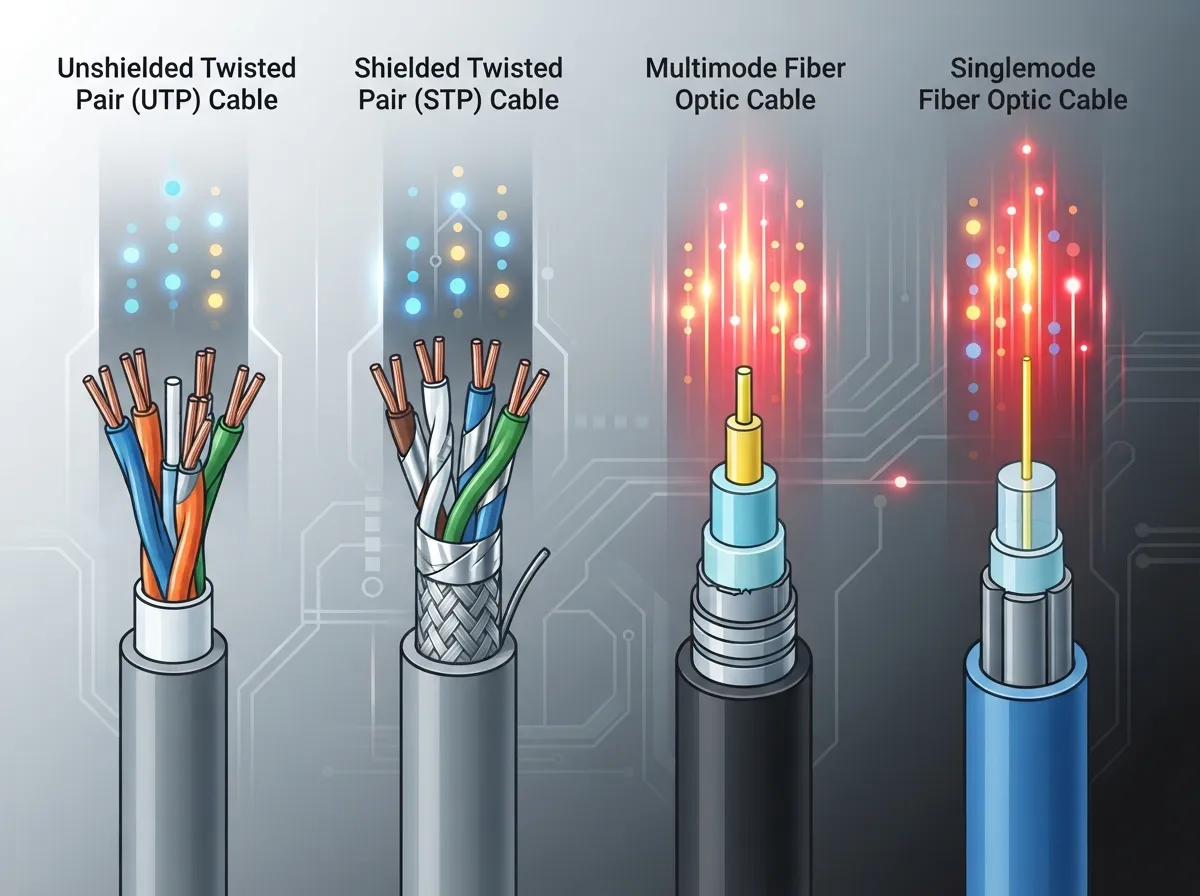
Common Cable Types and Their Real-World Limits
Business owners often ask which cable category fits their office. The answer depends on your speed needs, your building’s size, and your plans for the next five to ten years. Here’s a simple breakdown of what each type can handle.
| Cable Type | Nominal Bandwidth | Max Speed at 100m | Best Use Case |
|---|---|---|---|
| Cat 5e | 100 MHz | 1 Gb/s | Basic office phones and computers |
| Cat 6 | 250 MHz | 1 Gb/s (10 Gb/s at ~37-55m) | Standard offices with moderate growth |
| Cat 6A | 500 MHz | 10 Gb/s | Future-ready offices, PoE devices, Wi-Fi 6/7 |
| Cat 8 | 2000 MHz | 25/40 Gb/s (up to 30m only) | Data centers, not typical office runs |
Notice that Cat 6 can technically hit 10 Gb/s, but only over much shorter distances than a standard office run. This is why so many businesses now choose Cat 6A for new builds. It gives you the full 100-meter reach at 10 Gb/s, which matches most office layouts perfectly. If you want a deeper look at this comparison, check out our article on how to choose between Cat6 and Cat6A for your office.
Why the 100-Meter Rule Matters So Much
Standard business Ethernet cabling has a hard limit of 100 meters, or about 328 feet. This is not a suggestion. It’s a rule built into the design of Ethernet itself. Go past this distance, and your signal quality drops fast.
This 100-meter channel usually breaks down like this:
- Up to 90 meters of permanent cable run inside your walls and ceilings
- Up to 10 meters combined for patch cords at both ends
- Any connectors or splices in between, which can also add loss
If your office spans a large warehouse or multiple floors, you may need extra network closets or switches to stay within this limit. This is exactly the kind of planning our team handles during structured cabling installs. For a closer look at how proper planning helps avoid problems, read our guide on how to plan network cabling installation in Tampa Bay.
How to Calculate Your Business Cabling Bandwidth Requirements
Figuring out your cabling needs doesn’t have to feel like solving a puzzle. Follow these steps to get a clear picture of what your business actually needs.
- List every device that needs a connection. Count VoIP phones, computers, wireless access points, security cameras, and access control readers.
- Check the speed each device needs. Most phones need very little bandwidth, but multi-gigabit Wi-Fi access points and cloud cameras need much more.
- Measure your longest cable runs. Know the distance from your network closet to the farthest device.
- Add up your Power over Ethernet, or PoE, needs. Phones, cameras, and access points often draw power through the same cable that carries data.
- Think five to ten years ahead. Will you add more staff, more cameras, or faster Wi-Fi standards soon?
- Choose cabling that meets both your current and future needs. It’s cheaper to install Cat 6A now than to rewire later.
- Test and certify every installed link. Never assume a cable works just because it’s labeled correctly.
This process helps you avoid the two most common mistakes: buying more capacity than you need, or worse, running out of bandwidth right after your rooms are wired shut. Our article on 9 signs your Tampa business needs structured cabling now covers warning signs that your current setup is already falling short.
How PoE Changes Your Cabling Bandwidth Planning
Power over Ethernet lets a single cable carry both data and electricity. This is great news for VoIP phones, wireless access points, and security cameras. But it also changes how you should plan your cabling.
Higher-power PoE devices generate more heat inside cable bundles. Poor planning here can cause data loss or even damage over time. If you’re installing lots of PoE devices, like a full camera system paired with access control readers, work with an installer who understands both the electrical and network sides of the job. Our team frequently supports projects that combine Cloud Video Security with Cloud Based Access Control, so we know how these systems draw power and bandwidth together.
Copper vs. Fiber: Which One Fits Your Business?
Copper cabling, like Cat 6A, works great for most office connections. But fiber optic cabling shines when you need longer distances or heavier data loads, especially for backbone connections between buildings or floors.
- Multimode fiber is common for shorter backbone runs within a building or between nearby buildings.
- Single-mode fiber handles much longer distances, making it ideal for campus connections or links between separate locations.
- Copper Cat 6A remains the practical choice for most desk and device connections within 100 meters.
Choosing between these options depends on your building layout and growth plans. Our detailed comparison in copper vs fiber cabling: which wins for your office can help you weigh the pros and cons for your specific situation.
Planning for Wi-Fi 6 and Wi-Fi 7 Access Points
Modern wireless access points need more bandwidth than older models. Wi-Fi 6 and the newer Wi-Fi 7 standard can push data rates that exceed 1 Gb/s per access point. If your cabling can’t keep up, your fancy new access points will bottleneck at the wall jack.
This is one of the biggest reasons businesses now default to Cat 6A for new installs. It gives your wireless network room to grow without needing a full rewire in a year or two. Planning ahead here saves real money down the road.
Testing and Certifying Your Installed Cabling
Buying the right cable category is only half the job. The complete installed channel needs testing to confirm it actually performs as expected. This step gets skipped far too often, and it’s a costly mistake.
Professional testing checks things like signal loss, crosstalk, and total channel length. It confirms your cabling meets the standards set by organizations that define structured cabling requirements for commercial buildings. Skipping this step is a bit like buying a car without ever checking if the brakes work. For more on avoiding these pitfalls, see our post on 12 structured cabling mistakes that hurt your business.
Common Mistakes That Hurt Business Networks
Over our 24-plus years serving Tampa businesses, we’ve seen the same cabling mistakes pop up again and again. Here are the ones to watch for.
- Choosing cable based only on advertised speed labels, without checking the full installed channel
- Running cable past the 100-meter limit without adding proper network closets
- Ignoring future PoE needs when planning bundle sizes and conductor gauge
- Skipping certification testing after installation
- Mixing cable categories without a clear upgrade plan, creating confusing bottlenecks
Any one of these mistakes can quietly drag down your network performance for years. The good news is that all of them are easy to avoid with a bit of upfront planning and the right installer.
Why Working With One Telecom Partner Makes This Easier
Juggling cabling contractors, internet providers, and phone system vendors separately is exhausting. Miscommunication between these parties often leads to cabling that doesn’t match your actual network needs.
Ideal Solutions Provider works as a single point of contact for Tampa businesses and companies nationwide. We coordinate structured cabling, Business High Speed Internet Services, and Cloud Based Phone Systems so everything works together from day one. With partnerships across 35+ vetted suppliers, we compare your options honestly instead of pushing a single brand. You can see examples of our completed projects and client feedback on our Facebook page and our YouTube channel.
Bringing It All Together
Getting your cabling bandwidth requirements right isn’t about buying the fanciest cable on the shelf. It’s about matching your cable, your equipment, and your future plans into one working system. Start by listing your devices, checking your distances, and thinking ahead five to ten years. Then choose standards-compliant cabling and always test the finished job.
Small business owners save money by avoiding rewiring headaches later. IT managers gain confidence knowing every link is certified and documented. Franchise operators get a repeatable, scalable setup across every location. And office managers finally stop fielding complaints about dropped calls or slow Wi-Fi.
If you’re not sure whether your current cabling can keep up with your business, we’d love to take a look. Contact us for a free consultation, or call us today to talk through your options with a real person who knows this stuff inside and out.
FAQs
Q: What Ethernet cable category do I need for a business network?
A: For most modern offices, Cat 6A is a smart pick because it supports 10 Gb/s speeds over the full 100-meter distance. If your needs are simpler, like basic phones and computers, Cat 6 or even Cat 5e might still get the job done just fine.
Q: Is Cat 6A necessary for 10-gigabit Ethernet?
A: Cat 6A is the practical choice if you want reliable 10 Gb/s speeds across a standard 100-meter office run. Cat 6 can technically hit that speed too, but only over much shorter distances, which limits its usefulness in bigger spaces.
Q: How far can Cat 6 carry 10 Gb/s?
A: Cat 6 typically supports 10 Gb/s over roughly 37 to 55 meters, depending on installation quality and surrounding conditions. Beyond that range, you’ll likely see your speed drop back down to 1 Gb/s.
Q: What is the difference between cable bandwidth in MHz and network speed in Gb/s?
A: MHz measures a cable’s signal frequency, while Gb/s measures the actual data speed it can carry. They’re related, but a cable’s real-world performance also depends on length, connectors, and the equipment plugged into it.
Q: How does PoE affect business cabling requirements?
A: Power over Ethernet sends both electricity and data through the same cable, which powers devices like VoIP phones and security cameras. Higher-power PoE setups need careful planning around cable bundling and heat to keep your network running smoothly.





