

Key Takeaways
-
MPLS is a carrier-provided private transport with contract-backed performance, while SD-WAN is a software layer that steers traffic across multiple links, including MPLS itself.
-
A hybrid design often works best: keep MPLS for latency-sensitive or critical sites and use SD-WAN with broadband or cellular links for flexibility, failover, and cloud access.
-
SD-WAN savings are not automatic; compare total costs including circuits, licenses, edge equipment, implementation, ongoing support, and security tools before assuming a reduction.
-
Neither technology is inherently secure: MPLS traffic is separated but not encrypted, so plan encryption, segmentation, firewall policy, and monitoring as a distinct step regardless of transport.
-
SD-WAN can cut cloud and SaaS latency by sending trusted traffic directly out through local internet links, but only if each site's underlying internet connection is reliable.
-
SD-WAN cannot turn a weak connection into a strong one, so the quality of your underlying circuits remains critical to performance.
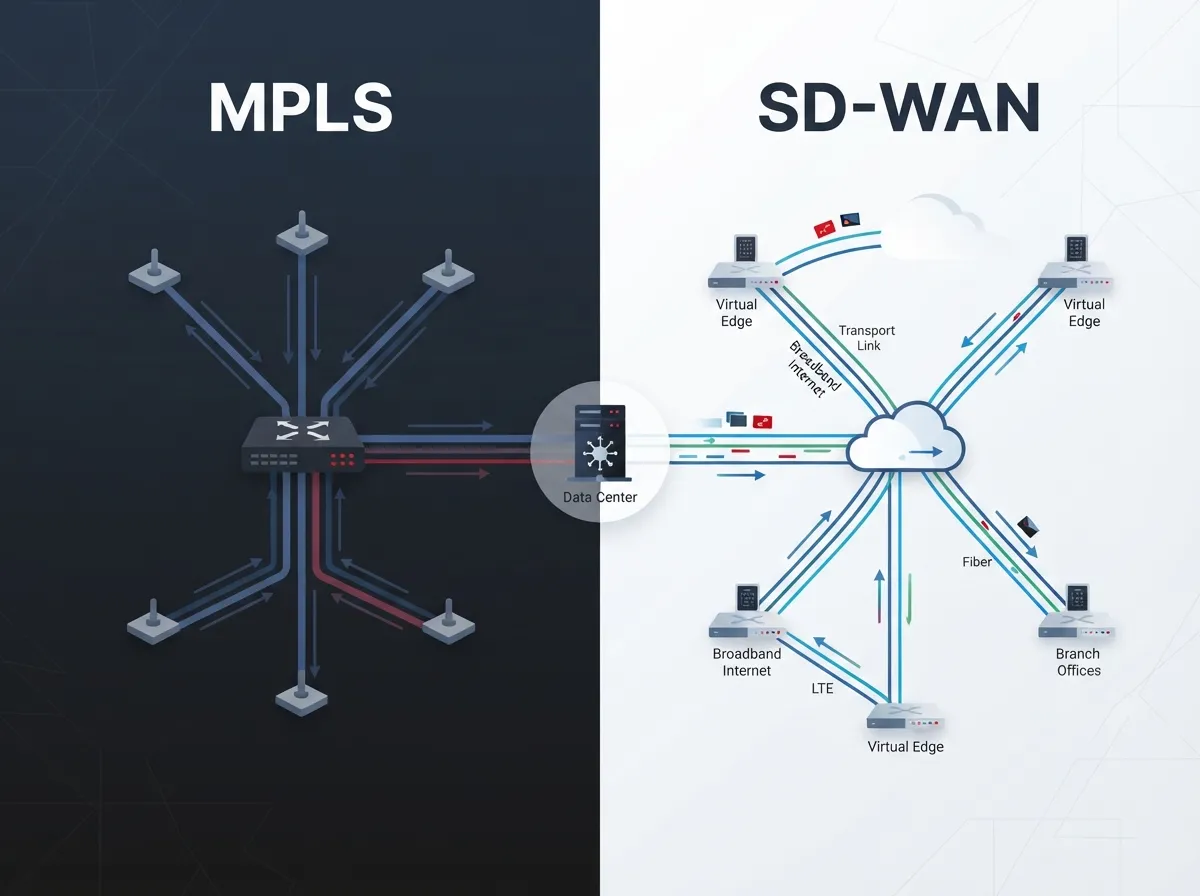
If you have ever tried to compare SD-WAN and MPLS, you know the feeling. The acronyms fly fast, every vendor has a pitch, and you just want to know which one keeps your offices connected without wrecking the budget. Good news: you are in the right place. So, what is the difference between SD-WAN and MPLS? In short, MPLS is a carrier-provided private transport, while SD-WAN is a software layer that manages traffic across one or more connections, including MPLS itself.
That one idea clears up most of the confusion. The two are not always rivals. In 2026, many businesses use them together. Whether you run a small Tampa office, a growing mid-sized company, or a franchise with sites across the country, this guide walks you through the differences in plain language. We will cover how each works, where each shines, what it costs, and how to choose. Grab a coffee and let’s dig in.
The Short Answer: What Is the Difference Between SD-WAN and MPLS?
MPLS (Multiprotocol Label Switching) is a connectivity service. You buy circuits from a carrier, and your traffic travels along label-switched paths inside the provider’s network. Carriers often back these circuits with performance commitments and quality of service (QoS) for selected traffic.
SD-WAN (software-defined wide area network) is not a circuit at all. It is a software overlay that applies rules centrally and steers traffic across whatever connections you have. Those connections can be broadband, dedicated internet access, LTE or 5G, and yes, MPLS.
Here is a simple way to picture it. MPLS is like a private express lane. SD-WAN is like a smart traffic app that can use the express lane, the main road, or a backup route, depending on conditions. That is the heart of what separates SD-WAN and MPLS.
How MPLS Works
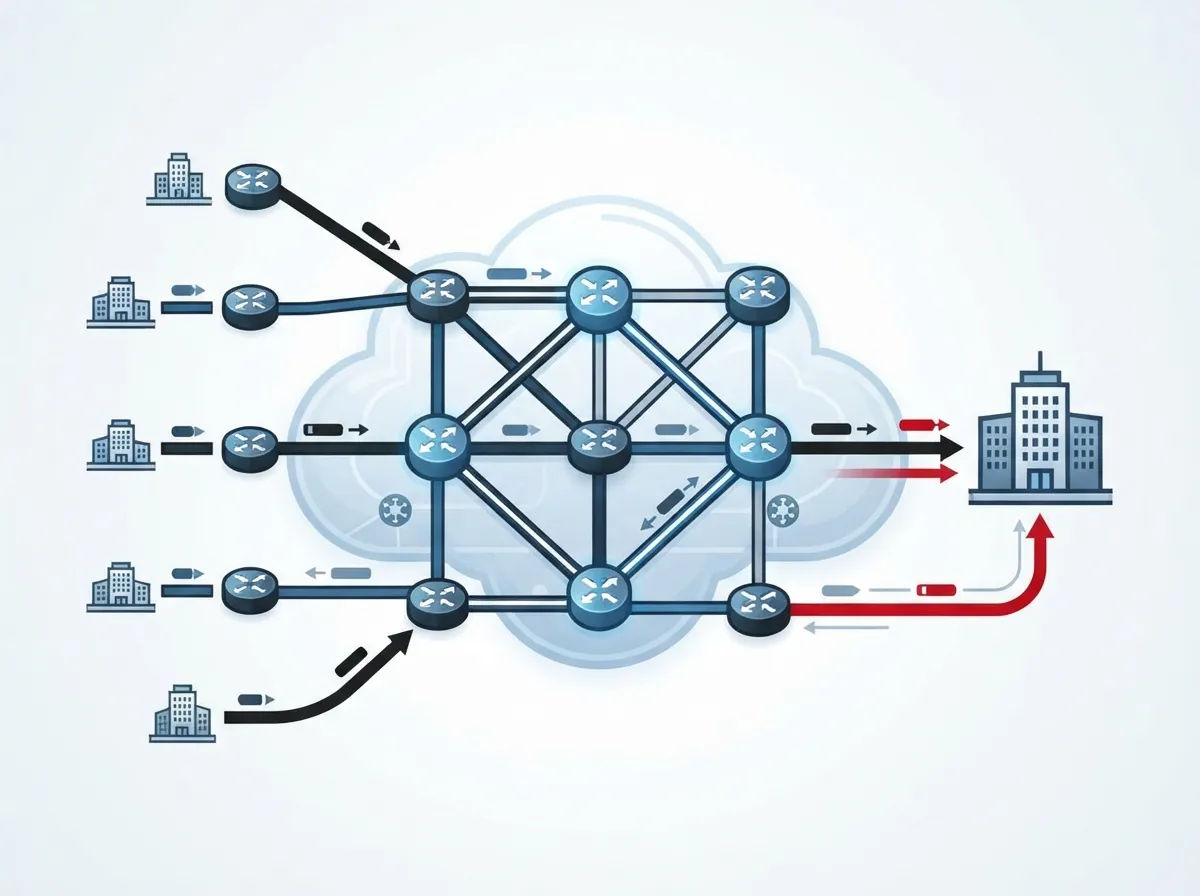
With MPLS, the carrier tags your packets with short labels. Routers inside the carrier network read those labels and forward traffic along set paths. Because the path is predefined and the network is managed, performance tends to be steady.
Businesses often choose MPLS for these reasons:
- Predictable performance: Providers commonly offer defined service levels for latency, jitter, and packet loss.
- Built-in QoS: Voice and video can be marked as high priority inside the carrier network.
- Private transport: Traffic stays within the provider’s managed network instead of crossing the open internet.
There are trade-offs too. MPLS circuits often cost more per megabit than broadband. Provisioning can take weeks or months. You also depend heavily on one carrier, and it can be harder to reach cloud and SaaS apps efficiently if traffic has to backhaul through a central data center first. Actual terms and results depend on the provider and your contract.
If you want a deeper dive into the basics, our guide on what MPLS is and how it works for business covers it step by step.
How SD-WAN Works
SD-WAN puts a small device or software client at each site. A central controller pushes policies to all of them. The system watches each link for latency, jitter, and packet loss, then sends each application down the best path at that moment.
Key things SD-WAN can do:
- Combine transports: Use broadband, dedicated internet, cellular, and MPLS together.
- Steer by application: Send voice over the cleanest link and file backups over the cheapest one.
- Fail over fast: If one link degrades, traffic can shift to another.
- Simplify management: Change a policy once and apply it to every site.
One honest caution: SD-WAN cannot make a weak connection strong. It can pick the best available path, but it cannot guarantee that a basic broadband line will meet a particular performance level. The quality of your underlying circuits still matters a lot. For a friendly primer, see what SD-WAN services are and whether your business needs them.
Side-by-Side Comparison Table
| Factor | MPLS | SD-WAN |
|---|---|---|
| What it is | Carrier-provided WAN transport | Software overlay that manages traffic across transports |
| Connection types | Private carrier circuits | Broadband, dedicated internet, LTE/5G, and MPLS |
| Performance | Contract-backed, predictable | Depends on the links you choose and how they are steered |
| Traffic control | QoS inside the carrier network | Application-aware, steered by live link conditions |
| Deployment speed | Often slower | Often faster, especially with broadband links |
| Cloud and SaaS access | Can require backhaul to a hub | Can send cloud traffic straight out locally |
| Security | Separated in the provider network, not inherently encrypted | Often supports encrypted tunnels; depends on configuration |
| Cost | Higher circuit charges are common | Can lower circuit costs but adds licenses and equipment |
Performance and Reliability
Reliability is where people argue the most, so let’s keep it fair. MPLS is known for steady, contract-backed performance. If your business runs latency-sensitive tools like voice, video, or real-time trading, that predictability is a real benefit.
SD-WAN improves resilience in a different way. It watches links all day and moves traffic when a path gets shaky. With two or more connections, one outage does not have to take a site offline. If you are curious about backup design, our tips on automatic internet failover for business are a great companion read.
So which is more reliable? It depends on what sits underneath. SD-WAN running over high-quality dedicated circuits can be excellent. SD-WAN running over a single budget connection will only be as good as that connection. MPLS gives you a contractual floor. SD-WAN gives you flexibility and failover. Neither is automatically better.
Cost: Is SD-WAN Really Cheaper?
Many buyers hear that SD-WAN saves money. It can, but it is not automatic. Savings usually come from shifting suitable traffic off premium private circuits onto broadband or other lower-cost links.
Before you assume a number, compare the full picture:
- Circuit charges: What do you pay today for each site, and what would new links cost?
- SD-WAN licenses: Most platforms charge by site, bandwidth, or feature tier.
- Edge equipment: Each location needs a device or virtual appliance.
- Implementation: Planning, installation, and testing take time and skill.
- Ongoing support: Monitoring and policy changes need someone to own them.
- Security tools: Firewalls and threat protection may be added to the design.
Costs vary by location, bandwidth, provider, contract, and managed-service scope, so be wary of any promise of a flat percentage saving. Instead, ask for a side-by-side quote. Our article on dedicated internet access pricing can help you set realistic expectations for the link side of the equation.
Security: Neither One Does It Alone
Here is a point that surprises many people. MPLS traffic is separated inside the provider’s network, but it is not inherently encrypted. That separation is helpful, yet it is not the same as a full security plan.
SD-WAN products commonly support encrypted tunnels between sites. Many also offer firewalling, segmentation, and threat protection. But these features depend on the product and how it is set up. Turning on SD-WAN does not mean you are automatically safe.
The takeaway is simple. Treat security as its own design step, whichever transport you choose. Think about encryption, segmentation, firewall policy, and monitoring together. If that sounds like a lot, our guide on how to choose network security services walks through the questions to ask.
Cloud and SaaS Performance
This is where SD-WAN often earns its keep. Many older MPLS designs send all traffic back to a main data center, then out to the internet. That works fine when most apps lived in the data center. It is slower when your team spends the day in cloud apps, video meetings, and web tools.
SD-WAN can send trusted cloud traffic straight out from each branch using a local internet link, while keeping sensitive traffic on private paths. That can cut delay and take pressure off your central connection. It also helps cloud-based tools you may already use, such as cloud phone systems and cloud video security.
Remember the caveat: local internet breakout is only as good as the local internet. A solid Internet Service Provider connection at each site makes a big difference.
The Hybrid Option: Use Both
Here is the part many buyers miss. You do not have to choose one. A hybrid design keeps MPLS for workloads that need contractual performance and uses SD-WAN to manage MPLS alongside internet and cellular links.
A hybrid setup lets you:
- Keep MPLS on critical sites or critical applications.
- Add broadband or dedicated internet for cloud traffic and bulk data.
- Use cellular as an emergency backup.
- Move sites off MPLS gradually, on your own schedule, as contracts end.
This approach lowers risk. You get the comfort of a proven circuit and the flexibility of software control, without a risky all-at-once switch. If your sites span several states, our overview of wide area network solutions for multi-site businesses shows how these pieces fit together.
Which Is Best for Your Business?
Let’s make this practical. Different readers will land in different places.
Small Business Owners
If you have one or two locations, you may not need either one in a big way. A reliable business internet line, a good phone system, and a backup link may be plenty. SD-WAN becomes useful when you add sites or rely heavily on cloud apps.
Mid-Sized Companies and IT Managers
With several offices, cloud tools, and remote staff, SD-WAN often brings real value in visibility and control. You may keep MPLS for a few critical sites while moving the rest to broadband-based links. A short network audit helps you decide where each option fits. Our checklist of network infrastructure audit steps is a good starting point.
Franchise Operators
Dozens of similar locations call for consistency. SD-WAN lets you roll out one policy to every site and add new locations quickly, often using local broadband. That speed is a big plus when you open sites on a tight timeline. You can also see ideas in our guide to multi-location telecom solutions.
Office Managers
You may not pick the technology, but you feel the results. Clear phone calls, steady video meetings, and fewer “the internet is down” moments matter most. Ask your provider how failover works and who answers the phone when something breaks.
A Simple Decision Checklist
Use these steps to guide your choice:
- List your applications. Which ones are sensitive to delay, like voice and video?
- Map your sites. How many locations do you have, and what connections are available at each?
- Check your contracts. When do current circuits end? That sets your timeline.
- Review service levels. What performance commitments do you truly need in writing?
- Plan your security. Decide how encryption, segmentation, and firewalling will work.
- Compare total cost. Include circuits, licenses, equipment, setup, and support.
- Pilot first. Test with a few sites before you commit everywhere.
Where Cabling and Fundamentals Fit In
Here is a friendly reminder from the field. No WAN design can fix a messy local network. Before you invest in SD-WAN or MPLS, make sure your in-building network is healthy. Good structured cabling, clean racks, and properly sized switches keep traffic flowing smoothly once it reaches your walls.
It is also smart to think about how the WAN supports your other systems, like VoIP phones, cloud cameras, and cloud-based access control. These tools all depend on steady connectivity. If you want a primer on the wiring side, read what structured cabling is for your business network.
How Ideal Solutions Provider Can Help
Choosing between SD-WAN, MPLS, or a hybrid can feel like a lot. That is where an independent partner helps. Ideal Solutions Provider is a Tampa-based telecom and IT partner with over 24 years of experience and relationships with 35+ vetted suppliers. Because they compare options across many carriers, they can recommend what fits your needs rather than pushing one product.
They handle the whole journey, from audit and comparison to installation and ongoing support. That means one point of contact instead of juggling several vendors. Their business network solutions cover SD-WAN, MPLS, dedicated fiber, and managed networking, so you can look at every option side by side.
Conclusion
Let’s bring it home. The difference between SD-WAN and MPLS comes down to this: MPLS is a carrier-provided transport with predictable, contract-backed performance, while SD-WAN is a software layer that steers traffic across many connections, including MPLS. Neither is universally cheaper, safer, or more reliable. The right answer depends on your applications, your sites, your security needs, and your total cost.
For many businesses in 2026, the sweet spot is a hybrid approach, keeping MPLS where it counts and using SD-WAN to add flexibility, resilience, and better cloud access. Start with an honest look at what you have today, then compare real quotes, not guesses.
Ready to see what fits your business? Contact the Ideal Solutions Provider team for a free review of your current setup, or call us at 813-388-4935 to talk it through with a friendly expert. You can also follow along with tips and updates on YouTube.
FAQs
Q: What is the main difference between SD-WAN and MPLS?
A: MPLS is a carrier-provided connection with contract-backed performance, while SD-WAN is a software layer that steers your traffic across one or more connections. SD-WAN can even use MPLS as one of its paths, so they are not always either-or.
Q: Is SD-WAN more secure than MPLS?
A: Not automatically. MPLS traffic is separated inside the provider network but is not inherently encrypted, and SD-WAN often supports encrypted tunnels. Real security depends on how you set up encryption, firewalls, segmentation, and monitoring, so plan it as its own step.
Q: Can SD-WAN use my existing MPLS connection?
A: Yes, and that is a very common setup! SD-WAN can manage your MPLS circuit alongside broadband or cellular links, which lets you move at your own pace instead of switching everything at once.
Q: How much can a business save by replacing MPLS with SD-WAN?
A: It varies, and anyone promising a flat percentage is guessing. Savings depend on your sites, bandwidth, contracts, and how much traffic can shift to lower-cost links. Compare circuit charges against SD-WAN licenses, equipment, setup, support, and security costs before deciding.
Q: Should I replace MPLS completely or go hybrid?
A: Many businesses choose hybrid. You keep MPLS for workloads that need contractual performance and use SD-WAN to manage it with internet and cellular links for flexibility and failover. A quick network audit can show which sites and apps belong where.





