
Key Takeaways
-
Structured cabling uses a star topology with hierarchical design (trunk, branches, leaves) instead of point-to-point wiring, making troubleshooting and expansion significantly easier and more scalable.
-
Cat 6A has become the standard for new commercial installations because it supports 10 Gigabit Ethernet, Power over Ethernet for devices like cameras, and provides room for 10-15 years of technology upgrades.
-
A single well-designed cabling system simultaneously supports VoIP, Wi-Fi, security cameras, access control, and IoT devices, eliminating the need for separate wiring infrastructure for each new technology.
-
Following ANSI/TIA-568 standards ensures your cabling works across different manufacturers, passes inspection, remains documented and predictable, and can be understood by any technician during future troubleshooting or expansion.
-
Copper cabling has a standard maximum horizontal run of 90 meters plus 10 meters of patch cords (100-meter channel limit); fiber optic is needed for longer distances or building-to-building backbone connections.
-
Professional installation with proper termination, labeling, testing, and certification protects your investment and prevents costly rework; skipping steps to save time typically costs more in future troubleshooting expenses.
Ever crawled under a desk and found a tangled mess of wires that nobody can identify? You’re not alone. Many Tampa businesses grow so fast that their cabling turns into spaghetti nobody wants to touch. That’s where structured cabling comes in, and once you understand it, you’ll wonder how you ever ran your office without it.
Structured cabling is the organized backbone that connects your phones, computers, Wi-Fi, and security systems. Think of it like the plumbing in a house. You don’t see most of it, but everything depends on it working right. If you’re a small business owner, an IT manager, or someone juggling a growing franchise, knowing the basics of structured cabling helps you make smarter decisions about your network. Let’s break it down together, in plain language, so you feel confident the next time this topic comes up.
What Is Structured Cabling, Really?
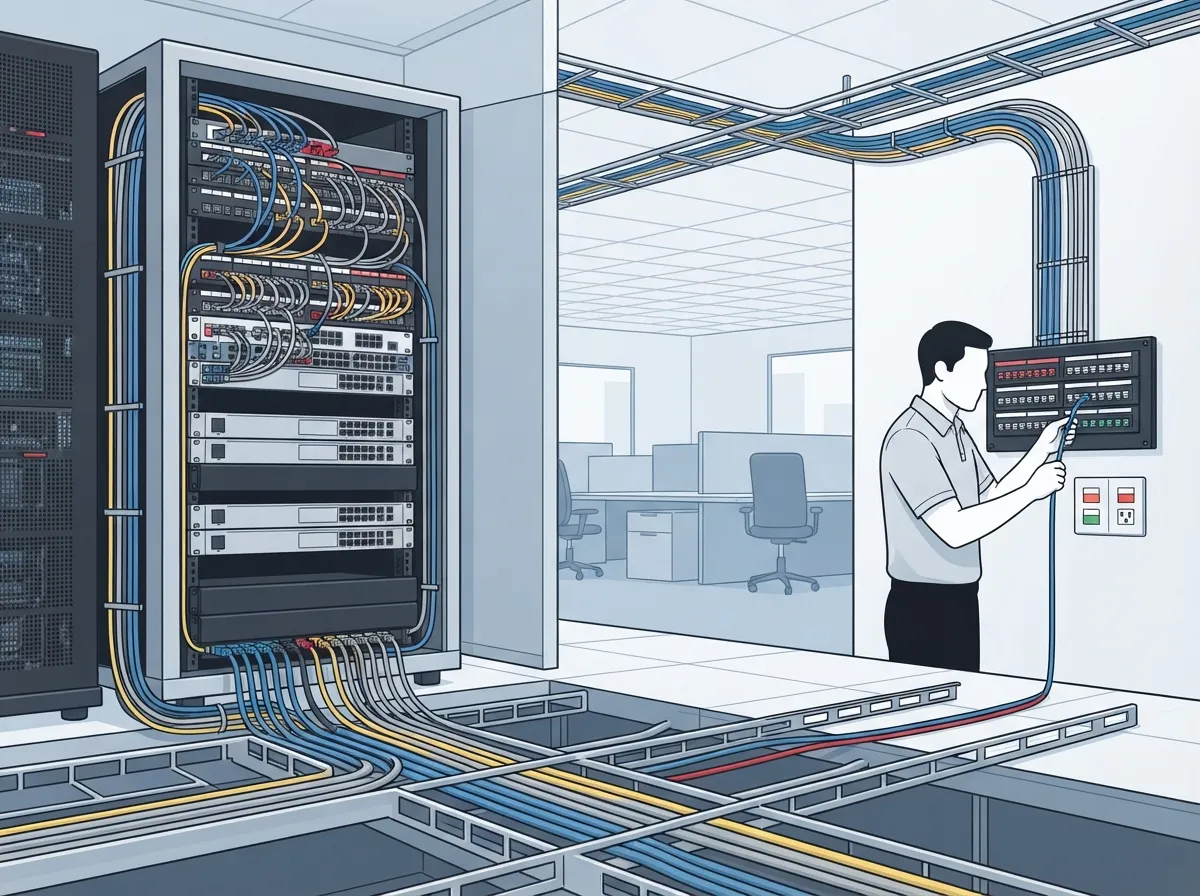
Structured cabling is a planned, standards-based system of cables, connectors, patch panels, and equipment racks. It’s the physical wiring that supports your voice, data, video, Wi-Fi, security cameras, and access control systems. Instead of running random wires from device to device, structured cabling uses an organized layout that anyone can follow, troubleshoot, and expand later.
According to structured cabling standards, this approach relies on a hierarchical design rather than messy point-to-point wiring. Picture a tree. The trunk is your main equipment room, the branches are your telecommunications rooms, and the leaves are the outlets at each desk. Everything connects back in an organized way, which makes life so much easier when something needs fixing or upgrading.
How It Differs From Point-to-Point Cabling
Older buildings sometimes have point-to-point wiring, where each device gets its own separate cable run straight back to a single spot. It works, until it doesn’t. Adding new equipment means adding more individual cables, and troubleshooting becomes a nightmare because nothing is labeled or organized in a predictable way.
Structured cabling solves this by using a star topology. Work-area outlets connect to a nearby telecommunications room. Those rooms connect through backbone cabling to your main equipment room. This design keeps things simple, scalable, and much easier to manage. If your office has ever dealt with confusing wiring, our guide on structured cabling versus ad-hoc wiring shows exactly why the difference matters.
The Six Subsystems of Structured Cabling
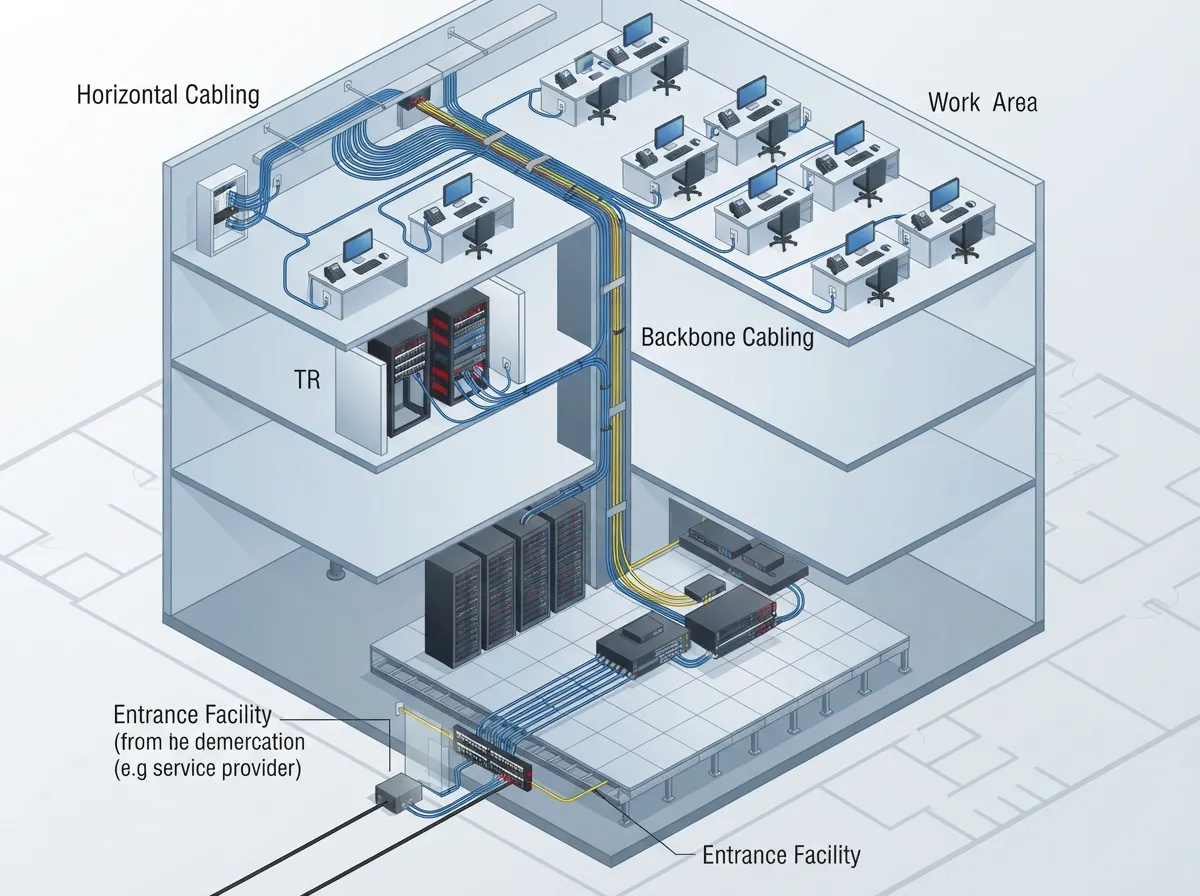
Structured cabling isn’t just one big bundle of wires. It’s built from distinct parts that work together. Here’s a simple breakdown:
- Entrance facility: Where outside services, like internet or phone lines, enter the building.
- Equipment room: The central hub housing your main network gear, servers, and switches.
- Backbone cabling: The cables connecting equipment rooms to telecommunications rooms, often fiber optic for speed and distance.
- Telecommunications rooms: Smaller hubs on each floor or section of the building that distribute connections locally.
- Horizontal cabling: The cables running from telecommunications rooms out to individual outlets at desks.
- Work-area components: The outlets, patch cords, and devices at each workstation, like phones and computers.
Each piece plays a role, and when they’re all installed correctly, your network runs smoothly for years. Skipping steps or cutting corners in any of these areas often leads to headaches down the road, something we cover in our post about structured cabling mistakes that hurt your business.
Why Standards Matter So Much
You wouldn’t want an electrician wiring your building without following code, right? Cabling works the same way. The main reference for commercial buildings in North America is the ANSI/TIA-568 family of standards. The most recent version, ANSI/TIA-568.1-E, was published in March 2020 and covers everything from cable types to termination methods.
These standards aren’t just red tape. They ensure your cabling works with equipment from different manufacturers, supports future upgrades, and passes inspection. Related standards also cover important details:
- TIA-569 for pathways and spaces
- TIA-606 for labeling and administration
- TIA-607 for grounding and bonding
Following these guidelines means your system is documented, predictable, and built to last. It also means that when you eventually need to troubleshoot or expand, whoever handles it can understand the layout right away.
Copper vs. Fiber: Which Cable Type Do You Need?
This is one of the most common questions we hear from IT managers and office managers alike. The truth is, it depends on your goals, your building, and your budget. Here’s a quick comparison to help you decide.
| Cable Type | Best For | Max Distance | Typical Use |
|---|---|---|---|
| Cat 5e | Basic voice and data | 100 meters | Older networks, light use |
| Cat 6 | Faster data, everyday business use | 100 meters (shorter for 10G) | Standard offices, VoIP phones |
| Cat 6A | High-speed networks, PoE devices | 100 meters | New installs, Wi-Fi 6, cameras |
| Fiber Optic | Backbone links, long distances | Varies (much longer) | Building-to-building, data centers |
For most growing businesses, Cat 6A has become the go-to choice. It supports 10 Gigabit Ethernet, handles Power over Ethernet for devices like cameras and access points, and gives you room to grow. Fiber is often reserved for backbone connections or situations needing long runs and immunity to electrical interference. If you want a deeper dive, check out our comparison on the differences between Cat5e and Cat6 cabling.
How Far Can Structured Cabling Run?
Good question, and the answer is pretty specific. The standard maximum length for a horizontal copper cable run is 90 meters. Add up to 10 meters of patch cords on each end, and you get a commonly cited 100-meter channel limit. That’s roughly the length of a football field.
Keep in mind that actual performance depends on more than just distance. Cable quality, connector types, installation practices, and the specific Ethernet standard you’re using all play a role. That’s why hiring an experienced installer matters so much. A poorly terminated cable, even at 50 meters, can cause more problems than a properly installed one at 90 meters.
Does Structured Cabling Support VoIP, Wi-Fi, and Security Cameras?
Absolutely, and this is exactly why structured cabling matters so much for Business Telecom Solutions. A single, well-designed cabling system supports multiple services at once, including:
- VoIP phone systems and unified communications
- Wired and wireless network connections
- Cloud-based security cameras
- Access control systems for doors and entry points
- Building automation and IoT devices
This is one of the biggest advantages of structured cabling. Instead of running separate wiring for every new system you add, your existing infrastructure can often support new technology as your business grows. If you’re curious how this works in practice, our article on how structured cabling supports VoIP and cameras walks through real examples.
Signs Your Business Might Need New or Upgraded Cabling
Not sure if your current setup needs attention? Here are some common red flags:
- Your internet speed feels slow, even though you pay for a fast plan
- Adding new employees or devices means calling in favors for extra wiring
- Your phone calls drop or sound choppy during busy hours
- Nobody at your office can explain where the cables actually go
- You’re planning to add security cameras or access control systems soon
- Your building is older and has never had a proper cabling audit
If any of these sound familiar, it might be time for a professional assessment. We’ve outlined more warning signs in our post about signs your Tampa business needs structured cabling now.
What Does a Professional Installation Actually Involve?
A quality structured cabling job isn’t just running wires and calling it done. Professional installers typically follow these steps:
- Design a layout based on your building and future needs
- Choose appropriate cable types based on distance, bandwidth, and budget
- Install cabling with proper separation from electrical interference
- Follow correct bend radius and pulling tension to avoid damage
- Terminate connections consistently using T568A or T568B standards
- Label everything clearly for future reference
- Test and certify every link for performance
This process ensures your system meets code, performs reliably, and can be understood by anyone who works on it later. Skipping steps to save time often costs more money down the road in troubleshooting and rework.
How Long Does Installation Take?
Timelines vary depending on the size of your space and complexity of the project. A small office might take a few days, while a larger commercial building could take several weeks. Factors that affect timing include the number of drops needed, building access, existing infrastructure, and whether you’re doing new construction or a retrofit. For a more detailed breakdown, take a look at our guide on how long structured cabling installation takes for a commercial building.
Structured Cabling Is Infrastructure, Not Equipment
Here’s something important to understand: structured cabling is the physical foundation, not the active equipment sitting on top of it. Your switches, routers, phones, and wireless controllers can all be upgraded or replaced without tearing out your entire cabling system, as long as the original design has enough capacity.
This is one of the biggest long-term benefits. A well-planned system installed today can support technology upgrades for the next 10 to 15 years. That kind of future-proofing saves real money and headaches for growing businesses, franchise operators, and mid-sized enterprises alike.
Why Businesses Choose a Single Telecom Partner
Juggling separate vendors for internet, phones, cabling, and security cameras gets complicated fast. Many business owners find it far easier to work with one trusted partner who understands how all these pieces fit together. That’s exactly the role Ideal Solutions Provider plays for businesses across Tampa Bay and nationwide, connecting structured cabling with VoIP, high-speed internet, networking, and cloud security solutions under one roof.
With over 24 years of experience and partnerships with 35 plus vetted suppliers, this approach means you get honest comparisons instead of a one-size-fits-all sales pitch. Whether you’re opening a new location or fixing an aging network, having a single point of contact saves time and reduces stress. You can learn more about this approach in our article on why one telecom partner makes sense for Tampa businesses.
Quick Recap: Key Facts About Structured Cabling
- It’s a standards-based system, not random wiring
- It uses a star topology for easy troubleshooting and expansion
- ANSI/TIA-568 standards guide commercial installations
- Cat 6A is increasingly the default for new commercial builds
- A 100-meter channel limit applies to most copper installations
- It supports VoIP, Wi-Fi, cameras, and access control on one system
- Proper testing and certification protect your investment
Understanding these basics puts you in a much stronger position when talking with contractors or planning a new office buildout. You can also follow updates and behind-the-scenes looks at real installations on our Facebook page, our Instagram, or our YouTube channel.
Ready to Get Your Cabling Sorted Out?
Structured cabling might sound technical, but at its core, it’s simply about organization. A clean, well-documented system makes your entire business run smoother, from phone calls to Wi-Fi to security cameras. Whether you’re building a new office or untangling years of quick fixes, getting this right now saves you time, money, and frustration later.
If you’re ready to see how your current setup measures up, why not get in touch with our team for a free consultation? Or if you’d rather talk it through right away, feel free to call us and we’ll walk you through your options, no pressure, just honest advice from people who’ve been doing this for over two decades.
FAQs
Q: What is structured cabling in a business network?
A: Structured cabling is an organized system of cables, patch panels, and racks that supports your phones, internet, Wi-Fi, and security systems. It’s designed using standards like ANSI/TIA-568 so everything stays organized, labeled, and easy to troubleshoot down the road.
Q: What are the six subsystems of structured cabling?
A: The six parts are the entrance facility, equipment room, backbone cabling, telecommunications rooms, horizontal cabling, and work-area components. Together, they create a clear path from your building’s entry point all the way to each desk or device.
Q: Which is better for a business: Cat 6, Cat 6A, or fiber optic cabling?
A: It really depends on your needs! Cat 6A is a popular choice for new installs because it handles faster speeds and Power over Ethernet devices like cameras. Fiber shines for backbone connections or longer distances, so many businesses use a mix of both.
Q: How far can structured cabling run?
A: The standard limit for copper cabling is a 100-meter channel, which includes a 90-meter permanent link plus up to 10 meters of patch cords. Beyond that distance, fiber optic cabling becomes the better option.
Q: Does structured cabling support VoIP phones, Wi-Fi access points, and security cameras?
A: Yes, that’s one of the best parts! A properly designed structured cabling system can support all of these at once, since it’s built to be flexible and vendor-independent. That means fewer headaches when you want to add new technology later.





