
Key Takeaways
-
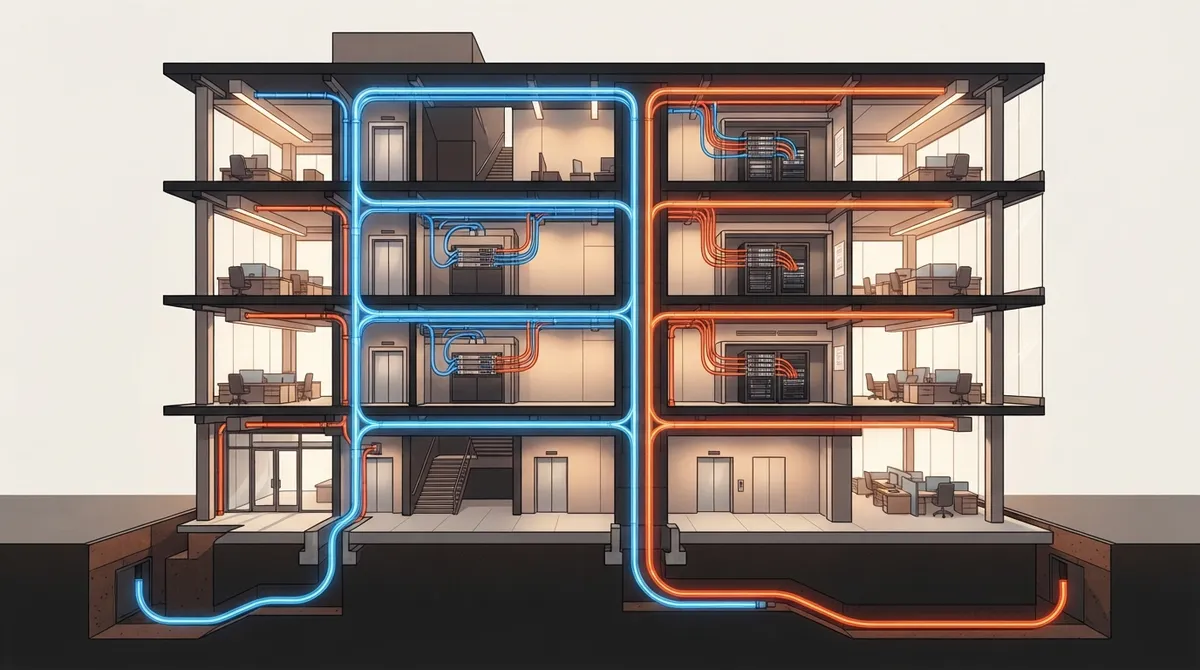
True redundancy requires physically separate pathways—two cables in the same conduit are not redundant and will fail together if that conduit is damaged, so route diversity is essential to avoid single points of failure.
-
Conduct a four-step risk assessment listing critical services, setting recovery time targets, mapping shared failure points, and comparing redundancy costs against potential downtime impact to determine the right protection level for your budget.
-
Redundant cabling alone is insufficient; you must also ensure compatible switches, backup power, proper failover configuration, and regular testing to guarantee the backup path actually works when needed.
-
Verify carrier circuit diversity before signing contracts by asking each provider where circuits enter the building, which central offices they use, and whether they share ducts or upstream paths with competitors.
-
Smaller offices can start with lighter redundancy strategies like spare cable capacity, backup internet links, and documented recovery plans, then add dual fiber risers or separate entrances as the business grows and downtime costs increase.
-
Work with a single telecom partner experienced in cabling, carriers, networking, and security to avoid gaps between vendors and ensure the entire redundancy system is properly designed, installed, and tested together.
Picture this: it’s a busy Tuesday morning. Phones are ringing, your team is on video calls, and the cloud tools you rely on are humming along. Then a contractor digs through a conduit down the street, and everything goes quiet. No calls. No email. No sales. Sound scary? It doesn’t have to be.
That is exactly the kind of day cabling redundancy for offices is designed to prevent. In simple terms, it means building backup pathways into your network so one cut cable or one failed piece of gear doesn’t take your whole office offline.
In this guide, we’ll walk through what redundancy really means, where it works best, and how to match the right level of protection to your budget. We’ll keep it friendly and practical, whether you run a small Tampa shop, manage IT for a growing company, or oversee several franchise locations.
What Is Cabling Redundancy for Offices?
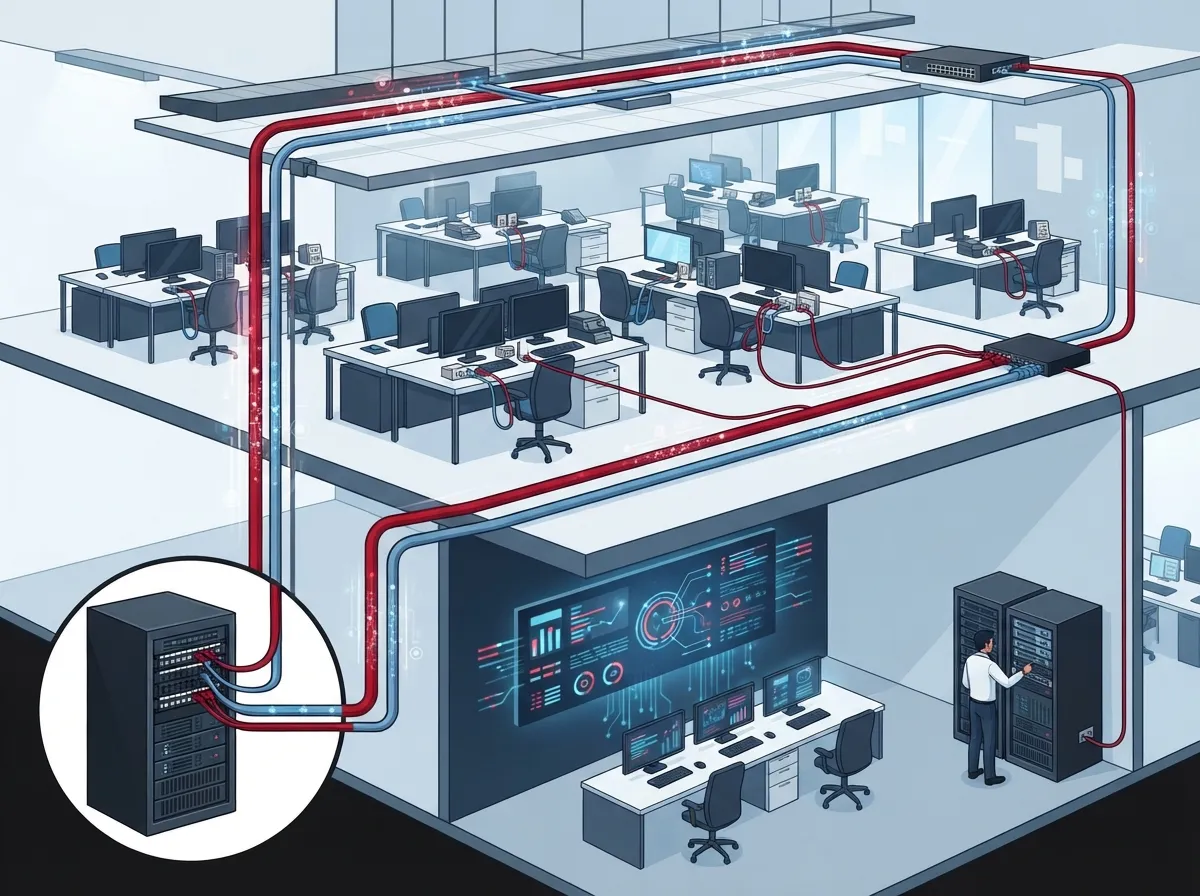
Cabling redundancy is the planned use of alternate, physically separate pathways and connections. The goal is to keep voice, data, Wi-Fi, and cloud access running if one link fails. Think of it like having a second route to work. If the highway is closed, you take the side streets and still arrive on time.
Good redundancy often includes more than cable. It can also include extra network equipment, backup power, and a second internet carrier. The right mix depends on how much downtime your business can handle.
Cabling Redundancy vs. Network Redundancy
These two terms get mixed up a lot, so let’s clear them up.
- Cabling redundancy: Alternate physical routes, such as a second fiber run or a separate riser between floors.
- Network redundancy: Duplicate equipment and configurations, such as paired switches, backup routers, and failover settings.
You need both working together. A spare cable that connects to nothing useful won’t save you. Likewise, a second switch with no second path to reach it leaves you exposed.
Why a Second Cable Isn’t Always Redundant
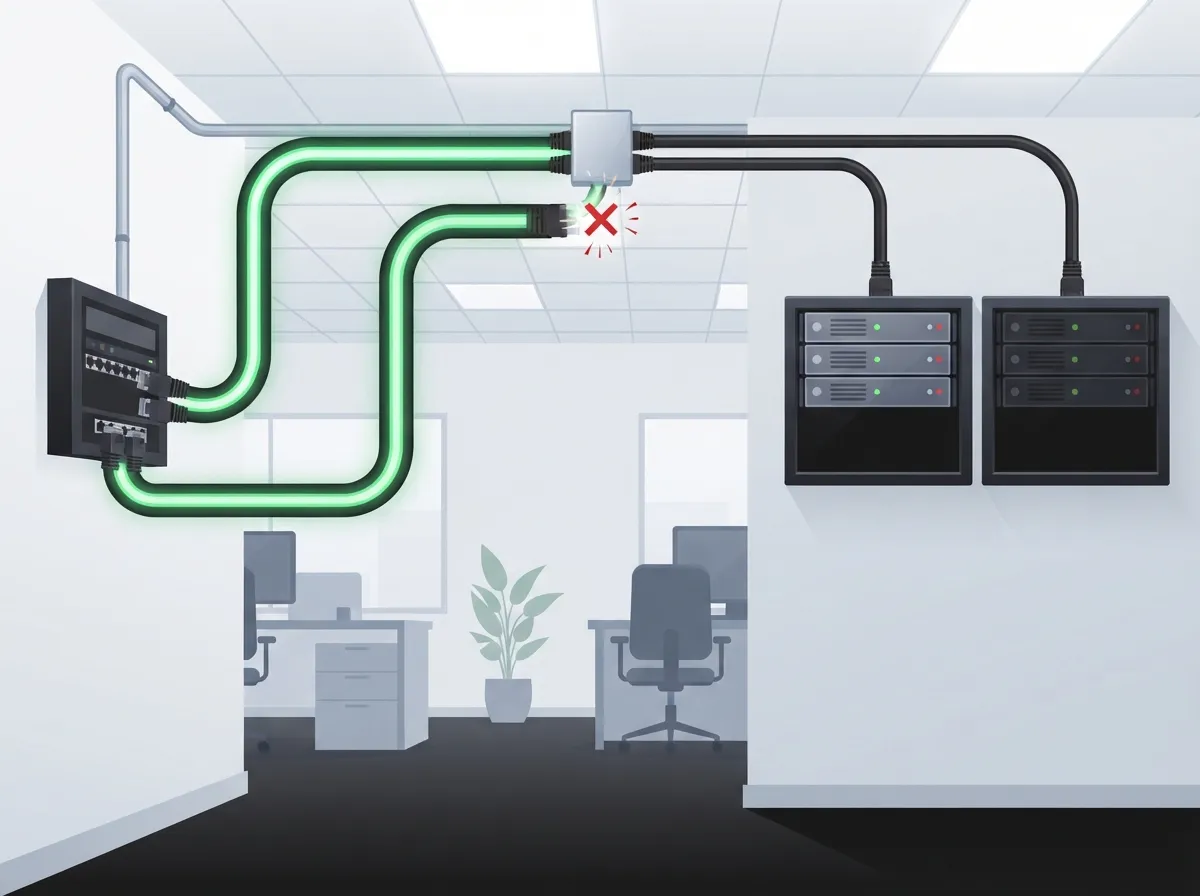
Here’s the part many offices miss. Two cables in the same conduit are not truly redundant. If a single event damages that conduit, both cables go down together. The same goes for two lines sharing one riser, one trench, or one building entrance.
Real redundancy means route diversity. The backup path should avoid the same single points of failure as the main path. Common shared risks include:
- One conduit or cable tray holding every run
- A single building entrance for all carrier lines
- One telecom room or closet that holds all the equipment
- Two internet providers that share the same underground duct or central office
When you plan your design, ask one simple question: “What one thing could break and take both paths down?” If you can name it, you’ve found a gap worth fixing.
Common Redundancy Strategies for Office Buildings
Not every office needs a data-center-grade setup. Here are the strategies we see most often, from lighter to heavier.
- Dual fiber backbones or risers. Two fiber runs travel between floors or buildings along different routes. If one is damaged, traffic shifts to the other.
- Redundant switch uplinks. Each access switch connects to two distribution switches. This protects you from a single bad port, cable, or switch.
- Diverse carrier circuits. You buy internet from two providers, ideally using different physical routes into the building.
- Separate entrance facilities or telecom rooms. Critical sites bring service in through two different points so one room incident doesn’t end the day.
- Spare capacity and documented recovery plans. Smaller offices may skip full duplication and instead keep spare pairs, spare fiber strands, and a clear restore plan.
Many offices land somewhere in the middle. They protect the few links that matter most and keep a simple plan for everything else.
How Much Redundancy Does Your Office Need?
The honest answer is: it depends. A busy call center that loses money every minute needs more protection than a small office that can pause for an hour. The best approach is a simple risk and cost check.
A Quick Four-Step Assessment
- List your critical services. Phones, internet, cloud apps, security cameras, and door access all count.
- Set a recovery target. Decide how long you can afford to be down. Minutes? An hour? A full day?
- Map shared failure points. Look for single conduits, single entrances, and single power sources.
- Compare cost to impact. Weigh the price of added cabling, equipment, and upkeep against what an outage would cost you.
We should be upfront about one thing. There is no reliable, industry-wide number that proves redundant cabling prevents a set percentage of outages or delivers a fixed return. Results depend on how diverse your routes are, how well your network is designed, and your local outage history. That is why a custom assessment beats a one-size-fits-all rule.
Which Option Fits Which Office?
This table gives a rough guide to help you start the conversation. Your own needs may differ.
| Office Type | Typical Priority | Common Redundancy Approach | Relative Cost |
|---|---|---|---|
| Small single-suite office | Keep phones and internet up | Spare cable capacity, backup internet link, documented plan | Low |
| Mid-sized multi-floor office | Protect shared systems and cloud access | Dual fiber risers, redundant switch uplinks, second carrier | Medium |
| Multi-building campus | Link buildings reliably | Diverse fiber paths between buildings, paired core equipment | Medium to high |
| Critical operations or server room | Near-zero downtime | Separate entrances, diverse pathways, redundant power and gear | High |
Standards That Guide Good Cabling Design
You don’t need to memorize every standard, but it helps to know the main ones.
- ANSI/TIA-568 is the main family of standards for commercial building telecommunications cabling.
- ANSI/TIA-569 covers telecommunications pathways and spaces, meaning the routes and rooms your cables use.
- TIA-942 and BICSI 002 offer deeper guidance on data-center infrastructure and redundancy.
A quick word of caution. TIA-942 includes guidance on physical separation for certain diverse data-center pathways, including a 20 m (66 ft) figure. That number is specific to data-center designs. It is not a rule for every office, so please don’t treat it as one.
Another handy number: a common design limit for permanent horizontal copper links is 90 m, with up to 100 m for the full channel including patch cords. Always confirm the edition of the standard and the details of your project. If you want to learn more about the basics, the overview of structured cabling is a friendly place to start.
Redundant Cabling Won’t Help Without These Pieces
Here’s a point worth repeating. Extra cable alone does not guarantee your office stays online. The backup path needs help to work when you need it.
- Compatible switches: Your gear must support the failover design you choose.
- Backup power: If a power loss shuts down your switches, the spare cable is useless.
- Proper configuration: Routing, spanning-tree, or failover settings must be set up and tuned correctly.
- Regular testing: A backup you’ve never tested is just a hope. Test failover on a schedule.
Skipping the testing step is one of the most common mistakes we see. For a closer look at pitfalls like this, check out 12 Structured Cabling Mistakes That Hurt Your Business.
How to Check That Carrier Circuits Are Truly Diverse
Buying service from two Internet Service Provider companies feels like safe redundancy. But two carriers can still share the same duct, the same central office, or the same upstream network. If that happens, one cut can still hit both.
Before you sign, ask each provider some direct questions:
- Does your circuit enter the building at a different point than the other provider’s?
- Which central office or hub does the circuit run through?
- Do you share any ducts, poles, or upstream paths with the other carrier?
- Can you provide route maps or written confirmation of diversity?
This is where an independent partner earns their keep. Ideal Solutions Provider works with more than 35 vetted suppliers, so we can compare carriers side by side and help you spot shared risks before they become surprises. If you’re weighing options, our guide on dedicated vs. shared fiber can help too.
Redundancy for Phones, Cameras, and Door Access
Redundancy isn’t only about internet. Modern offices rely on the network for a lot more.
Cloud phones need steady connections to keep calls clear. If your line drops, calls drop with it. Learn more about how this works in 13 Ways Structured Cabling Supports VoIP & Cameras. Cloud security cameras and access control also depend on your connection, so a solid backup plan helps keep doors working and footage flowing. You can read more about this in how to keep security cameras working during internet outages.
For franchise operators with many sites, consistency matters most. A repeatable redundancy plan across locations saves time and makes support much simpler.
Planning Your Redundant Cabling Project
A little planning up front saves a lot of money later. Here’s a simple path to follow.
- Audit what you have. Document current cable routes, rooms, and equipment.
- Identify single points of failure. Look for shared conduits, entrances, and power.
- Design diverse pathways. Plan separate routes where the risk justifies the cost.
- Match your equipment. Make sure switches and routers support the failover design.
- Install and label everything. Clear labels and drawings make future fixes faster.
- Test and document. Run failover tests and keep results on file.
If you’re starting from scratch, our post on how to plan network cabling installation in Tampa Bay walks through the early stages. And if you’re deciding who should do the work, see DIY vs. Professional Cabling.
What Does Redundant Cabling Cost?
Costs vary widely. Several things drive the final number: the length of the runs, the type of cable (copper or fiber), pathway work like new conduit, the extra equipment needed, and ongoing maintenance. A small office adding a second internet link will spend far less than a campus adding a second fiber backbone.
The smartest way to think about cost is to compare it with downtime. If an hour offline costs you thousands in lost sales and wasted wages, a modest investment in a backup path can pay off quickly. If an hour offline is a minor annoyance, lighter protection may be plenty. For help with budgeting, see how to budget for managed network services in Tampa.
Why Work With a Single Telecom Partner
Redundancy touches cabling, carriers, networking, phones, and security all at once. Juggling separate vendors for each can leave gaps between them, and gaps are exactly where failures hide.
Ideal Solutions Provider has more than 24 years of experience as a Tampa-based telecom and IT partner. We handle structured cabling, networking, internet, VoIP, cloud video security, and access control from one point of contact. That means one team looks at the whole picture, from consultation and installation to ongoing support. You can explore our structured cabling services to see how we approach it.
Ready to Protect Your Office From Downtime?
Cabling redundancy for offices is really about peace of mind. With diverse routes, matched equipment, backup power, and regular testing, one bad day on the road doesn’t have to become a bad day at the office.
You don’t have to guess where your weak spots are. Contact us for a free consultation, or call us to talk through your setup. We’ll review your current cabling, flag any shared risks, and help you build a plan that fits your needs and budget. You can also follow our tips and updates on YouTube.
FAQs
Q: What is cabling redundancy in an office network?
A: It’s the use of alternate, physically separate cable routes and connections so one cut or failure doesn’t knock your office offline. Think of it as a backup road for your voice, data, and cloud traffic. It works best when paired with backup equipment and power.
Q: Is a second cable in the same conduit really redundant?
A: Not really, and that’s a super common mix-up! Two cables sharing one conduit, riser, or entrance can fail together from a single event. True redundancy uses separate pathways so one problem can’t take out both.
Q: Should a small office use dual internet providers or redundant cabling?
A: It depends on how costly downtime would be for you. Many small offices start with a backup internet link and spare cable capacity, then add more protection as the business grows. A quick risk review can show where your money works hardest.
Q: How can I confirm two carrier circuits use diverse routes?
A: Ask each provider where their circuit enters your building, which central office it uses, and whether it shares ducts or upstream paths with the other carrier. Get the answers in writing, and ask for route maps when you can. An independent telecom partner can help you compare and verify.
Q: Which cabling standards apply to commercial offices?
A: ANSI/TIA-568 is the main standard for commercial building cabling, and ANSI/TIA-569 covers pathways and spaces. TIA-942 and BICSI 002 add deeper guidance for data-center-style redundancy, but they aren’t blanket rules for every office.





