
Key Takeaways
-
A business internet circuit is the service linking your location to the internet, and dedicated access (DIA) offers committed symmetrical bandwidth with an SLA, while shared business broadband speeds often vary.
-
Size bandwidth by listing your critical apps, counting peak-hour users, adding 25-50% for growth, and checking upload speed, since cloud cameras, backups, and video calls depend on it.
-
Read the SLA closely: 99.9% uptime allows about 8.8 hours of downtime yearly, and uptime alone does not guarantee a repair time, so check restoration commitments, exclusions, and service credits.
-
Availability depends on your exact address and which facilities reach the building, so confirm options, construction needs, and lead times with the carrier before setting a cutover date.
-
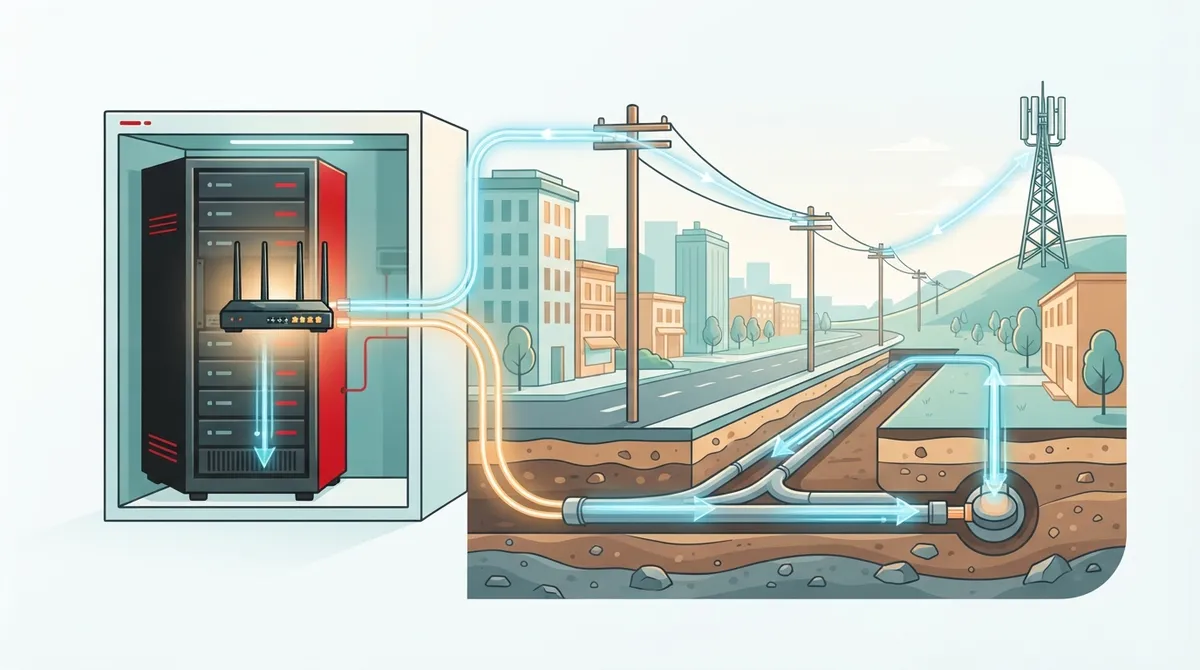
A real backup needs a physically separate route, such as a second carrier or cellular service, with automatic failover, because two circuits on the same buried path offer limited protection.
-
Compare full costs side by side, including installation fees, equipment, contract length, early termination terms, and SLA support, and test inside cabling to ensure it can handle the new speed.
Picking a business internet circuit can feel like learning a new language. Terms like DIA, SLA, last mile, and failover fly around fast. Then a salesperson quotes a speed, and you wonder if that number tells the whole story. Good news: it does not, and you do not need to be an engineer to choose well.
A business internet circuit is simply the service that connects your location to the public internet. In 2026, that link carries your phones, cloud apps, cameras, card readers, and more. When it slows down or drops, work stops. So the choice matters.
This friendly guide walks you through the process in plain steps. You will learn how circuits differ, how to size one, how to read an SLA, and how to plan a backup. Whether you run a small shop, manage an office, or oversee many franchise sites, you will leave with a clear checklist.

What a Business Internet Circuit Really Is
In telecom, the word “circuit” often means the access line or service that reaches your building. It does not always mean a private wire running all the way across the internet. That is a common mix-up, so it helps to ask your provider how the service is designed and what the contract promises.
Circuits come in a few main flavors:
- Dedicated Internet Access (DIA): Committed bandwidth, usually the same speed up and down, backed by an SLA. It is often delivered over fiber or Ethernet.
- Business broadband: Delivered over cable, fiber, DSL, or fixed wireless. It is usually shared or best-effort, so real speeds can vary.
- Backup circuits: A second service, such as another carrier or cellular, that keeps you online if the main one fails.
Any Internet Service Provider can sell you one of these, but the terms behind each one can look very different. Products vary by provider, so please do not treat all business broadband as the same thing.

Step 1: List What Your Business Actually Does Online
Before you shop, write down what depends on the internet. This keeps you from paying for more than you need or buying too little.
- Voice and video: Cloud phones and video meetings are sensitive to delay and lost data.
- Cloud apps and backups: These often push lots of data upward, so upload speed matters.
- Point-of-sale and payments: A short outage can stop sales cold.
- Security cameras and access control: Cloud systems rely on steady upload capacity.
- Remote access: Staff working from home may connect into your office systems.
Next, count your peak users. A quiet Tuesday morning is not the number to plan around. Think about the busiest hour of your busiest day. Then add room to grow over the next two to three years.
If you use cloud cameras, check out 8 Internet Speeds Your Cloud Cameras Actually Need (2026) for a closer look at upload needs. Phone users can also read What Internet Speed Is Needed for VoIP in 2026? to size voice traffic.
Step 2: Understand Dedicated Versus Shared Service
This is the biggest fork in the road. Think of shared broadband like a busy highway. Most days it moves fine, but rush hour can slow everyone down. A dedicated circuit is more like a reserved lane with a promise attached.
| Feature | Dedicated Internet Access | Business Broadband |
|---|---|---|
| Bandwidth | Committed amount | Shared or best-effort |
| Upload vs. download | Typically symmetrical | Often different (upload is lower) |
| Delivery | Fiber or Ethernet, commonly | Cable, fiber, DSL, or fixed wireless |
| SLA | Usually included | Limited or sometimes absent |
| Typical cost | Higher | Lower |
| Best fit | Voice, cloud-heavy, multi-user sites | Smaller offices with lighter needs |
Neither choice is automatically right. A small office with a few computers may do great on solid business broadband. A busy clinic or a company running cloud phones and cameras all day may need the steadiness of a dedicated business internet circuit.
For a deeper comparison, read Dedicated vs. Shared Fiber: Which Is Right for Tampa Businesses? and What Is Dedicated Fiber Internet and Does Your Business Need It?
Step 3: Size Your Bandwidth Without Guessing
Many owners ask how much bandwidth they need. The honest answer is: it depends on your list from Step 1. Still, you can build a simple estimate.
- Add up the traffic from your heaviest regular uses, such as video calls, cloud backups, and cameras.
- Multiply by the number of people or devices that use them at the same time.
- Add 25 to 50 percent for growth and surprise spikes.
Upload deserves special attention. Cloud cameras, backups, and video meetings all send data out. Plans that advertise a big download number but a small upload number can leave you stuck.
Here is some useful context. The FCC reported that, as of December 2024, about 110 million U.S. homes and small businesses, or 95 percent of locations, could get terrestrial fixed broadband at 100 Mbps down and 20 Mbps up or higher. The agency also noted nearly 7 million more locations gained access to fixed service at 1 Gbps down and 100 Mbps up or higher in that same data collection. Those figures describe what is available in the market. They do not tell you what is available at your address, which is why the next step matters.
Your wiring matters too. Even a fast circuit can be held back by old cabling inside the building. See How to Calculate Cabling Bandwidth Requirements Right for help.
Step 4: Check What Is Available at Your Exact Address
Here is a truth many people learn late: availability depends on your exact street address and which facilities reach the building. The carrier down the road may not serve your suite. A neighbor’s great deal may not apply to you.
To find real options:
- Give your full address, including suite or floor, to a trusted advisor or provider.
- Ask which technologies reach the building today, such as fiber, cable, or fixed wireless.
- Ask whether new construction would be needed and who pays for it.
- Confirm building access rules with your property manager early.
New fiber construction, permits, and site work can change both cost and lead time. Verify these details with the carrier before you plan a cutover date. Nothing is more stressful than promising a launch day you cannot keep.
If you want a walkthrough, How to Find Business Internet Providers by Address covers the process step by step.
Step 5: Read the SLA Like a Pro
A service-level agreement is the written promise behind your circuit. A big uptime number looks comforting, but the fine print decides what you really get.
Here is a quick math check. An availability of 99.9 percent equals about 8 hours and 46 minutes of downtime in a 365-day year. At 99.99 percent, that drops to about 52 minutes. Those are just math conversions, not universal guarantees. The contract’s own definitions control.
When you review an SLA, look for these items:
- Availability target: What percentage, and over what period?
- Measurement method: Who measures it, and how?
- Repair or restoration commitment: Is there a promised response or fix time? Uptime alone does not guarantee a repair time.
- Latency and packet loss terms: These affect voice and video quality.
- Exclusions: Planned work, customer-caused issues, and other events may not count.
- Service credits: What do you receive if the provider misses the target, and how do you claim it?
Remember, an SLA is not a promise of zero outages. It describes what happens when something goes wrong. Ask for the document in writing and read it before you sign.
Step 6: Plan Your Backup So One Cut Cable Does Not Stop You
Even the best circuit can fail. A construction crew cuts a line, a power event hits a central office, or equipment breaks. A backup plan turns a disaster into a small hiccup.
Real resilience usually needs a genuinely independent second connection. Good options include a second carrier on a different route or a cellular service. Putting two circuits on the same buried path gives you less protection than it seems.
Ask these questions:
- Does the backup use a physically different route into the building?
- Will traffic switch over automatically, and how fast?
- Does the backup have enough capacity for your must-have systems?
- Will your router, switches, and phone gear stay powered during an outage?
You do not always need to back up everything at full speed. Many businesses protect phones, payments, and cameras first. Our guide 15 Automatic Internet Failover Tips for Business (2026) goes deeper, and How to Keep Security Cameras Working During Internet Outages shows one common example.
Step 7: Compare Costs and Contract Terms Fairly
A dedicated business internet circuit usually costs more than shared broadband, because you are paying for committed capacity and stronger support terms. Prices vary by speed, location, technology, and contract length, so be careful with any quote that lacks details.
When you compare offers, line them up side by side:
- Monthly recurring price for the same speed and technology.
- One-time installation or construction fees.
- Contract length and early termination terms.
- Equipment costs, such as routers or modems.
- SLA terms, support hours, and credits.
Fair comparison is where an independent advisor shines. Dedicated Internet Access Pricing: What to Expect in 2026 explains what shapes the numbers, and 12 Ways to Find the Best Business Internet Deal in Tampa shares practical savings tips.
Step 8: Prepare for Installation Day
Installation timing depends on what already reaches your building. If fiber is nearby and ready, setup may move quickly. If new construction, permits, or building approvals are needed, expect a longer wait. Your carrier can give a firm estimate after reviewing your address.
A few friendly tips can save headaches:
- Order early. Do not wait until your old contract is about to end.
- Keep the old service running until the new one is tested.
- Confirm a spot for the carrier equipment, with power and space.
- Check that your internal cabling and network gear can handle the new speed.
Inside wiring is a hidden bottleneck for many offices. Learn more in What Are Gigabit Cabling Capabilities for Your Business? and structured cabling services from a qualified installer. If you want background on the basics, structured cabling is a good place to start. Switching carriers can also feel less scary with 10 Smart Steps for Switching Telecom Providers in Tampa.
Tips for Different Types of Businesses
Small business owners: You may be well served by solid business broadband plus a cellular backup. Spend extra only where an outage would truly hurt.
Mid-sized companies: Dedicated service with a second carrier often pays off, especially with cloud phones and heavy file sharing.
IT managers: Document the SLA, route diversity, and failover tests. Ask for the carrier’s escalation path before you need it.
Office managers: Keep a one-page sheet with circuit IDs, support numbers, and account details. It saves minutes when every minute counts.
Franchise operators: Standardize on a repeatable circuit design across sites, then adjust bandwidth per location. For multi-site ideas, see 7 Multi-Location Telecom Solutions Florida Firms Need and What Are SD-WAN Services and Does Your Business Need Them?
Why Working With One Partner Helps
Shopping circuits carrier by carrier takes time. Each one shows you only its own products, and every quote uses different words. That is where an independent partner can lighten the load.
Ideal Solutions Provider is a Tampa-based telecom and IT partner with over 24 years of experience and relationships with 35+ vetted suppliers. They compare options side by side, audit your current setup, and recommend what fits your needs. Their business high speed internet services cover fiber, broadband, SD-WAN, and dedicated circuits, and the same team can help with phones, cabling, and security. You can read more about what to look for in a business internet provider before you reach out.
Your Business Internet Circuit Checklist
Keep this short list handy as you shop:
- List your apps, peak users, and growth plans.
- Decide between dedicated and shared service.
- Size bandwidth with upload and headroom in mind.
- Confirm availability for your exact address.
- Read the SLA for repair terms, exclusions, and credits.
- Add a truly independent backup connection.
- Compare full costs and contract terms.
- Plan installation early and test before cutover.
Ready to Pick the Right Circuit?
Choosing a business internet circuit does not have to be a guessing game. When you match the service to your real needs, read the fine print, and plan a backup, you protect your team and your customers. If you would like a second set of eyes, contact us for a free consultation, or call us to talk through your options. You can also catch helpful tips on YouTube.
FAQs
Q: What is a business internet circuit?
A: It is the service that connects your business location to the public internet. It can be a dedicated line with committed bandwidth or a shared broadband connection. The right type depends on how much your team relies on the internet and how much downtime you can afford.
Q: What is the difference between dedicated internet access and business broadband?
A: Dedicated internet access gives you committed bandwidth, usually the same speed up and down, with an SLA behind it. Business broadband is typically shared or best-effort, so real speeds can vary and support terms may be lighter. Dedicated costs more but offers steadier performance.
Q: What does an internet circuit SLA cover?
A: A good SLA spells out the availability target, how it is measured, repair or restoration commitments, latency and packet-loss terms, outage exclusions, and service credits. A high uptime number alone does not promise a quick fix, so read the details before you sign.
Q: Should my business have a backup internet circuit?
A: Yes, if outages would hurt sales, calls, or security. The best backup is truly independent, such as a second carrier on a different route or a cellular service, with automatic failover and enough capacity for your must-have systems.
Q: How can I check which business internet circuits are available at my address?
A: Availability depends on your exact address and which facilities reach your building. Share your full address, including suite or floor, with a trusted advisor or carrier, and ask about construction needs, permits, and lead times before you plan a cutover.





