

Key Takeaways
-
Fiber backbone cabling is the high-capacity link joining equipment rooms, floors, and buildings, carrying combined traffic rather than connecting individual devices directly.
-
Standard copper structured cabling is generally limited to about 100 meters, while fiber backbones can reach 500 meters or more, making inter-building links practical.
-
Choose single-mode fiber for longer runs and future flexibility, and multimode for shorter in-building links, matching fiber grade, optics, and data rate to actual distances.
-
Install spare fiber strands during the first build, since adding extra strands upfront is far cheaper than pulling new cable later.
-
Define test methods and pass/fail limits before installation, using optical loss testing for acceptance and OTDR for locating splices, breaks, or high-loss points.
-
Build resilience with physically diverse pathways, since two cables in the same conduit can fail together from a single cut or spill.
Picture your office network as a busy highway system. Every desk, phone, and camera is a small neighborhood street. But those streets all need a big, fast highway to carry the traffic between them. That highway is your fiber backbone.
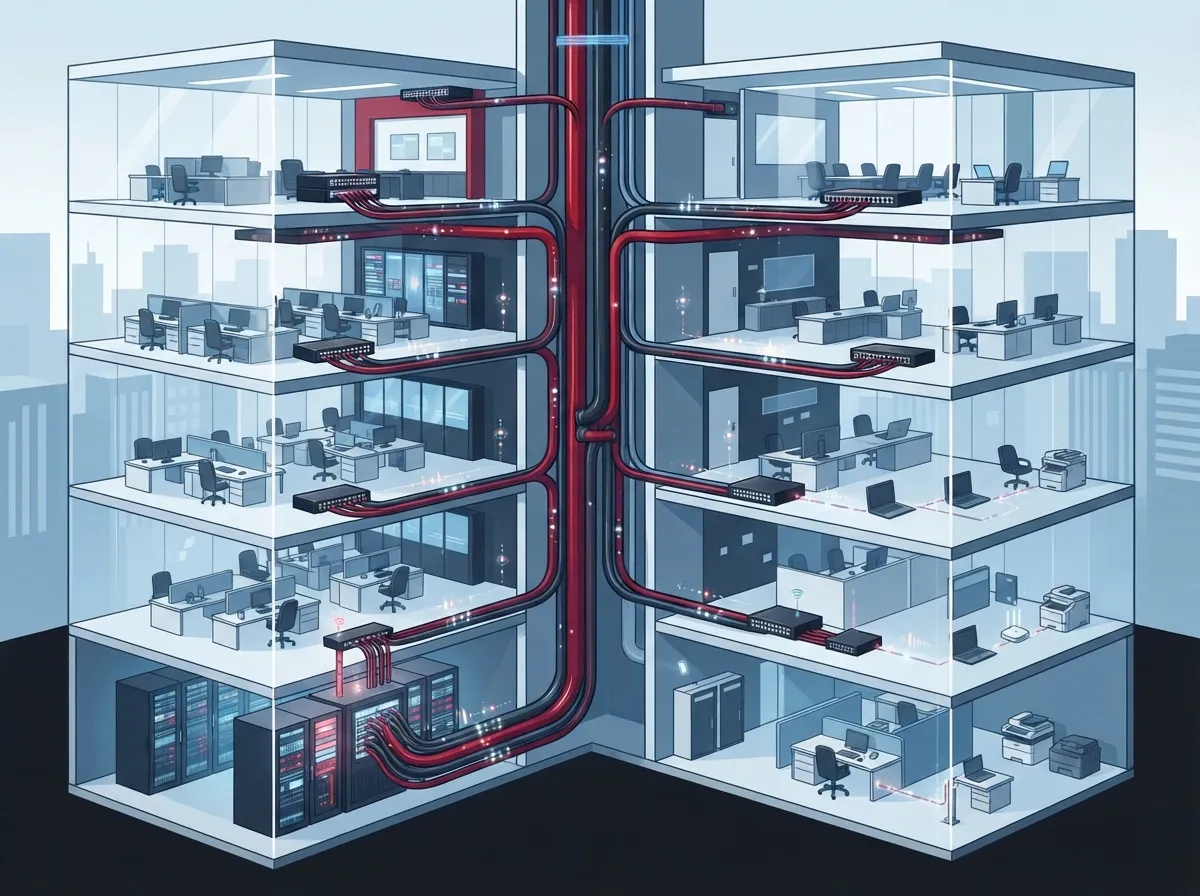
Fiber backbone cabling is the high-capacity optical cabling that links your telecom rooms, floors, buildings, and server areas. It carries combined traffic from many users at once. It does not plug into individual laptops or phones. Instead, it ties the whole network together.
If you run a small shop, a growing company, or a multi-site franchise, this guide is for you. We will keep it simple and friendly. You will learn what fiber backbone cabling is, how to choose the right type, how to plan it, and how to test it. Let’s dig in and make this easy.
What Is Fiber Backbone Cabling in a Business Network?
Fiber backbone cabling is the main set of optical links that connects the key parts of your network. Think of the spaces where your network gear lives. Those might be a main equipment room, a closet on each floor, or a separate building on your property.
The backbone joins those spaces. It moves large amounts of data between switches, servers, and other core gear. Because it carries so much traffic, it needs to be fast, clean, and dependable.
It also differs from the cables that reach your desks. Those shorter runs are called horizontal cabling. The backbone sits above them and feeds them. If you want a refresher on how the whole system fits together, our guide on what structured cabling is for your business network is a great place to start.
Backbone vs. Horizontal Cabling
Here is a quick way to tell them apart:
- Backbone cabling: Connects equipment rooms, floors, and buildings. It carries combined traffic.
- Horizontal cabling: Connects a telecom room to wall jacks, desks, and devices.
- Typical media: Backbones often use fiber. Horizontal runs often use copper, such as Cat6.
Many businesses use both. Copper handles the short hops to your desks. Fiber handles the long, heavy lifts between spaces.

Why Do Businesses Choose Fiber for the Backbone?
Fiber has real strengths for backbone work. It handles high data rates. It supports long distances. It also leaves room to grow when your needs change.
Distance is a big one. Standard structured cabling channels are generally limited to about 100 meters, according to the Fiber Optic Association (FOA). Campus backbones, though, can reach 500 meters or more. That is hard to do with copper alone. Fiber makes inter-building links practical.
Here are a few more reasons businesses pick fiber for the backbone:
- Capacity: Fiber supports high-speed links between switches and servers.
- Distance: It reaches across floors, buildings, and campuses.
- Growth: The right fiber can support faster speeds later with new optics.
- Clean signals: Fiber is not affected by electrical noise the way copper can be.
Not sure whether copper or fiber suits your space? Our comparison of copper vs. fiber structured cabling walks through the tradeoffs in plain language.
Single-Mode or Multimode: Which Fiber Should You Pick?
This is one of the most common questions we hear. The honest answer is: it depends on your distance, your gear, and your plans.
Single-mode fiber is commonly chosen for longer runs, inter-building links, and future flexibility. Multimode fiber can be a cost-effective choice for shorter links inside a building or data room, as long as your optics and distances line up. Some projects install both types to keep options open.
| Factor | Single-Mode Fiber | Multimode Fiber |
|---|---|---|
| Best for | Longer runs, campuses, inter-building links | Shorter runs inside buildings or data rooms |
| Distance | Strong at long distances | Limited by fiber grade and data rate |
| Optics | Single-mode optics required | Multimode optics required |
| Future flexibility | High | Moderate, depends on fiber grade |
| Common use | Building-to-building backbone | Floor-to-floor backbone |
One key tip: the supported distance depends on the fiber grade, the optics, the data rate, and the Ethernet specification you use. So do not guess. Match the fiber to the actual link length and the gear you plan to buy.
If you want to go deeper on the shorter-reach option, check out our walkthrough on picking the right multimode fiber cabling. For longer runs, see how to deploy single-mode fiber cabling the right way.
How Do You Plan a Fiber Backbone for a Multi-Floor Office or Campus?
Good planning saves money and headaches. The best designs start with what your business actually needs, not with the cable itself. Here is a simple step-by-step approach.
- List your applications. Think about phones, video, cloud tools, security cameras, and servers. Each one adds traffic.
- Measure your link distances. Walk the routes. Note how far it is from your main equipment room to each floor or building.
- Estimate bandwidth and growth. Plan for the traffic you expect in a few years, not just today.
- Decide on resilience. Ask how long you can afford to be offline. That shapes your redundancy plan.
- Choose fiber type and counts. Pick single-mode, multimode, or both. Add spare strands for future needs.
- Plan the pathways and spaces. Cable needs conduit, trays, racks, and room to breathe.
- Write down your test and documentation plan. Agree on this before any cable goes in.
Going multi-floor? Our guide on planning multi-floor office cabling covers the details. You can also review our 5 steps for cabling layout planning for a quick checklist.
Plan for Growth With Spare Strands
Here is a friendly tip from years of field work. It is far cheaper to add extra fiber strands during the first install than to pull new cable later. Spare strands give you room for new gear, new services, or a second link. So think ahead and leave yourself options.
What Standards Apply to Commercial Fiber Backbone Cabling?
Standards keep your cabling consistent and supportable. For premises fiber, one key standard is ANSI/TIA-568.3-E. The Telecommunications Industry Association (TIA) published it in September 2022. It covers optical-fiber cabling and components, including performance, transmission, testing, and measurement requirements. It also addresses connectivity and polarity for simplex, duplex, and array connections.
You can read more from TIA’s announcement of ANSI/TIA-568.3-E. Don’t worry if the details feel heavy. A good installer knows these rules and builds to them. Following standards makes your network easier to test, support, and upgrade.
Standards matter for a simple reason. They give everyone, from your installer to your future IT team, a shared rulebook. That cuts guesswork and avoids surprises. To learn how standards shape the full cabling system, see our post on structured cabling standards mistakes to avoid.
What Goes Into a Complete Fiber Backbone Installation?
Many people think a backbone is just a long cable. In reality, the cable is only one piece. A full installation includes several parts that all affect performance and long-term care.
- Pathways: Conduit, cable trays, and routes that protect the fiber.
- Racks and enclosures: A home for your termination panels and gear.
- Termination panels: Where fiber ends and connects to patch cords.
- Connectors or splices: The joins that link cable segments and ends.
- Patch cords: Short jumpers that connect panels to switches.
- Labeling: Clear tags so anyone can trace a link fast.
- Grounding and bonding: Where applicable, for safety and protection.
- Documentation: Records for every link, saved for future support.
Good labeling and records are worth their weight in gold. When something goes wrong at 4:55 on a Friday, you will thank yourself. Read more in our guides on network cable labeling tips and building structured cabling documentation.
How Do You Protect Fiber During Installation?
Fiber is tough in the right hands, but it does have a few weak spots. It reacts badly to dirt, tight bends, heavy pulling, and poor terminations. Handle it with care, and it will serve you for years.
Here are the habits that make the biggest difference:
- Clean and inspect connectors. Dust on a connector end face can hurt performance. Inspect and clean before every connection.
- Respect bend radius. Follow the maker’s limits. Sharp bends can damage the fiber or add loss.
- Watch pulling tension. Never pull harder than the manufacturer allows.
- Protect the cable. Keep it away from sharp edges, crush points, and heavy traffic.
- Manage slack neatly. Leave service loops, but coil them gently and label them.
These steps sound small, yet they prevent many of the problems that show up later. Poor handling is one reason networks end up with weak links. For more on common slip-ups, see 12 structured cabling mistakes that hurt your business.
How Should a New Fiber Backbone Be Tested?
Testing proves your backbone works as designed. Decide on the tests before installation begins, and record the results for every link. That way, there are no arguments later about what “passing” means.
Two main tests come up again and again:
- Optical loss testing: A light source and power meter, or an optical loss test set, checks end-to-end insertion loss. This confirms the link meets its loss budget.
- OTDR testing: An optical time-domain reflectometer helps find events along the fiber, such as splices, breaks, or high-loss points. It is especially handy on longer campus or outside-plant links.
Before testing, agree on the test method, the reference procedure, the polarity checks, and the pass/fail limits. Put it all in writing. Our post on OLTS vs. OTDR explains how the two tests compare. Also see cable testing and certification mistakes to avoid.
OLTS vs. OTDR at a Glance
| Test | What It Does | Best Use |
|---|---|---|
| Optical loss test (OLTS) | Measures total end-to-end loss on a link | Acceptance testing of every link |
| OTDR | Shows where events and loss occur along the fiber | Troubleshooting and longer links |
How Can You Make Your Backbone Resilient and Easy to Upgrade?
Your backbone carries a lot of weight. If it fails, many users feel it at once. So smart resilience planning pays off.
Resilience can come from a few design choices:
- Physically diverse routes: Send redundant links through different pathways.
- Redundant backbone links: Add a second link between key spaces.
- Redundant switching: Use backup distribution equipment where it matters.
Here is a point many people miss. Two cables in the same pathway can still fail together. A single cut, spill, or construction mishap could take both out. That is why route diversity matters, not just a second cable.
For upgrades, keep spare strands, leave rack space, and keep your records current. Then adding a new floor or a faster link becomes a simple project instead of a big rebuild. If you manage several sites, our guide to cabling redundancy for offices is a handy read.
What Does This Mean for Different Business Types?
Every business uses a backbone a little differently. Here is how it plays out for a few common situations.
- Small business owners: You may not need a big backbone today. Still, planning a clean fiber link between your main room and a second space keeps costs low as you grow.
- Mid-sized companies: Multiple floors or buildings often call for a proper backbone with spare strands and documented testing.
- IT managers: Focus on resilience, labeling, test records, and upgrade room. Those details save hours during outages.
- Office managers: Ask for clear documentation and a plain-English summary of what was installed. It helps when staff or vendors change.
- Franchise operators: Standardize your design across locations. Repeatable cabling makes support faster and cheaper at every site.
A solid backbone also supports the tools you rely on every day. Cloud phones, cameras, and access control all depend on a healthy network. If your security systems feel slow or unreliable, our article on why cloud-based security systems fail without fast internet shows how connections can make or break them.
Can Fiber Backbone Work With Your Internet Service?
Yes, and the two go hand in hand. Your backbone moves traffic inside your walls. Your Internet Service Provider brings traffic in and out. If your inside network is slow, even a fast internet plan will feel sluggish.
Fiber broadband is growing fast across the country. The Fiber Broadband Association reports that U.S. fiber-to-the-home networks reached about 98.4 million homes. That is useful market context, though it is not a count of business backbones. Still, it shows how common fiber has become. For your office, the goal is to make sure the network inside matches the speed you pay for outside.
If you are shopping for service too, see our post on how to choose the right fiber internet for your business. It pairs nicely with a well-built backbone.
Ready to Build a Backbone That Lasts?
A strong fiber backbone is one of the best investments you can make in your network. Match the fiber to your distances and gear. Follow the standards. Handle the cable with care. Test every link and keep good records. Add route diversity and spare strands, and you will be ready for what comes next.
You do not have to figure it all out alone. Ideal Solutions Provider is a Tampa-based telecom and IT partner with over 24 years of experience. We offer structured cabling services, networking, and more, all through one friendly point of contact. Want to see more of our work? Follow us on YouTube for helpful videos.
Have questions about your backbone plans? Contact us for a free consultation, or call us at 813-388-4935. We would love to help you build a network that keeps your business moving.
FAQs
Q: What is fiber backbone cabling in a business network?
A: Fiber backbone cabling is the high-capacity optical cabling that links your equipment rooms, floors, buildings, or data areas. It carries combined traffic between network segments rather than connecting individual devices. Think of it as the main highway for your network.
Q: Should I choose single-mode or multimode fiber for my backbone?
A: Single-mode is a great pick for longer runs, building-to-building links, and future flexibility. Multimode can be a cost-effective fit for shorter links inside a building when your optics and distances match. Some businesses install both to keep their options open.
Q: What is the maximum distance for a fiber backbone link?
A: There is no single answer, because it depends on the fiber grade, optics, data rate, and Ethernet specification. Standard structured cabling channels are often limited to about 100 meters, while campus fiber backbones can reach 500 meters or more. Your installer can match the right fiber to your exact link length.
Q: How should a new fiber backbone be tested?
A: Agree on test methods and pass/fail limits before installation, then document results for each link. An optical loss test checks end-to-end loss, while an OTDR helps locate splices, breaks, or high-loss points. Together they give you confidence that your backbone is ready to go.
Q: How can I make my fiber backbone redundant and easier to upgrade?
A: Use physically diverse routes, add redundant backbone links, and consider backup switching equipment. Remember that two cables in the same pathway can still fail together. Leave spare strands and rack space so future upgrades are simple.





