
Key Takeaways
-
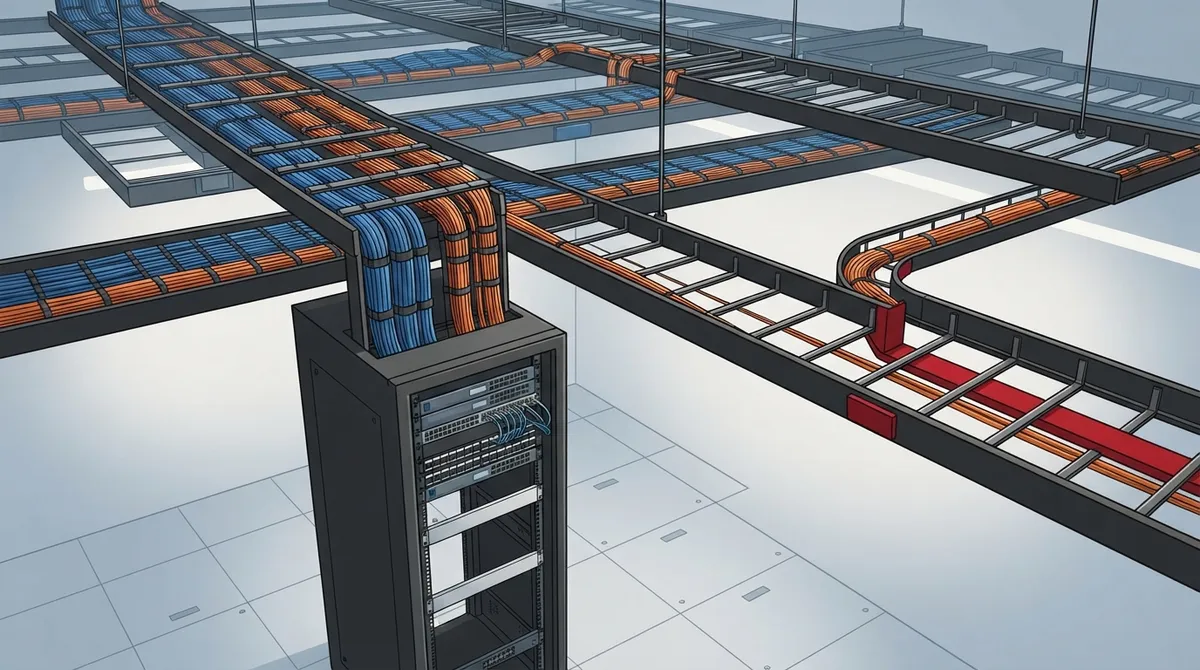
Plan cabling pathways and racks during initial construction with 25-50% spare capacity to avoid expensive retrofitting and business downtime when adding users, devices, and services later.
-
Conduct a baseline site survey documenting existing cable routes, pathway fill levels, rack capacity, power infrastructure, and service entrances before designing expansion, as congested pathways and full closets are common bottlenecks.
-
Forecast growth honestly with leadership by projecting employee headcount, new locations, and planned devices like cameras and access control systems to right-size cable types, switch capacity, and room specifications.
-
Choose Cat 6A copper for horizontal runs to desks and devices to support 10 Gb/s speeds up to 100 meters, and use fiber for backbones and longer campus links to future-proof performance capabilities.
-
Account for Power over Ethernet (PoE) power budgets in switches, cable bundle heat limits, and closet cooling requirements, as cameras, access points, and door readers increase both cable runs and electrical demand.
-
Phase installation across multiple stages—build critical pathways and power infrastructure first, add horizontal runs and switches as growth occurs, and maintain complete documentation and labels to enable fast, clean moves and changes.
Picture this: your business just landed three new clients, hired eight people, and added a handful of security cameras. Everyone is celebrating. Then someone asks, “Where are we going to plug all of this in?” Suddenly, the ceiling is full, the patch panel has no open ports, and the network closet looks like a bowl of spaghetti.
We have all been there, or know someone who has. The good news is that this headache is avoidable. Smart future expansion cabling planning means designing your cabling system today so that tomorrow’s growth fits in without tearing up ceilings or interrupting your workday.
In this friendly guide, we will walk through what future expansion cabling planning really means, what to survey, how much room to leave, and which cable types make sense. Whether you run a small Tampa shop, manage IT for a growing company, or oversee multiple franchise locations, you will find simple steps you can use right away.

What Is Future Expansion Cabling Planning?
Future expansion cabling planning is the process of designing a structured, well-documented cabling system that can handle more users, devices, bandwidth, and services later. The goal is simple: avoid rebuilding pathways again and again, and avoid downtime when your business grows.
Think of it like building a house with a bigger electrical panel than you need today. You may not use every breaker now, but you will be glad it is there when you add a new appliance.
A good plan covers the whole system, not just the cable itself. That includes:
- Entrance facilities where your internet service arrives
- Equipment rooms and telecommunications rooms
- Backbone cabling between rooms and floors
- Horizontal cabling to desks, rooms, and devices
- Racks, patch panels, and outlets
- Power, cooling, and pathways such as conduit and trays
If you want a quick refresher on the basics, our guide on what structured cabling is for your business network is a great starting point. You can also read a general overview of structured cabling to see how the pieces fit together.

Why Does Planning Ahead Save So Much Money and Stress?
Adding cable later is almost always more expensive than planning it up front. Once walls are painted and ceilings are closed, every new run costs more in labor, patching, and disruption.
Here is what planning ahead gives you:
- Less downtime: You can add users and devices without shutting down work areas.
- Lower long-term cost: Spare pathway space is cheap during construction and costly afterward.
- Cleaner, safer installs: Congested pathways cause heat, damage, and troubleshooting nightmares.
- Faster moves, adds, and changes: Spare ports and labeled cables make changes a quick job.
If you have noticed signs that your current setup is straining, check out 9 signs your Tampa business needs structured cabling now. It may be the nudge you need.
Step One: Survey What You Already Have
Before you design anything new, take a good look at what is already in place. A site survey gives you a baseline, and it helps you spot bottlenecks before they become problems.
A solid telecom cabling survey should document:
- Cable routes and types: What is installed, how old it is, and what condition it is in.
- Pathway fill: How full your conduits, trays, and J-hooks are right now.
- Room and rack capacity: Open rack space, free patch panel ports, and switch ports.
- Power and cooling: Whether your closets can handle more equipment.
- Service entrances: Where your internet and phone carriers enter the building.
- Planned building changes: Remodels, new tenants, or expansion into nearby suites.
This baseline helps you avoid replacing things that still work fine. It also shows you where the real pain points are. Many businesses are surprised to learn that their problem is a crowded closet, not slow cable.
If you want help with this step, you can read how we approach it in how to run a cabling audit for your existing office.
Step Two: Forecast Your Growth Honestly
This is the fun part, and also the part people skip. Sit down with leadership and ask a few friendly but honest questions.
- How many employees do we expect in 3 years? In 5 years?
- Will we add new offices, suites, or locations?
- Are we adding security cameras, access control, or digital signs?
- Will we use more cloud tools, video calls, or heavy data apps?
- Could we move to a bigger space or open another site?
Your answers shape how much spare capacity you leave in pathways, rooms, and ports. There is no magic number that fits every business. Standards bodies and project owners set their own rules, so always confirm requirements with your designer and local authorities.
For franchise operators, this forecast gets even more helpful. If you plan to open more locations, a repeatable cabling design makes each new site faster and cheaper to set up. You can see how this works in our post on reliable network solutions for multi-location Tampa businesses.
How Much Spare Capacity Should You Leave?
This is one of the most common questions, and the honest answer is: it depends. No single percentage applies everywhere. Still, a few real-world examples can guide you.
| Source or Example | Guidance | Important Note |
|---|---|---|
| BICSI Telecommunications Practices Manual | Plan cable trays for an initial calculated fill of about 25% | Confirm exact wording and context in the current manual |
| Clemson University design guide (2018) | Size J-hook pathways to allow 100% more cable after install, so no more than 50% full at completion | An institutional rule, not a universal code |
| Your own growth forecast | Leave room based on expected users, devices, and sites | Often the best starting point for a small or mid-sized business |
The takeaway? Use published guidance as a reference, but let your forecast, your building, and your project specs set the final number. When in doubt, ask your designer to check current standards and local codes.
Which Cable Type Should You Choose for Expansion?
Choosing the right media is a big part of future expansion cabling planning. The right choice depends on your applications and distances.
Cat 6A for Horizontal Runs
Cat 6A is commonly chosen for new copper horizontal cabling when you want 10 Gb/s capability up to 100 meters, provided the installation and channel meet requirements. It is a popular pick for desks, offices, and devices because it gives you headroom for faster equipment later.
Fiber for Backbones and Longer Links
Fiber is typically used for building backbones, longer distances, and high-capacity links between rooms or floors. It is also helpful when you want to connect separate buildings on a campus.
| Cable Type | Best For | Why Choose It |
|---|---|---|
| Cat 6A copper | Desks, offices, access points, cameras | 10 Gb/s capability to 100 m when properly installed |
| Single-mode fiber | Long backbones, campus links | Very high capacity over long distances |
| Multimode fiber | Shorter backbones inside buildings | Strong performance for in-building links |
Always validate your choices against current standards, your equipment, and the actual channel design. If you want to dig deeper, we have helpful reads on how to choose between Cat6 and Cat6A for your office and how to choose fiber cabling for your business network.
Do Not Forget Power Over Ethernet
Here is a growth factor that sneaks up on a lot of people: Power over Ethernet, or PoE. Phones, access points, cameras, sensors, and door readers can all draw power through the same cable that carries data.
That is wonderful for flexibility, but it affects your plan in a few ways:
- More cable runs: Each new device usually needs its own home run.
- Bigger switch power budgets: Your switches must supply enough total power for every device.
- Bundle and heat limits: Large bundles of powered cable can run warm, so check bundle size and environmental limits.
- Room power and cooling: More switches mean more heat and more electrical demand in your closet.
This matters a lot if you plan to add cloud cameras or door readers. Our posts on how structured cabling supports VoIP and cameras and cloud access control systems show how these pieces connect.
Which Standards Should Guide Your Design?
Two big names come up again and again in commercial cabling:
- ANSI/TIA-568: Covers cabling performance and architecture.
- ANSI/TIA-569: Covers telecommunications pathways and spaces.
These standards get updated from time to time. For example, a recent search result reported that ANSI/TIA-568.2-E was released in October 2024, but you should verify the current edition and any addenda directly with TIA before you specify it. Local building and fire codes also apply, so confirm requirements with your project designer.
For a simple walk-through of the rules, see our article on ANSI/TIA-568 cabling rules Tampa businesses must follow.
Design for Maintenance, Not Just Growth
A system that can grow but is a pain to work on is only half a win. Build in habits that keep your network tidy for years.
- Use accessible pathways: Keep trays and conduits reachable so future installers are not guessing.
- Label everything: Cables, ports, panels, and outlets should have clear, consistent labels.
- Keep test records: Save certification results so you know each link passed on day one.
- Maintain as-built drawings: Update them whenever something changes.
- Leave spare ports and modular patching: This makes moves and changes a quick patch instead of a rewiring job.
Good documentation is a gift to your future self. If you are curious how to do it well, check out how to build structured cabling documentation that works.
Phase Your Expansion Like a Pro
You do not have to buy and install everything on day one. A phased plan spreads out cost while still protecting your future.
Here is a simple way to think about it:
- Phase 1 (build it right): Install the backbone, pathways, rooms, racks, and power capacity. These are the hardest and costliest things to change later.
- Phase 2 (add as you grow): Pull more horizontal runs and add patch panels and switches as new people or devices arrive.
- Phase 3 (refresh): Upgrade active equipment on a schedule while the cabling stays put.
This approach works well when you coordinate with IT, facilities, electrical, security, audiovisual, and construction teams. When everyone is on the same page early, you avoid surprises like a ceiling that cannot hold more cable or a closet with no room for a second rack.
Common Expansion Mistakes to Avoid
Even careful teams slip up. Watch for these traps:
- Filling pathways to the brim on day one
- Skipping spare rack space and patch panel ports
- Ignoring PoE power and cooling needs
- Choosing cable by price alone instead of by future needs
- Leaving labels and drawings until “later”
- Forgetting to coordinate with other trades on the project
We cover many more in 12 structured cabling mistakes that hurt your business. It is worth a quick read before your next project.
How Ideal Solutions Provider Can Help
Planning for growth is easier with a partner who has done it many times. Ideal Solutions Provider is a Tampa-based telecom and IT partner with over 24 years of experience. We serve as a single point of contact, so you do not have to juggle multiple vendors for cabling, internet, phones, cameras, and access control.
We can audit your current setup, map your growth plans, and recommend a cabling design that fits your budget today and your goals tomorrow. If you are curious about the full service, take a look at our structured cabling services page or our guide on how to plan network cabling installation in Tampa Bay.
Your Simple Expansion Planning Checklist
Here is a quick checklist you can print and keep handy:
- Survey your current cabling, rooms, power, and pathways.
- Forecast your growth in people, devices, and locations.
- Confirm applicable standards and local codes with your designer.
- Choose cable types for your applications and distances.
- Reserve spare pathway, rack, and port capacity.
- Plan PoE power budgets, room power, and cooling.
- Label, test, and document everything.
- Phase your install and coordinate with other teams.
Ready to Build a Network That Grows With You?
Future expansion cabling planning is really about giving your business room to breathe. A little thought now means fewer surprises, smaller bills, and smoother growth later. You do not have to figure it out alone, either. We love helping Tampa-area and nationwide businesses build networks that keep up with their success.
Want a friendly, no-pressure review of your current setup? Contact us today for a free consultation, or call us to talk with our team. You can also follow along with tips and updates on YouTube. Let’s plan your growth together.
FAQs
Q: What is future expansion cabling planning for a business?
A: It is the process of designing your cabling, pathways, rooms, and racks so they can handle more users, devices, and bandwidth later. The goal is to grow without rebuilding or disrupting your daily work.
Q: How much spare capacity should I leave in cable trays and conduits?
A: There is no single number that fits every project. Published guides give examples, such as planning trays at about 25% initial fill or sizing J-hooks to allow 100% more cable, but your growth forecast and project specs should set the final target.
Q: Should I install Cat 6A or fiber for future network expansion?
A: Most businesses use both. Cat 6A is a popular choice for desks and devices where you want 10 Gb/s capability up to 100 meters, while fiber works best for backbones and longer links.
Q: How do PoE devices affect cabling and switch planning?
A: PoE devices like cameras, phones, and access points add more cable runs and draw power from your switches. Check switch power budgets, cable bundle limits, and closet power and cooling before you add them.
Q: What should a telecom cabling site survey include?
A: A good survey records cable routes and types, pathway fill, rack and room capacity, power and cooling, carrier entrances, and any planned building changes. This baseline helps you find bottlenecks and avoid unnecessary replacement.





