

Key Takeaways
-
Plan structured cabling from day one to avoid expensive rework later; ad-hoc wiring leads to mystery cables, slow connections, and costly expansion issues as teams grow from 6 to 16+ people.
-
Choose Cat 6A for long-term startups expecting heavy file transfers or many PoE devices; Cat 6 works for tight budgets and modest needs, but decision should be based on bandwidth, distance, and lease length—not just Wi-Fi generation.
-
Plan for 2-3 years of growth by installing extra drops in open areas, spare fiber strands, and flexible layouts; this prevents costly rewiring when your team expands and desks move.
-
Calculate your PoE power budget upfront by listing every powered device (access points, phones, cameras, door readers), noting wattage needs, and choosing switches that supply total power plus headroom for future growth.
-
Insist on complete handover documentation including labels, as-built drawings, cable test results, and rack layouts; these records dramatically speed troubleshooting and make future moves or additions much cheaper.
-
Install fiber cabling for backbone links between floors or buildings and runs exceeding 90 meters, as copper Ethernet has distance limits; coordinate internet, phones, cameras, and access control during initial build-out rather than adding piecemeal.
Picture this: your startup just signed a lease, the team is buzzing, and the first monitor goes on the first desk. Then someone asks, “Where do we plug this in?” If you do not have a good answer, you are not alone. Many founders spend months on product and funding, then treat the wiring behind the walls as an afterthought.
Here is the good news. Understanding your tech startup cabling needs is not as scary as it sounds. A smart plan today can save you from ripped-out ceilings, tangled closets, and slow Wi-Fi tomorrow.
In this friendly guide, we will walk through what cabling is, what a growing team really needs, and how to plan so your network grows right alongside your headcount. Whether you run a five-person team or a fast-growing company with a second location on the way, you will leave with a clear checklist and the confidence to ask the right questions.

What Does Structured Cabling Actually Mean for a Startup?
Structured cabling is the fixed wiring system inside your office. It connects your internet service, switches, Wi-Fi access points, phones, cameras, door readers, and desk outlets into one organized network. Think of it as the plumbing of your digital life. You rarely see it, but everything depends on it.
The key word is system. Instead of adding a cable here and a cable there as problems pop up, you plan the whole thing from the start. That means labeled cables, tidy patch panels, clear pathways, and a dedicated spot for your network gear.
If you want a deeper primer, our post on what structured cabling is for your business network breaks it down in plain language.
Why Ad-Hoc Wiring Hurts Growing Teams
Startups change fast. Desks move. Teams double. A quick fix that worked for six people can fall apart at sixteen. Ad-hoc wiring often leads to:
- Mystery cables nobody can trace
- Slow or dropping connections
- Expensive rework when you expand
- Long downtime when something breaks
For a closer look at this trade-off, see structured cabling vs. ad-hoc wiring.
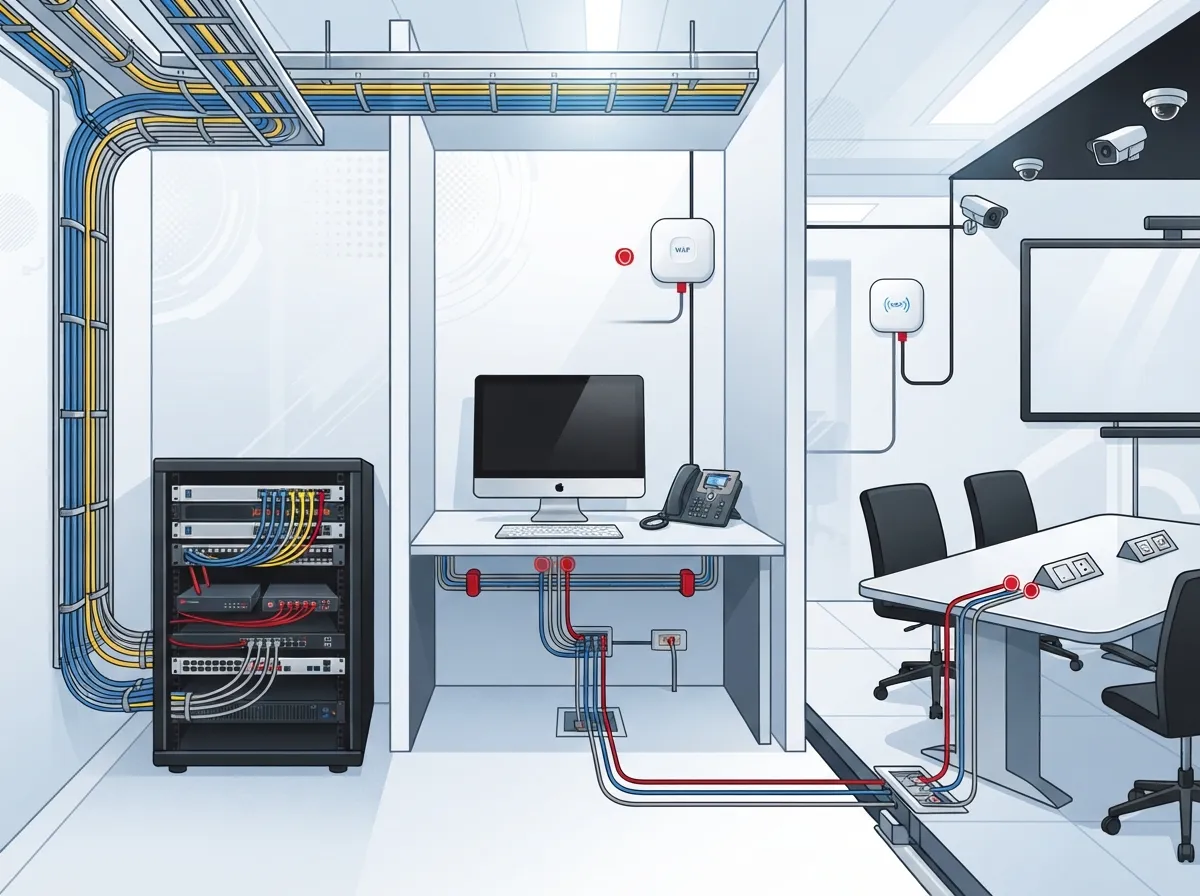
The Core Parts of Your Startup Cabling Plan
Every good plan covers a handful of building blocks. Here is what a typical office needs, from the street to the desk.
- Internet entry point: Where your service provider’s line enters the building.
- Telecom room or closet: A secure, cool, accessible space for racks, switches, and patch panels.
- Horizontal cabling: The copper runs from the closet to each outlet and device.
- Backbone cabling: Fiber or copper links between floors, closets, or buildings.
- Work area outlets: The wall jacks and patch cords people actually use.
- Labeling and documentation: The records that make future changes easy.
Skipping any of these steps is like building a house without a plan for the stairs. Everything works until you need to move around.
Cat 6 or Cat 6A: Which Should a Startup Choose?
This is one of the most common questions we hear. Both are popular for office copper cabling, and both do a solid job. The right pick depends on your budget, your equipment, and how long you expect the cabling to last.
| Factor | Cat 6 | Cat 6A |
|---|---|---|
| Typical use | Everyday desks, phones, printers | High-demand areas, longer-term builds |
| 10 Gigabit support | Limited by distance and conditions | Supports 10 Gigabit over a full 100-meter channel under specified conditions |
| Interference handling | Good | Better |
| Cable size and cost | Thinner, lower cost | Thicker, higher cost |
| Lifecycle outlook | Solid for many offices | Longer runway for growth |
A practical rule of thumb: if you expect heavy file transfers, lots of PoE devices, or a long-term lease, Cat 6A is worth a hard look. If budget is tight and needs are modest, Cat 6 can be a smart fit. One tip worth remembering: do not pick a cable category just because of the newest Wi-Fi generation. Base the choice on bandwidth, distance, interference, power needs, and how long you plan to use the cabling.
Want more detail? Read how to choose between Cat6 and Cat6A for your office, or see 14 Cat6 cabling facts every business owner should know.
Distance Rules You Should Know
Copper cable cannot run forever. For balanced twisted-pair Ethernet, a common design limit is a 90-meter (about 295 feet) permanent link, with a total channel of up to 100 meters (about 328 feet) once you add patch cords. Your installer should confirm the exact standard edition and channel setup for your project.
If you have long runs, a big floor plate, or links between buildings or floors, fiber is usually the better answer. Fiber carries data over longer distances and handles high-speed backbones well. Our guide on copper vs. fiber cabling can help you decide, and you can also learn how far network cable can run.
How Many Ethernet Drops Does Your Office Need?
There is no magic number, but here is a friendly way to think about it. Count more than just desks.
- Desk drops: At least two per workstation is a common starting point, so you have a spare.
- Wi-Fi access points: One drop for each planned access point, often placed on the ceiling.
- Conference rooms: Several drops for displays, video bars, and wall jacks.
- Printers and shared gear: Do not forget copiers, plotters, and kitchen or lab equipment.
- Phones: Desk phones and any lobby or reception units.
- Cameras and door readers: Both often use the same cabling system.
- Spare drops: Extra runs in key spots for future needs.
A good installer will walk your floor plan and match drops to how you actually work. That is far better than guessing from a template.
Wi-Fi Still Needs Wires
Here is a fun fact that surprises many founders: wireless networks depend heavily on wired ones. Every access point needs an Ethernet line back to your switch, and most are powered over that same cable using Power over Ethernet, or PoE.
Wi-Fi is moving fast. An operator survey published in 2025 reported that more than half of surveyed service providers had deployed or expected to deploy Wi-Fi 7 service plans within 12 months. IDC also reported that Wi-Fi 6E and Wi-Fi 7 together made up 60% of global enterprise WLAN spending in the fourth quarter of 2025. Keep in mind that these numbers describe providers and market spending, not how many offices have upgraded. Still, they show where the industry is heading.
Does Wi-Fi 7 Require New Ethernet Cabling?
Not automatically. Faster Wi-Fi may benefit from stronger cabling and multi-gigabit switch ports, but the right answer depends on your access points, your internet speed, and your layout. Plan the cabling, switches, and PoE budget together instead of picking one piece in isolation.
Planning Your PoE Power Budget
PoE lets one cable carry both data and electricity. It is a lifesaver for ceiling access points, phones, cameras, and door controllers because you do not need a nearby wall outlet.
But PoE has limits. Each switch has a total power budget, and each device has its own needs. Cisco’s campus design guidance, for example, discusses planning access-layer PoE for devices that need up to 90 W per port in some deployments. Your real needs depend on device class, switch capability, and total budget.
When you plan, make a simple list:
- List every PoE device you expect, including future ones.
- Note the power each device needs.
- Add them up and leave extra room for growth.
- Choose switches that can supply that total power.
This small exercise keeps you from buying switches that cannot power everything you plug in.
Do Not Forget Pathways and Telecom Rooms
Cable is only half the story. It also needs somewhere to live. Pathways include conduit, cable trays, ceiling spaces, and wall routes. Telecom rooms hold your racks, patch panels, and switches.
A few friendly tips:
- Choose a closet with good airflow and easy access.
- Leave empty space in racks and trays for later.
- Check with your landlord about rules for ceilings, risers, and shared spaces.
- Confirm local code requirements before work begins.
Common standards help guide this work. The ANSI/TIA-568 family covers structured cabling design and performance. Related standards address pathways and spaces (TIA-569), labeling and administration (TIA-606), and grounding and bonding (TIA-607). Confirm the current editions and any local code rules with your designer or installer.
Build in Room to Grow
Startups are optimists, and that is a good thing. Your cabling should be optimistic too. Plan for the team you hope to have in two to three years, not just the team you have today.
That might mean extra drops in open areas, spare fiber strands between closets, and a layout that lets you move desks without pulling new cable. Our article on planning cabling now for growth you’ll need later shares more ideas, and cabling for open office layouts is handy if you plan a flexible floor plan.
Cabling for Security, Phones, and Cameras
Your network wiring does more than connect laptops. It often carries your phone system, security cameras, and door access too. Planning these early avoids surprise costs.
- Phones: Cloud phone systems run over your network, so solid cabling and enough PoE matter. See 13 ways structured cabling supports VoIP and cameras.
- Cameras: Cloud video cameras need steady bandwidth and power. Learn more in cloud video security systems.
- Access control: Door readers and controllers also need cable runs, which you can read about in cloud-based access control systems.
Running all of these at once, during your build-out, is usually cheaper and less disruptive than adding them one by one.
Do You Need a Pro, or Can You DIY?
It is tempting to save money by pulling cable yourself. For a tiny space, a simple fix might be fine. But for a new office, a professional install brings real value: proper testing, standards-based work, neat documentation, and a warranty on the work. We cover the trade-offs in DIY vs. professional cabling and share a handy checklist in how to find a reliable structured cabling contractor.
At Ideal Solutions Provider, our Tampa-based team has spent over 24 years helping businesses plan and install cabling, internet, phones, and security as one connected system, with support from 35+ vetted suppliers. You can explore our structured cabling services to see how we work.
What Should Your Cabling Handover Include?
This is the step many people forget, and it makes a huge difference later. When the job is done, ask your contractor for a complete handover package. A good one includes:
- Clear labels on every cable, outlet, and patch panel port.
- As-built drawings showing where each cable actually runs.
- Cable test results proving each link meets the agreed specification.
- Rack and patch-panel layouts so you can see what connects to what.
- Warranty details and who to call if something goes wrong.
These records speed up troubleshooting and make future moves, adds, and changes much easier. Our post on building structured cabling documentation that works goes deeper.
A Simple Startup Cabling Checklist
Before you sign off on a plan, run through this quick list:
- Have we counted drops for desks, access points, rooms, printers, phones, cameras, and doors?
- Did we pick Cat 6 or Cat 6A based on real needs and lifespan?
- Is fiber planned for any long or high-speed backbone links?
- Does our PoE budget cover today’s devices and tomorrow’s?
- Do we have a secure, cool telecom space with room to expand?
- Did the landlord and local code requirements get a check?
- Will we receive labels, drawings, and test results at handover?
If you can check every box, you are in great shape.
Ready to Plan Your Startup Network?
Getting your tech startup cabling needs right early on is one of the smartest, quietest investments you can make. A well-planned system keeps your team connected, your Wi-Fi strong, and your growth plans free from costly rewiring. And you do not have to figure it all out alone. Our team can help you map drops, choose cable types, plan PoE, and coordinate internet and phones in one friendly process. We also invite you to follow us on YouTube for helpful tips, and check your service options with a trusted Internet Service Provider as you plan.
Ready to get started? Contact us for a free consultation, or call us at 813-388-4935 and let us help you build a network that grows right alongside your startup.
FAQs
Q: What cabling does a tech startup need for a new office?
A: Most startups need structured cabling that includes desk drops, Wi-Fi access point drops, conference room outlets, a telecom closet with patch panels, and fiber for any long backbone links. Add drops for printers, phones, cameras, and door access, plus a few spares for growth.
Q: Should a startup choose Cat 6 or Cat 6A cabling?
A: Cat 6 works well for everyday office use on a tighter budget. Cat 6A is a stronger long-term pick because it can support 10 Gigabit Ethernet over a full 100-meter channel under specified conditions, so it is great if you expect heavy use or a longer lease.
Q: When should an office use fiber instead of copper cabling?
A: Fiber is the go-to choice when links run longer than copper’s common 90-meter permanent link limit, such as between floors, closets, or buildings. It is also helpful for high-speed backbones that tie your switches together.
Q: What should be included in a cabling contractor’s handover documentation?
A: Ask for clear labels, as-built drawings, cable test results, and documented rack and patch-panel layouts. These records make troubleshooting and future changes faster and help confirm every link meets the agreed specification.
Q: Does Wi-Fi 7 require new Ethernet cabling?
A: Not always. Wi-Fi 7 may benefit from stronger cabling and multi-gigabit switch ports, but the right choice depends on your access points, internet speed, and layout. Plan cabling, switches, and PoE together rather than picking a cable category based only on a Wi-Fi generation.





