
Key Takeaways
-
Dedicated internet access reserves bandwidth for your business alone and typically includes symmetrical speeds and written SLA performance commitments, while shared business broadband costs less but offers fewer guarantees.
-
Don't choose a plan based on advertised download speed alone; upload demand from cloud tools, cameras, and VoIP often matters more, so plan for peak usage and grow capacity for 2-3 years.
-
Review the SLA carefully: confirm how uptime and outages are defined, what repair response times are, whether latency, packet loss, and jitter are covered, and what credits apply if promises are missed.
-
Check fiber availability by specific business address, since national coverage statistics cannot confirm service or installation timelines at your location.
-
Plan resilience with a second connection from a different carrier or technology, automatic failover, and backup power, so one cut line or storm does not halt operations.
-
Compare total cost of ownership, including installation, equipment, upgrade fees, and the cost of downtime, rather than relying on the lowest monthly price.
Picture this: it’s Monday morning, your team is jumping into video meetings, your phones run over the internet, and your payment system is humming along. Then everything slows to a crawl. If that sounds familiar, you already know why enterprise internet service matters so much.
The good news? Choosing the right connection doesn’t have to feel overwhelming. In this friendly guide, we’ll walk through what enterprise internet service really is, how it differs from regular business broadband, and what to check before you sign a contract. We’ll keep the language simple and the advice practical.
Whether you run a small Tampa office, manage IT for a growing company, or oversee a franchise with many locations, you’ll find useful tips here. By the end, you’ll know which questions to ask and how to avoid costly surprises.

What Is Enterprise Internet Service?
Enterprise internet service is business connectivity built to support many users, several sites, and business-critical apps. It goes beyond what a home-style plan can offer. It often comes with stronger performance promises and faster support.
The term covers several connection types. Depending on your location and needs, enterprise internet service may include:
- Dedicated internet access (DIA) over fiber
- Shared business broadband, such as cable
- Ethernet services between locations
- Fixed wireless connections
- Satellite links for hard-to-reach sites
Think of it like a road. Shared broadband is a busy public highway, so traffic can slow you down at peak times. Dedicated access is more like a private lane reserved just for your business.
Your provider is usually an Internet Service Provider or carrier. The right pick depends on what is available at your address, how much capacity you need, and how much downtime your business can handle.
Dedicated Internet Access vs. Business Broadband
This is the big question for most buyers. Both options connect you to the internet. But they work very differently behind the scenes.
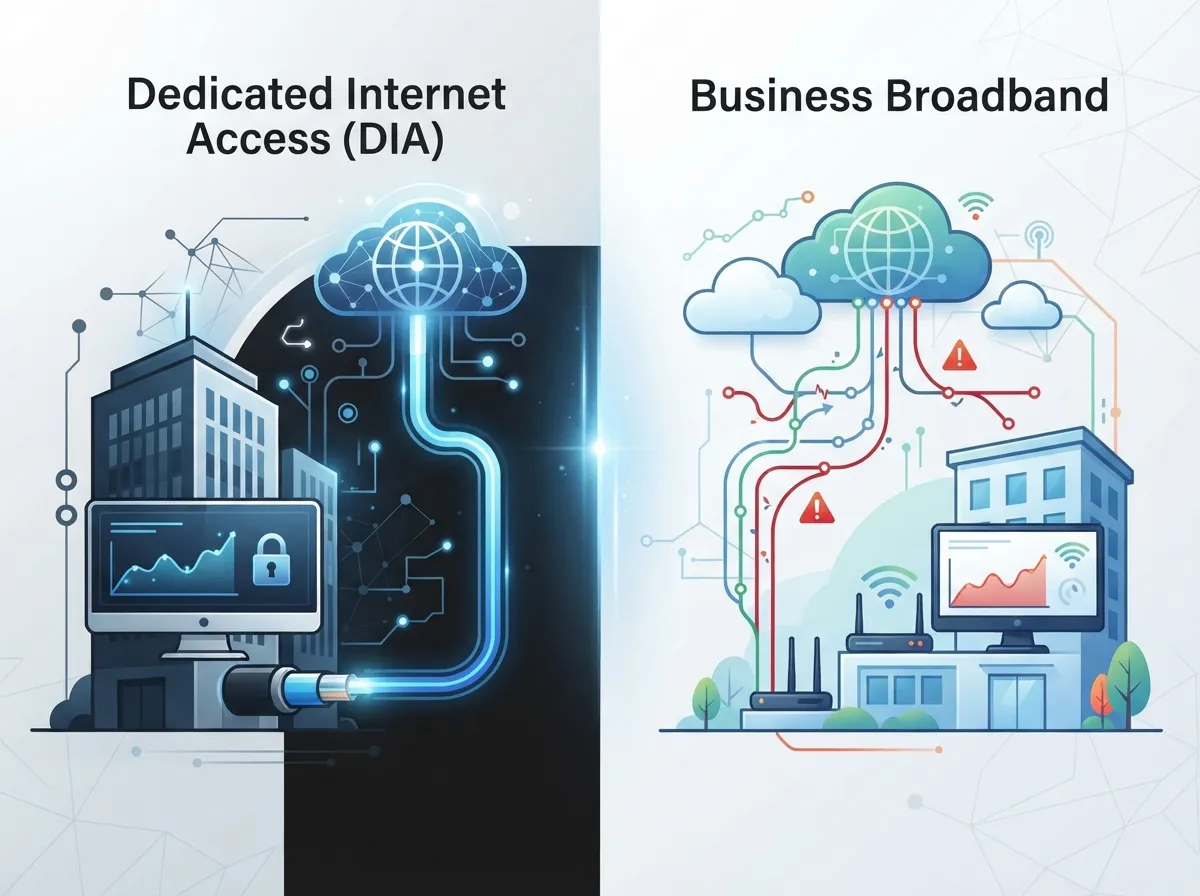
Dedicated internet access typically gives you bandwidth reserved for your business alone. It usually offers matching upload and download speeds. It also tends to include written performance commitments.
Shared business broadband costs less in most cases. But performance can vary, since you share capacity with other customers in your area. It often comes with fewer guarantees.
| Feature | Dedicated Internet Access | Shared Business Broadband |
|---|---|---|
| Bandwidth | Reserved for one customer | Shared with others |
| Upload and download | Usually symmetrical | Often asymmetrical |
| Performance commitments | Contractual SLA terms | Fewer guarantees |
| Typical cost | Higher | Lower |
| Best for | Cloud-heavy, voice, multi-site teams | Smaller offices with lighter needs |
Want a deeper look at costs? Our guide on dedicated internet access pricing explains what to expect in 2026. You can also read about dedicated vs. shared fiber for a side-by-side view.
Symmetrical vs. Asymmetrical Speeds
Speed isn’t just one number. Download speed is how fast you pull data in. Upload speed is how fast you send data out.
Asymmetrical plans give you much more download than upload. That works fine for browsing and email. But modern offices send a lot of data out too.
Symmetrical service gives you the same speed in both directions. That helps with:
- Video meetings with many participants
- Cloud backups and file syncing
- VoIP phone calls
- Cloud security camera footage
If your team lives in the cloud, upload speed matters more than most people think. Learn more in our post on symmetrical business internet.
How Much Bandwidth Does Your Business Need?
Here’s a tip that saves a lot of headaches: don’t pick a plan based on advertised download speed alone. Think about peak usage, upload demand, and how sensitive your apps are to delays (called latency).
A simple way to plan is to follow these steps:
- Count how many people and devices connect at the same time.
- List your main apps, such as video calls, cloud software, and VoIP.
- Note your busiest hours, since that is when slowdowns hurt most.
- Check how much upload capacity you use during those hours.
- Add room for growth over the next two to three years.
That last step is easy to skip. But adding staff, cameras, or a second location can change your needs fast. For help with the math, see how to calculate bandwidth requirements the right way.
Cloud cameras are a good example. They send video up to the cloud all day long. Check out the internet speeds your cloud cameras actually need to see how fast those needs add up. Voice has its own demands too, covered in what internet speed you need for VoIP.
What Should an Enterprise Internet SLA Include?
A service-level agreement, or SLA, is a written promise about how your service will perform. SLA terms vary by provider and by product. So please read the fine print before you sign.
Here is a friendly checklist of what to review:
- Availability: How is uptime measured, and over what time period?
- Outage definition: What counts as an outage, and what does not?
- Repair commitments: How quickly will the provider respond and restore service?
- Performance metrics: Are latency, packet loss, and jitter covered?
- Support hours: Is help available 24/7, or only during business hours?
- Remedies: What credits do you receive if the provider misses a promise?
Some providers apply their SLA terms only to specific services. So always confirm the exact language for the product you are buying. A promise on paper is only helpful if it covers your connection.
Is Fiber Available at Your Address?
Fiber is a popular choice for high-capacity enterprise access. It’s fast, steady, and built to grow with you. The trouble is that availability depends on location and building access.
Fiber has expanded a lot lately. A 2026 Fiber Broadband Association update reported that about 84.6 million U.S. homes, roughly 60 percent, were passed by fiber at year-end 2025. A separate CostQuest summary of FCC data reported that fiber covered 62 percent of U.S. broadband serviceable locations. It also counted 1,593 active fiber providers nationwide.
Here’s the important catch. Those numbers describe broad coverage, and the first one is a residential measure. They can’t confirm service or performance at your specific business address. Installation timelines also vary based on construction needs and building access.
The best move is to check availability by address. Our guide on finding business internet providers by address shows you how. If you want to compare options in the Tampa area, see dedicated internet in Tampa.
When Fiber Isn’t an Option
Don’t worry if fiber doesn’t reach your building yet. You still have solid choices. Cable, fixed wireless, and even satellite can serve as the main link or as a backup where fiber is impractical.
Each option has trade-offs. Cable is widely available and often affordable. Fixed wireless can be quick to install. Satellite can reach remote spots. For a comparison, read fiber vs. fixed wireless or fiber vs. cable.
How to Keep Service Running During an Outage
Even the best connection can fail. A cut line, a power problem, or a storm can knock you offline. Resilience depends on more than the main circuit.
Here are smart ways to plan for the unexpected:
- Diverse physical routes: Separate paths reduce the chance one cut takes you down.
- A second connection: Use a different carrier or technology as backup.
- Automatic failover: Traffic switches to the backup without anyone lifting a finger.
- Backup power: Keep routers and key gear running during a blackout.
- Monitoring: Catch problems early, often before staff notice.
Florida businesses know that storms happen. A backup link is like a spare tire. You hope you never need it, but you will be glad it’s there. Dive into our automatic internet failover tips for more ideas.
Multi-site firms can also look at smarter networking. Our overview of SD-WAN services explains how it can steer traffic across several connections.
Look at Total Cost, Not Just the Monthly Price
A low monthly price can be tempting. But it rarely tells the whole story. The smarter move is to compare total cost of ownership.
These are the cost items worth adding up:
- Installation and construction charges
- Equipment, such as routers and switches
- Managed router or security services
- Contract length and renewal terms
- Bandwidth upgrade fees
- Support and maintenance
- The cost of downtime for your team
That last item is the one people forget. If an outage stops sales or phones for an hour, what does that cost you? Sometimes a slightly pricier plan with stronger guarantees saves money in the long run.
If you want to trim costs the smart way, try our tips on reducing business telecom costs. You can also explore ways to find a great internet deal.
Match the Connection to Your Business Type
Different teams have different needs. Here’s how enterprise internet service often fits each type of business.
Small Business Owners and Office Managers
You want things to just work. A reliable plan with simple support is often enough. If you use VoIP and cloud tools, consider symmetrical speeds so calls stay clear. Our small business internet guide is a friendly place to start.
IT Managers and Mid-Sized Companies
You need performance you can measure and a plan that scales. Dedicated access, clear SLAs, and failover are usually on your wish list. Pairing the right circuit with solid cabling matters too. Learn about structured cabling and why your internal wiring can limit even a fast connection.
Franchise Operators
Many locations mean many circuits to manage. Consistency is key. Look for providers who can serve every site and simplify billing. See multi-location telecom solutions for helpful ideas.
Why Your Internal Network Matters Too
Here’s a secret many buyers miss. A blazing-fast line won’t help if the wiring inside your building holds it back. Old or poorly installed cabling can create slowdowns that look like internet problems.
That is why it helps to think of connectivity as a full system. Your circuit, router, switches, and cabling all work together. If you suspect issues, our post on why business internet runs slow walks through common causes.
Also, cloud-based tools depend on a steady connection. Phones, cameras, and door systems all rely on it. Read why cloud security systems fail without fast internet to see how it all connects.
A Simple Way to Compare Providers
Comparing offers can feel like comparing apples and oranges. A clear process keeps you calm and on track.
- Confirm which connection types are available at each of your sites.
- Request quotes for the same bandwidth and term from each option.
- Ask for the full SLA and read how outages are measured.
- Add up installation, equipment, and support costs.
- Check install timelines, since construction can take time.
- Plan your backup connection before you sign.
For more on this topic, check out what to look for in a business internet provider and how to choose a business internet circuit.
Why Work With a Telecom Partner?
Shopping across many carriers takes time. Each one has its own plans, terms, and pricing. That is where an independent partner can help.
Ideal Solutions Provider is a Tampa-based telecom and IT partner with over 24 years of experience. The team compares options across 35+ vetted suppliers and acts as a single point of contact. They handle consultation, installation, and ongoing support, so you don’t have to juggle multiple vendors. They also serve businesses nationwide.
You can explore their business high speed internet services to see how it works. To learn why a single partner can simplify life, read why Tampa Bay businesses need one telecom partner.
Ready to Find the Right Fit?
Enterprise internet service isn’t one-size-fits-all. The best choice depends on your sites, your apps, your backup plans, and your budget. Take your time, ask good questions, and look past the monthly price.
If you’d like friendly, no-pressure help, we’re here for you. Contact us for a free review of your current setup, or call us to talk it through with a real person. You can also follow along on YouTube for helpful tips. Your team deserves a connection you never have to think about.
FAQs
Q: What is enterprise internet service?
A: Enterprise internet service is business connectivity built for many users, multiple sites, and critical apps. It can include dedicated internet access, business broadband, Ethernet, fixed wireless, or satellite. The right mix depends on your location, needs, and budget.
Q: What is the difference between dedicated internet access and business broadband?
A: Dedicated internet access gives you bandwidth reserved for your business, usually with matching upload and download speeds and written performance commitments. Business broadband is shared with other customers, so it often costs less but can vary more in performance. Many growing teams start with broadband and move to dedicated access as needs grow.
Q: What should an enterprise internet SLA include?
A: A good SLA explains how availability is measured, what counts as an outage, and how fast repairs happen. It should also cover performance metrics, support hours, and remedies like service credits. Terms vary by product, so always confirm the language for your exact service.
Q: How can my business keep internet running during an outage?
A: Plan for backup before trouble strikes. Use a second connection from a different carrier or technology, add automatic failover, and keep backup power for key equipment. Monitoring also helps you spot issues early, often before your team notices.
Q: Is fiber internet available at my business address?
A: National coverage numbers show fiber is growing, but they can’t confirm availability at your specific address. Installation timelines also depend on construction and building access. The best step is to check by address, and a telecom partner can do this across many carriers for you.





